

Software budgets are stretched thinner than they've ever been, and the developers who used to absorb that pressure are harder to hire than ever. Add AI copilots that write half your code for you, and a market where a competitor can ship a new feature before your team finishes the requirements doc, and you get a simple business reality: the old build-everything-from-scratch model doesn't fit every project anymore.
That's why low-code and no-code platforms have moved from "interesting side project" to a line item on real enterprise roadmaps — from Dubai and Abu Dhabi to the wider UAE market, where digital transformation mandates are pushing businesses of every size to move faster. They promise faster builds, smaller teams, and software that ships in weeks instead of quarters. But they are not the same thing, and picking the wrong one can cost you more than it saves — in rework, in security gaps, or in a system you outgrow in eighteen months.
This guide, brought to you by SISGAIN IT solutions, breaks down exactly what separates low-code from no-code, where each one wins, where traditional development still beats both, and how to make the right call for your business in 2026.
Quick Answer: What's the Difference Between Low-Code and No-Code?
Low-code development uses visual tools plus a layer of custom scripting, letting developers build faster while still writing code for complex logic, integrations, and edge cases. No-code development uses only drag-and-drop interfaces with zero coding, built for business users creating internal tools, forms, and simple workflows without any IT involvement.
What Is Low-Code Development?
Low-code is a development approach that replaces most manual coding with visual, model-driven tools — while still leaving room for developers to write custom code where it matters. Think of it as a highway with on-ramps for hand-written code: you move fast on the parts that are standard, and drop into real code for the parts that aren't.
Under the hood, most low-code platforms generate clean, readable application code behind the scenes. A developer drags a component onto a canvas, wires it to a data source, and the platform writes the underlying code automatically. When the platform's building blocks run out — a strange integration, a compliance rule, a performance tweak — the developer opens a code editor and writes it by hand.
How Low-Code Works
- Visual development — screens, data models, and business logic get built on a canvas instead of in a text editor.
- Auto-generated code — the platform writes production-grade code from your visual design, so you're not maintaining spaghetti.
- Custom coding capabilities — developers can extend, override, or replace generated code with their own, which is what separates low-code from no-code.
Key Features
- Drag-and-drop UI builders
- Visual workflow builders for business logic and approvals
- Pre-built API integrations plus the ability to build custom ones
- Custom scripting (JavaScript, Python, or platform-specific languages) for anything the visual tools can't handle
- Enterprise scalability — built to run production workloads, not just prototypes
Best Use Cases for Low-Code
Low-code earns its keep on systems that are too complex for a business user to build alone, but don't need a fully custom architecture from day one — including Desktop, Web and Cloud Applications built to run across an organization's full device footprint:
- Enterprise applications with multiple user roles and permission tiers
- CRM systems tailored to a specific sales process
- ERP modules connecting finance, inventory, and operations
- Healthcare software that needs to meet regulatory and data-handling requirements
- Logistics platforms tracking shipments across multiple systems
- Financial software with audit trails and transaction logic
- Government portals serving citizens at scale
Benefits of Low-Code
Faster development is the headline benefit, but it's the downstream effects that matter to a CFO. A team that used to spend four months on a CRM extension can often ship it in four to six weeks, which means lower labor cost per feature and a faster return on the initial build. Because the platform handles infrastructure, hosting, and a lot of the boilerplate, maintenance also gets lighter — updates roll out at the platform level instead of requiring a developer to patch twenty separate services. And because the underlying architecture is built for growth, scaling up rarely means starting over.
What Is No-Code Development?
No-code takes the low-code idea and strips out the code entirely. Everything happens through visual builders: drag a form field onto a page, connect it to a spreadsheet or database, set a rule ("if status = approved, send email"), and the app runs. There's no code editor, no syntax, and no developer required.
This is what makes no-code the domain of the "citizen developer" — a marketing manager, operations lead, or HR coordinator who understands the business problem but has never written a line of code and doesn't need to.
Best Use Cases for No-Code
- Internal dashboards for tracking team metrics
- HR tools for onboarding, time-off requests, or performance reviews
- Lead management and simple CRM views for a sales team
- Forms and surveys for data collection
- Workflow automation — approvals, notifications, task routing
- Inventory tracking for a single warehouse or department
- Approval systems for expenses, purchase requests, or content review
Advantages of No-Code
The pitch is simple: fast deployment, an easy learning curve, and a price tag that doesn't require a procurement meeting. A team can go from idea to working app in days, and because there's no technical skill barrier, the person who understands the problem best is also the person building the solution. No developer hours, no backlog, no waiting.
Limitations of No-Code
The trade-off shows up later. No-code platforms are built around a fixed set of components, so customization has a ceiling — once your requirements go past what the drag-and-drop builder supports, you're stuck. Vendor lock-in is real too: your app lives entirely inside that platform's ecosystem, and migrating it elsewhere later is rarely simple. Scaling challenges tend to appear once usage grows past what the platform was designed for, and API restrictions can quietly limit which outside systems you're able to connect to.
Low-Code vs No-Code — Side-by-Side Comparison (2026)
| Factor | Low-Code | No-Code |
|---|---|---|
| Typical users | Professional developers, IT teams | Business users, "citizen developers" |
| Coding skills required | Basic to intermediate coding knowledge | None |
| Flexibility | High — custom code fills the gaps | Limited to platform components |
| Learning curve | Moderate | Low |
| Development speed | Fast, especially for complex apps | Fastest, for simple apps |
| Cost | Mid to high (licensing + dev time) | Low (subscription-based) |
| Scalability | Built for enterprise-scale growth | Limited beyond a certain complexity |
| Security | Configurable to enterprise standards | Depends heavily on the vendor |
| Maintenance | Handled partly by platform, partly by IT | Mostly handled by the platform |
| Integrations | Extensive — pre-built and custom | Pre-built only, often limited |
| AI capabilities | AI-assisted coding, testing, and workflow automation | AI-assisted app generation, basic automation |
| Enterprise readiness | Strong — designed for governance and compliance | Weak to moderate |
| Best use case | CRM, ERP, healthcare, financial, logistics systems | Internal tools, forms, dashboards, lead tracking |
Low-Code vs High-Code Development
"High-code" is just another name for traditional software development: every screen, every API call, every line of business logic written by hand. It's the slowest path and the most expensive one — but it's also the only path when your product needs something genuinely novel. For a full breakdown of what each approach actually runs a UAE business, see our guide to software development cost in 2026.
| Factor | High-Code (Traditional) | Low-Code |
|---|---|---|
| Development speed | Slow — everything built from scratch | Fast — visual tools plus custom code |
| Cost | High (larger dev teams, longer timelines) | Moderate (smaller teams, shorter timelines) |
| Team size | Larger, specialized teams needed | Smaller teams can deliver more |
| Maintenance | Fully owned by your engineering team | Shared between platform and your team |
| Flexibility | Unlimited — build anything | High, but bounded by the platform's architecture |
| Performance | Fully optimizable for your exact use case | Strong, but platform-dependent |
| Security | Fully controlled by your team | Configurable, but partly inherited from the vendor |
| Long-term ownership | Full ownership, no vendor dependency | Partial dependency on the platform provider |
Decision Matrix: High-Code, Low-Code, or No-Code?
Match the approach to project complexity, not to whichever platform your team has heard of:
- Choose High-Code if you're building a novel product, need full control over architecture and performance, or your IP depends on proprietary technology no platform offers.
- Choose Low-Code if you need enterprise-grade software fast, have some in-house technical capacity, and your requirements are complex but not unprecedented.
- Choose No-Code if a business user needs to solve an internal problem quickly, the app is single-purpose, and long-term scale isn't a concern.
Low-Code, No-Code, and Traditional Development at a Glance
| Factor | Traditional | Low-Code | No-Code |
|---|---|---|---|
| Development Time | Months to years | Weeks to months | Days to weeks |
| Maintenance | Fully in-house | Shared with platform | Handled by platform |
| Customization | Unlimited | High | Limited |
| AI Integration | Custom-built, resource-intensive | Built-in AI copilots and automation | Built-in, basic AI features |
| Cost | Highest | Moderate | Lowest |
| Scalability | Unlimited (with investment) | Strong, enterprise-ready | Limited past a certain point |
| Business Fit | Complex, proprietary systems | Enterprise apps with custom logic | Internal tools, simple workflows |
| Compliance | Fully controllable | Configurable to standards | Vendor-dependent |
| Future Growth | Scales with continued investment | Scales within platform architecture | Often requires migration later |
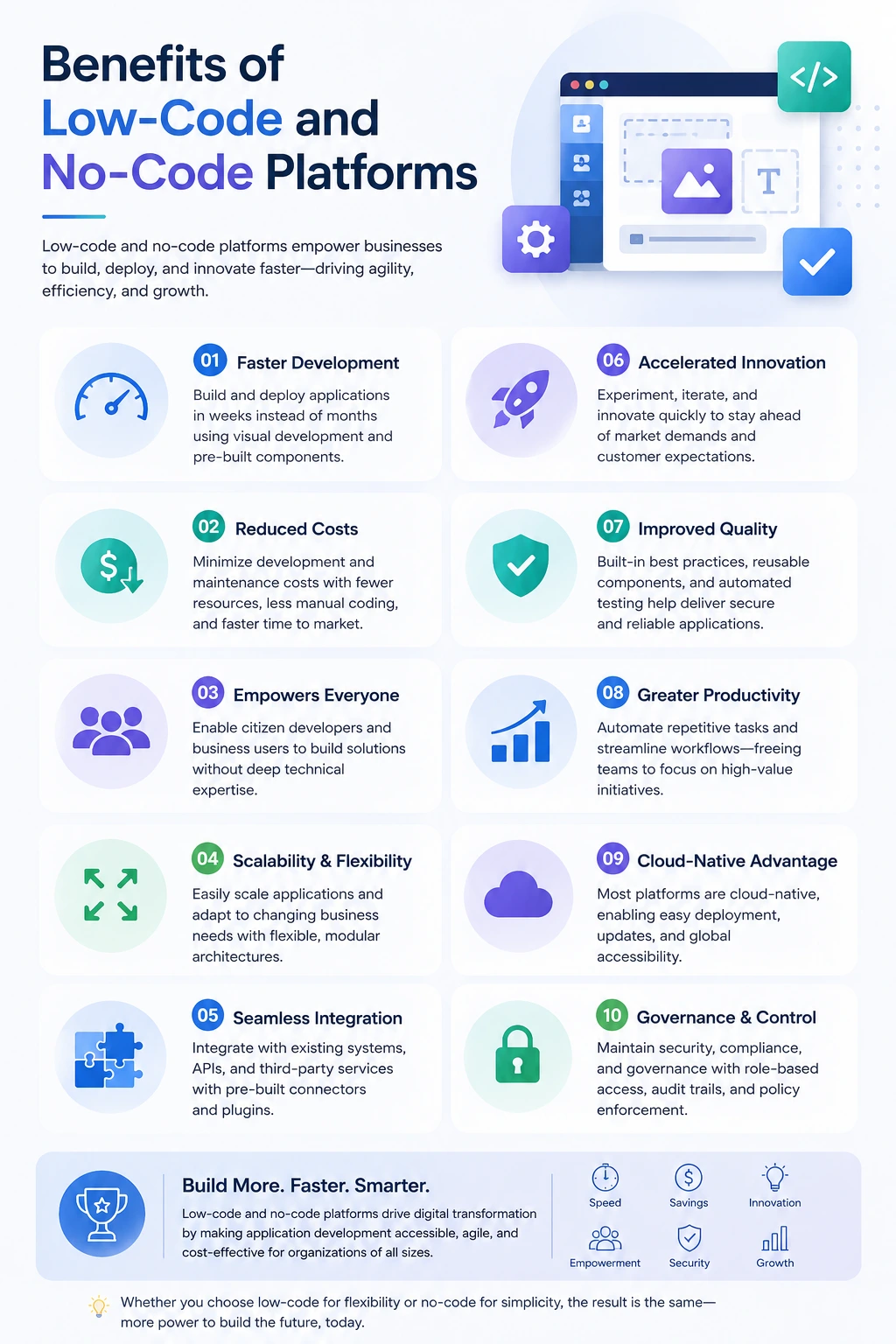
Benefits of Low-Code and No-Code Platforms
Faster Digital Transformation
When a business can turn an idea into working software in weeks instead of quarters, digital transformation stops being a five-year initiative and starts being something that happens continuously, department by department.
Reduced Development Costs
Fewer developer-hours per feature means a lower cost of ownership over the life of the application. For many mid-sized businesses, that difference is what makes digital initiatives affordable at all — not just faster, but actually within budget.
Increased Productivity
Developers stop rebuilding the same login screens, data tables, and approval flows for the tenth time. That time goes into the logic that actually differentiates your product.
Better Business-IT Collaboration
Low-code platforms give business stakeholders a visual view of what's being built, which shortens the feedback loop between "here's what we need" and "here's what we shipped."
Faster MVP Development
Testing an idea with real users used to mean a multi-month build. Now a working prototype can exist within days, which means you find out whether the idea works before you've spent the budget proving it doesn't.
Improved Customer Feedback Cycle
Faster releases mean faster feedback, and faster feedback means your product evolves based on how people actually use it — not on assumptions made six months before launch.
Easier Maintenance
Platform-level updates, security patches, and infrastructure management get handled centrally, which frees your internal team from constant upkeep work.
AI-Assisted Development
This is where 2026 platforms diverge sharply from what existed even two years ago. AI code suggestions now handle a meaningful share of the logic developers used to write by hand. AI-driven workflow automation configures entire processes from a plain-language description. And AI-powered testing catches bugs and edge cases before a human reviewer ever sees the build. None of this replaces developers — it removes the repetitive work that used to eat their time.
Common Limitations You Should Know
No platform is a free lunch. Understanding the trade-offs upfront saves you from a painful migration later.
Low-Code Limitations
- Platform dependency — your app's performance and roadmap are tied to the vendor's.
- Licensing costs — enterprise-grade low-code platforms aren't cheap at scale.
- Learning curve — developers still need to learn the platform's specific tools and constraints.
- Performance bottlenecks — highly complex logic can run slower than hand-optimized code.
No-Code Limitations
- Vendor lock-in — your entire app lives inside one company's ecosystem.
- Limited customization — you're building within a fixed set of components.
- Difficult migrations — moving off the platform later often means rebuilding from scratch.
- Limited integrations — connecting to niche or legacy systems can be a dead end.
Low-Code vs No-Code Use Cases Across Industries
| Industry | Best Choice | Why |
|---|---|---|
| Healthcare | Low-Code | Needs regulatory compliance, data security, and integration with clinical systems |
| Retail | No-Code | Inventory tracking, promotions, and internal tools rarely need deep customization |
| Manufacturing | Low-Code | Complex workflows spanning supply chain, production, and quality control |
| Banking | Low-Code | Strict compliance, security, and audit requirements rule out no-code |
| Insurance | Low-Code | Claims processing and underwriting logic are too complex for pure no-code |
| Education | No-Code | Simple portals, forms, and scheduling tools fit no-code's sweet spot |
| Government | Low-Code | Compliance, accessibility standards, and citizen data require enterprise controls |
| Construction | No-Code | Field reporting, checklists, and site tracking are straightforward workflows |
| Logistics | Low-Code | Real-time tracking and multi-system integration demand custom logic |
| Travel | Low-Code | Booking engines and dynamic pricing need flexibility no-code can't offer |
| Hospitality | No-Code | Guest feedback forms and internal scheduling tools fit no-code well |
| Real Estate | No-Code | Listing management and lead capture are common, well-templated needs |
| eCommerce | Low-Code | Custom checkout logic, integrations, and scale needs push past no-code limits |
| Oil & Gas | Low-Code | Safety compliance and complex operational data require custom architecture |
| Telecommunications | Low-Code | Billing, provisioning, and network systems are too complex for no-code |
Low-Code vs No-Code for Enterprise Applications
Enterprise software has to satisfy people who never touch the app itself — compliance officers, security teams, auditors. That's where the gap between low-code and no-code widens the most, and it's why enterprises typically bring in a Custom Software Development Company in Dubai rather than trying to build governance-grade systems on a pure no-code stack.
Security in a low-code platform can typically be configured to match your organization's existing standards: role-based access, encryption, audit logs. No-code platforms often ship with fixed security models that work for internal tools but rarely satisfy enterprise-grade requirements.
Governance matters once more than a handful of people are building apps. Low-code platforms generally include admin controls for managing who can build what, and how it gets reviewed before going live. No-code tools, built for speed, often skip this layer entirely — which is exactly how "shadow IT" problems start.
Compliance — industries like healthcare, banking, and government need to prove exactly how data is handled, stored, and accessed. Low-code platforms are far more likely to offer the certifications and configurability that compliance teams require.
Role management and API management round this out: enterprise applications need fine-grained permissions and controlled access to internal and external systems, both of which low-code platforms are built to handle and no-code platforms generally are not.
Understanding Low-Level Code vs Low-Code
These two terms sound alike and mean almost opposite things — a mix-up worth clearing up before it causes confusion in a technical conversation.
Low-level code refers to programming that's close to the hardware: assembly language, machine language, and the code that runs on embedded systems. Writing it requires deep technical expertise, and it's used where performance and hardware control matter more than development speed — think firmware, device drivers, or real-time systems.
Low-code, on the other hand, has nothing to do with hardware proximity. It refers to visual, high-level tools for building business applications — CRMs, portals, workflow systems — as fast as possible. The two sit at opposite ends of the development spectrum: one trades speed for hardware-level control, the other trades hardware-level control for speed.
How to Choose Between Low-Code and No-Code
Run your project through these questions before committing to a platform:
- Do you need custom APIs? If yes, lean low-code — no-code's integration options are usually pre-built and limited.
- Do you have complex workflows with branching logic, multiple approval layers, or conditional rules? Low-code handles this more reliably.
- Do you need AI integration beyond basic automation? Low-code platforms generally offer deeper AI capabilities.
- Do you need enterprise security — SSO, granular permissions, audit trails? That's a low-code (or traditional) requirement.
- Will this run across multiple locations or business units with different needs? Low-code scales better across that kind of complexity.
- Do you need this to scale significantly over the next few years? Build on low-code or traditional development from the start.
- Do you have developers available, even part-time? If yes, low-code lets them multiply their output. If no, no-code may be your only realistic option.
- What's your budget? No-code is cheaper upfront; low-code costs more but scales further before you outgrow it.
- What's your timeline? For something needed this week, no-code wins. For something that needs to last five years, low-code or traditional development is the safer bet.
Why Many Enterprises Are Combining Low-Code with AI in 2026
The platforms leading the market this year aren't just low-code — they're low-code with AI built into the core workflow, and demand for AI powered solutions in Dubai reflects exactly that shift. AI copilots suggest logic and generate components as developers build, cutting design-to-deployment time significantly. Workflow automation now runs on natural-language configuration: describe the process, and the platform builds the flow. Intelligent forms adjust their own fields based on what a user has already entered, instead of showing every field to every person.
Predictive analytics, layered directly into low-code apps, flags patterns in operational data without a separate BI project. AI agents are starting to handle multi-step tasks autonomously inside these platforms — pulling data, triggering approvals, and updating records without a human clicking through each step. And RPA (robotic process automation) is converging with low-code entirely, so the line between "an app" and "an automated process" is disappearing.
None of this is hype for its own sake — it's what digital transformation looks like in practice when the tools available to build it have gotten this much faster.

Future Trends in Low-Code and No-Code Platforms (2026–2030)
- Generative AI will move from "suggesting code" to generating entire application modules from a plain-language brief.
- AI-assisted coding will become the default inside low-code platforms, not an add-on feature.
- Hyperautomation will connect low-code apps, RPA, and AI agents into a single automated operating layer for the business.
- Agentic AI will take on more autonomous, multi-step work inside enterprise applications — not just answering questions, but completing tasks.
- Composable applications — built from interchangeable, reusable components — will replace monolithic app builds as the default architecture.
- Cloud-native development will keep pushing low-code platforms toward container-based, infinitely scalable deployment models.
- Enterprise governance tools will mature to keep pace with how many apps and citizen developers a large organization now supports.
- Citizen development will keep maturing from "quick internal tool" to genuinely production-grade software, narrowing the gap with professional development.
Final Thoughts
Low-code isn't replacing developers — it's changing what they spend their time on. No-code isn't replacing IT departments — it's giving business teams a way to solve their own small problems without waiting in a backlog. And traditional development isn't going anywhere, because some systems are too specialized, too performance-critical, or too proprietary to build any other way.
The right choice depends on your business goals, your technical resources, how much the system needs to scale, and what your compliance requirements look like. Get that assessment wrong, and you either overbuild a simple internal tool or underbuild a system that can't handle enterprise demands eighteen months in.
That's the evaluation SISGAIN helps businesses get right. As one of the IT software development companies in Dubai working across custom software, low-code platforms, and AI-powered solutions, SISGAIN helps organizations figure out which approach actually fits their situation — not just which one is trending.
Ready to Build Smarter Software in 2026?
Whether you're exploring low-code platforms, planning a custom enterprise application, or looking to bring AI into your existing systems, the team at SISGAIN can help you choose the right technology stack for your business. Explore the full range of Software Development Services We Give Across UAE to see where you fit.