
Most retailers don't lose money because they picked the "wrong" platform brand. They lose it because they picked a platform before they'd written down what their business actually needed it to do.
An eCommerce platform isn't your website. It's the connective tissue between your storefront, your product catalogue, payments, inventory, fulfilment, marketing, customer data, and the day-to-day operations that keep orders moving. Shopify, WooCommerce, Magento, and headless commerce are all capable of running a serious business — and all capable of becoming an expensive mistake, depending on what you're asking them to do.
This guide walks through how eCommerce platform development actually works in 2026: how to choose between SaaS, open-source, enterprise, and headless architecture; what B2B commerce demands that a standard storefront doesn't; how AI is changing product discovery and operations; and how to plan a replatform without breaking your SEO or your order pipeline along the way.
The decision points that matter most:
- Your business model (B2C, D2C, B2B, or hybrid)
- Catalogue and SKU complexity
- Required integrations (ERP, CRM, PIM, WMS)
- Geographic and multi-currency expansion plans
- Budget — specifically total cost of ownership, not sticker price
- Internal technical capability
- Where you expect the business to be in three years
Get those right first. The platform choice follows.
Quick Answer: What Is eCommerce Platform Development?
eCommerce platform development is the process of planning, designing, building, integrating, testing, launching, and maintaining the technology that runs an online commerce business — the storefront, product catalogue, checkout, payments, inventory, customer accounts, third-party integrations, analytics, security, and SEO infrastructure. The right platform depends on your business requirements, not on whether Shopify, WooCommerce, or Magento happens to be the platform everyone's talking about this year.
What Is eCommerce Platform Development?
A Simple Definition
In plain terms: eCommerce platform development is building the system that lets a business sell online and keep selling as it grows — from the first transaction to the ten-thousandth, across however many product lines, markets, and sales channels the business ends up running.
What an eCommerce Platform Actually Includes
A mature platform is really a stack of connected layers, not a single piece of software:
- Customer-facing storefront
- Product catalogue and search
- Shopping cart and checkout
- Payment processing
- Customer accounts
- Order management
- Inventory synchronisation
- Shipping and fulfilment
- Promotions and pricing rules
- Content management
- Analytics and reporting
- Third-party integrations
- Security and access management
Miss one of these during planning and it usually surfaces later as a manual workaround — someone re-keying orders into an ERP, or a spreadsheet tracking stock levels the platform should be tracking itself.
eCommerce Website vs eCommerce Platform
A website can display products and take an order. A platform runs the business behind that order.
|
Factor |
Basic Website |
Mature eCommerce Platform |
|
Product management |
Manual page edits |
Structured catalogue, bulk updates, variants |
|
Checkout |
Single, fixed flow |
Multiple payment methods, tax logic, fraud checks |
|
Automation |
Minimal |
Order routing, inventory sync, workflow triggers |
|
Integrations |
Rare, manual |
ERP, CRM, PIM, shipping, analytics |
|
Scalability |
Breaks under load |
Built to handle traffic and SKU growth |
|
Multi-channel selling |
Not supported |
Marketplaces, POS, social commerce |
|
Business workflows |
None |
Approvals, pricing rules, B2B logic |
Businesses that expect to sell through more than one channel, or that need mobile commerce alongside the web experience, often reach a point where a browser-only storefront isn't enough. That's usually when Custom Ecommerce App Development enters the conversation — building a dedicated mobile experience that shares data with the core platform rather than running as a disconnected side project.
Why eCommerce Platform Development Is a Business Decision, Not Just a Technology Decision
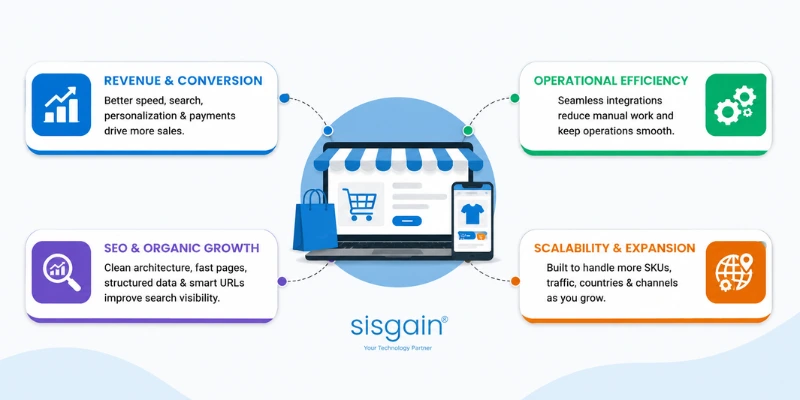
Platform architecture shows up directly in revenue, cost, and how fast you can grow. It's not a back-office decision.
Revenue and Conversion
Checkout friction, page speed, and weak product discovery cost sales quietly — nobody files a support ticket for a slow checkout, they just leave. Search and filtering quality, personalisation, mobile experience, and the range of payment options offered all move conversion rate in ways that are measurable, if anyone bothers to measure them.
Operational Efficiency
A platform that doesn't talk to your ERP means someone is manually re-entering orders. One that doesn't sync inventory in near-real time means overselling, or worse, underselling because stock looks unavailable when it isn't. Pricing management, customer service workflows, and marketing operations all get faster or slower depending on how well the platform is wired into the rest of the business.
SEO and Organic Growth
SEO requirements have to be part of the build, not a post-launch task. That means crawlable site architecture, sensible URL structure, a category hierarchy that makes sense to both shoppers and search engines, disciplined internal linking, controls on faceted navigation (so filter combinations don't generate thousands of near-duplicate indexable pages), product structured data, a proper redirect strategy, and page speed that doesn't fight against all of the above.
Scalability and Expansion
The platform that handles 500 SKUs comfortably might buckle at 15,000. The one built for a single country might have no real answer for multi-currency pricing or in-market payment methods. Plan for more SKUs, more traffic, new countries, additional sales channels, and — if it's on the roadmap at all — B2B functionality, before you're forced into a rushed replatform.
Getting this mapping right at the start is usually where Technology Consulting Services in Dubai earn their keep — requirements discovery and architecture planning done properly before a single line of code gets written, rather than after a platform choice has already been made and quietly regretted.
Types of eCommerce Platforms: Which Model Fits Your Business?
Don't choose a platform by brand recognition. Choose the operating and architecture model your business actually requires, then shortlist platforms that fit it.
SaaS eCommerce Platforms
Hosted infrastructure, subscription pricing, faster implementation, and updates the vendor manages for you. Lower infrastructure responsibility on your side, but customisation has real limits. Best suited for: businesses that want speed and operational simplicity over deep control.
Open-Source eCommerce Platforms
Greater ownership and flexibility, at the cost of more development responsibility. You handle custom integrations, hosting, security, and long-term maintenance yourself — or pay someone to. Best suited for: businesses that need control the SaaS model won't give them.
Enterprise Commerce Platforms
Built for complex catalogues, multiple storefronts, advanced pricing logic, high transaction volumes, and complex B2B requirements. Best suited for: large or operationally complex organisations where a mid-market platform would buckle.
Headless Commerce
Headless separates the front end from the commerce engine, connected through APIs, with the CMS and other services plugged in independently. The payoff is frontend flexibility, genuine omnichannel experiences, faster experimentation, and the ability to scale each layer on its own terms instead of the whole stack moving as one block.
Composable and API-First Commerce
Composable commerce takes headless a step further: pick specialised, best-of-breed services and connect them through APIs instead of accepting the limitations of an all-in-one suite. It buys flexibility, but it also raises the architecture and governance bar — someone has to own how all those pieces stay in sync.
|
Platform Model |
Speed to Launch |
Customisation |
Technical Ownership |
Best For |
|
SaaS |
High |
Moderate |
Low |
Fast-growing retailers |
|
Open Source |
Moderate |
High |
High |
Custom commerce needs |
|
Enterprise |
Moderate |
High |
Moderate to High |
Complex organisations |
|
Headless |
Moderate |
Very High |
High |
Omnichannel brands |
|
Composable |
Varies |
Very High |
High |
Advanced digital ecosystems |
The Core Capabilities Every eCommerce Platform Needs
Whatever architecture you land on, this is the baseline — the actual eCommerce software for eCommerce, the functional core every serious retailer needs regardless of vendor.
Product and Catalogue Management
Products, variants, attributes, categories, digital assets, and real-time inventory visibility. This is the foundation everything else sits on — get the data model wrong here and every other feature inherits the problem.
Search, Navigation, and Product Discovery
Site search, filtering, recommendations, product comparison, and increasingly, AI-assisted discovery that understands a query like "waterproof jacket under $150" without the shopper having to manually apply three filters.
Checkout and Payment Management
Guest checkout, multiple payment methods, accurate tax calculation, fraud prevention, and support for regional payment preferences — a platform that only speaks one country's payment language will cap your expansion before you've even started.
Inventory and Order Management
Near-real-time synchronisation between what's in the warehouse and what the storefront shows. This is where overselling, cancelled orders, and angry customers usually start — or don't, if the system is built right.
Customer Management
Customer profiles, purchase history, loyalty programmes, segmentation, and account management that gives both the shopper and your marketing team something useful to work with.
Promotions and Pricing
Discount rules, bundles, coupons, customer-specific pricing, and contract pricing for accounts that negotiate terms rather than paying list price.
Analytics and Reporting
Conversion tracking, cart abandonment data, revenue reporting, product performance, and customer behaviour — visible in a way that actually informs decisions, not buried in a dashboard nobody opens.
B2B eCommerce Requirements: When Standard Store Features Are Not Enough
A lot of B2B commerce projects fail not because the platform is bad, but because it was chosen using B2C criteria. B2B buying looks nothing like B2C buying, and the platform has to reflect that.
Account Hierarchies and Purchasing Roles
Large B2B accounts often have multiple users under one company account, each with different purchasing permissions — a buyer who can request, and an approver who can commit budget.
Customer-Specific and Contract Pricing
The same SKU might have five different negotiated prices depending on which account is buying and what volume they've committed to.
Approval Workflows
Orders above a certain value, or from certain roles, often need internal sign-off before they're placed — a workflow B2C storefronts simply don't have a concept for.
Quote Requests and Negotiated Orders
Not every B2B sale happens at list price through a cart. Quote requests and negotiated terms need a path through the platform, not a workaround via email.
Credit Terms and Business Payments
Net-30, net-60, purchase orders, and credit limits — payment structures that standard consumer checkout flows weren't designed to handle.
Bulk Ordering and Repeat Purchasing
Fast reordering of the same SKUs, in bulk, ideally without re-navigating the entire catalogue every time.
ERP Synchronisation
B2B orders almost always need to flow into an ERP for fulfilment, invoicing, and accounting — in near-real time, not as a nightly batch job that leaves a 12-hour gap in visibility.
Map every one of these requirements before you shortlist a platform, not after. Retrofitting B2B logic onto a platform that was never designed for it is one of the more expensive mistakes in this space. Customer account structures, sales workflows, and connected customer data are also where building CRM softwares connects directly into the commerce layer — the platform and the CRM need to be talking to each other, not maintaining two separate versions of the same customer.
How to Choose the Right eCommerce Software for Your Business
Start With Your Business Model
Are you B2C, D2C, B2B, or a hybrid of more than one? Do you sell physical products, subscriptions, services, or digital goods? Do marketplaces play a role in your sales strategy?
Evaluate Catalogue Complexity
Count your SKUs, but also look at variants, configurable products, product attributes, and how often inventory actually changes. A 200-SKU catalogue that updates weekly needs a different platform than a 50,000-SKU catalogue that updates hourly.
Assess Integration Requirements
Does the business need ERP, CRM, PIM, POS, WMS, marketing automation, or customer support system integration? List them now — not after development starts.
Consider Markets and Expansion
Multiple languages, multiple currencies, regional tax rules, international shipping, and local payment methods all need platform-level support, not a workaround.
Understand Your Team's Technical Capability
There's a real difference between a business that can support an in-house engineering team maintaining an open-source or headless stack, and one that needs a managed platform where the vendor handles infrastructure. Being honest about which one you are saves a lot of pain later.
Calculate Total Cost of Ownership
Total Cost of Ownership = Platform Fees + Development + Hosting + Extensions + Integrations + Security + Maintenance + Performance Optimisation + Support
Requirements-Led Platform Scorecard
Score each of the following 1–5 based on how critical it is to your business:
- Catalogue complexity
- B2B requirements
- Customisation needs
- Integration needs
- Global expansion plans
- SEO flexibility
- Performance requirements
- Technical resources available
- Budget
- Expected growth over 3 years
Add up the scores. A business scoring high on customisation, integration, and technical resources is pointing toward open-source or headless. A business scoring high on speed and low on technical resources is pointing toward SaaS. The scorecard won't make the decision for you, but it stops the decision from being made on brand familiarity alone.
Shopify vs WooCommerce vs Magento vs Headless Commerce
No platform here is universally "best" — each wins under different conditions.
Shopify Development
Strengths: Faster deployment, managed infrastructure, lower technical overhead, a large app ecosystem.
Considerations: Platform constraints on deep customisation, recurring transaction and app costs, boundaries on how far you can push the checkout experience.
Best fit: Businesses prioritising speed and managed operations over deep control.
WooCommerce Development
Strengths: Flexibility, strong content integration through WordPress, full ownership of the codebase.
Considerations: Plugin governance becomes a real job once you're running a dozen of them, hosting is your responsibility, and maintenance doesn't happen automatically.
Best fit: Content-led brands and businesses that want more control than SaaS offers.
Magento / Adobe Commerce Development
Strengths: Handles complex catalogues well, advanced commerce capabilities, strong enterprise and B2B functionality.
Considerations: Higher implementation complexity, requires genuine development expertise, and ongoing costs that scale with complexity.
Best fit: Larger, operationally complex commerce operations.
Headless Commerce Development
Strengths: Frontend flexibility, API-based integration across systems, strong omnichannel potential, more control over the actual customer experience.
Considerations: Higher architecture complexity and more technical governance required to keep everything in sync.
Best fit: Businesses with advanced experience, performance, or omnichannel requirements that a monolithic platform can't satisfy.
|
Factor |
Shopify |
WooCommerce |
Magento |
Headless |
|
Time to market |
Fast |
Moderate |
Slow |
Moderate |
|
Initial cost |
Low–Moderate |
Low |
High |
High |
|
Ongoing cost |
Moderate |
Low–Moderate |
High |
Moderate–High |
|
Customisation |
Moderate |
High |
High |
Very High |
|
SEO flexibility |
Moderate |
High |
High |
Very High |
|
Performance control |
Moderate |
Depends on hosting |
High |
Very High |
|
B2B capability |
Add-on |
Add-on |
Strong native |
Fully custom |
|
Integration flexibility |
Moderate |
High |
High |
Very High |
|
Technical ownership |
Low |
High |
High |
Very High |
|
Scalability |
Good |
Depends on setup |
Strong |
Strongest |
Choosing the Right eCommerce Architecture in 2026
Monolithic Architecture
Everything — front end, back end, business logic — bundled into a single integrated system. Simpler to run, but changes to one part often mean touching the whole thing.
Headless Architecture
The front end and back end are separated and connected via APIs, so a redesign of the storefront doesn't require touching the commerce logic underneath, and vice versa.
Composable Commerce
A modular approach: pick individual services — search, checkout, subscriptions, personalisation — based on what the business actually needs, rather than accepting a fixed bundle.
Progressive Web Apps (PWA)
App-like experiences delivered through the browser: faster load times, offline capability, push notifications, without requiring a native app install. Makes commercial sense when mobile traffic is heavy but a full native app isn't justified yet.
API-First Development
When multiple systems need to exchange data reliably, API quality stops being a technical detail and becomes a business risk. Poorly designed APIs are where integrations quietly break under load.
Some businesses are building commerce as one part of a much bigger digital ecosystem — combining shopping with content, services, and community inside a single app experience. That's the territory AI-Powered Super App Development covers, where commerce is a module inside something larger rather than the entire product.
The eCommerce Platform Development Process
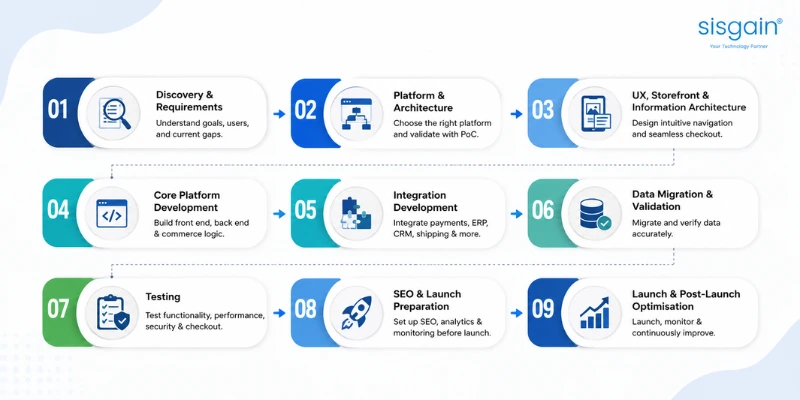
Step 1: Discovery and Requirements. Business goals, user journeys, stakeholder interviews, a technical audit, and an honest look at what the existing platform does and doesn't do well.
Step 2: Platform and Architecture Selection. Run the requirements scorecard, make build-vs-buy decisions, evaluate vendors, and build a proof of concept where the risk justifies it.
Step 3: UX, Storefront, and Information Architecture. Navigation, product discovery, category structure, mobile-first UX, and checkout flow design.
Step 4: Core Platform Development. Front end, back end, APIs, and the commerce logic that ties them together.
Step 5: Integration Development. Payments, ERP, CRM, PIM, shipping, analytics — built and tested, not just planned.
Step 6: Data Migration and Validation. Products, customers, orders, categories, attributes, and media, moved and checked — not assumed to have transferred cleanly.
Step 7: Testing. Functional testing, performance testing, security testing, mobile testing, and checkout testing under realistic conditions.
Step 8: SEO and Launch Preparation. Redirect mapping, metadata, canonicals, XML sitemaps, structured data, analytics setup, and Search Console monitoring in place before launch, not after.
Step 9: Launch and Post-Launch Optimisation. Launch day is the start of the platform's operating life, not the finish line.
Essential eCommerce Platform Integrations
- Payment gateways — processing, fraud checks, regional payment method support
- Shipping and fulfilment systems — rate calculation, label generation, tracking
- ERP systems — order flow, inventory, accounting synchronisation
- CRM platforms — customer data, sales workflows, service history
- PIM solutions — centralised, consistent product data across channels
- Analytics and business intelligence — the reporting layer that turns transactions into decisions
- Marketing automation — email, retargeting, lifecycle campaigns triggered by commerce events
Integration architecture, in one line: Customer → Storefront → Commerce Platform → Payments / ERP / CRM / PIM / Shipping / Analytics. Every arrow in that chain needs to be built, tested, and monitored — not assumed to just work.
How AI Is Changing eCommerce Platform Development in 2026
AI-Powered Product Discovery
Semantic search that understands intent rather than matching exact keywords, natural-language queries, and recommendation engines that get more useful the more purchase data they have to work with.
Conversational Commerce
AI assistants that help customers find products, compare options, get pre-purchase questions answered, and check order status — without waiting in a support queue. Building this well is a genuine discipline, which is where Conversational AI development services come in — the difference between a chatbot that frustrates people and one that actually resolves things is almost entirely in the implementation.
AI for Operational Automation
Product data enrichment, customer support triage, order routing, inventory insights, and content assistance — the operational side of the business, not just the customer-facing side. This is squarely where AI Automation Solutions fit: connecting AI into the workflows that already run the business, rather than adding it as a separate layer nobody uses.
Responsible AI Implementation
Human oversight where decisions matter, data quality as a prerequisite (not an afterthought), security around what data the AI touches, and clear measurement of the business value it's actually producing. Not every store needs AI bolted onto every feature — the useful question is which specific problem it's solving, and whether it's solving it better than the process it replaced.
Performance, Mobile UX, Security, and SEO Requirements
Performance and Core Web Vitals
Image optimisation, disciplined JavaScript management, caching strategy, CDN usage, and control over how many third-party scripts get loaded on a page that's trying to convert a visitor in under three seconds.
Mobile-First Commerce
Navigation, search, product pages, checkout, and payment flows all need to work as well — or better — on a phone as on a desktop, because for most retailers, that's where the majority of traffic already is. When the browser experience isn't enough on its own, working with a mobile application development company in UAE to build a dedicated native or cross-platform app can extend that mobile experience further, particularly for repeat-purchase and loyalty-driven businesses.
Security
Secure authentication, payment security, access controls, backups, vulnerability management, and a clear update policy — not a "we'll patch it when something breaks" approach.
SEO by Design
Clean URLs, crawlability, internal linking, category architecture, product structured data, duplicate-content controls, and a redirect strategy — all decided during development, because retrofitting SEO onto a finished platform is slower and less effective than building it in from the start.
Total Cost of Ownership: What Does eCommerce Platform Development Really Cost?
There's no single honest number here — it depends entirely on scope. But the categories are consistent across every project.
Initial Development Costs
Discovery, UX/UI design, development, integrations, data migration, and testing.
Recurring Platform Costs
Subscription or licence fees, hosting, extensions, and support.
Ongoing Optimisation Costs
Security maintenance, performance tuning, SEO work, conversion rate optimisation, and new feature development as the business evolves.
Budgeting for a platform should account for its full lifecycle, not just the invoice for getting it live — the same logic that applies when thinking through app development cost in 2026: the launch budget and the ownership budget are two different numbers, and treating them as one is how projects run out of money in year two.
When Should You Customise, Replatform, or Migrate?
Signs Your Current Platform Is Still Suitable
Performance is acceptable, integrations are working, and the platform isn't actively blocking growth plans — in which case, targeted improvement usually beats a full rebuild.
Signs You Need Custom Development
Unique operational workflows the platform can't natively support, advanced B2B requirements, complex integration needs, or a customer experience you're trying to differentiate that off-the-shelf features can't deliver.
Signs You Should Replatform
Slow performance that resists optimisation, a maintenance burden that keeps growing, scalability limits you've actually hit (not just anticipate hitting), integration limitations blocking new initiatives, or security concerns that can't be resolved on the current stack.
How to Plan an eCommerce Platform Migration
- Current-state audit
- Requirements documentation
- Data audit
- SEO audit
- Redirect mapping
- Integration testing
- Parallel validation
- Controlled launch
- Post-launch monitoring
Skip the SEO audit or redirect mapping step and it's common to see organic traffic drop 20–40% in the weeks after launch — not because the new platform is worse, but because search engines lost track of pages that moved without a signal telling them where.
Data Readiness: The Most Overlooked Part of eCommerce Platform Development
Product Data Quality
Inconsistent titles, missing attributes, and duplicate entries don't disappear when you migrate — they just move to the new platform with you.
Product Taxonomy and Attributes
A category structure that made sense for 500 SKUs often doesn't hold up at 5,000. Taxonomy needs revisiting, not just copying over.
Customer and Order Data
Purchase history, account details, and order records need to migrate accurately — this is the data a mistake in migration is most likely to be noticed against.
Redirect and URL Mapping
Every URL that changes needs a 301 redirect mapped to it, or the SEO equity built up over years quietly evaporates.
When a PIM Becomes Necessary
Once product data needs to flow consistently across multiple channels — web, marketplaces, POS — a dedicated Product Information Management system usually becomes worth the investment. A technically excellent platform running on poor-quality data will still underperform.
Platform Governance and Post-Launch Operations
Who owns the code and infrastructure? Know this before launch, not when something breaks and nobody can say who has access.
Access and documentation. Who can log in, change what, and where is that documented?
Extension and plugin governance. Every plugin added is a maintenance obligation and a potential security risk — someone needs to own that list.
Security patch policy. How often, and who's responsible for applying updates.
Backup and recovery planning. Tested, not assumed to work.
Release management. A clear process for pushing changes without breaking production.
Performance and conversion monitoring. Core Web Vitals, conversion rates, checkout abandonment, error monitoring, and uptime — tracked continuously, not checked once a quarter.
An eCommerce platform is a product and an operating system for the business, not a one-time development project that ends at launch.
Common Mistakes in eCommerce Platform Development
- Choosing a platform because it's popular. The risk: mismatched capability. Why it happens: familiarity feels safer than a requirements process. How to avoid it: run the scorecard before the shortlist.
- Ignoring future catalogue and traffic growth. The risk: forced replatform within 18 months. Why it happens: planning for today's numbers, not next year's. How to avoid it: size the platform for the three-year plan.
- Treating integrations as a post-launch requirement. The risk: manual workarounds that never get fixed. Why it happens: integrations feel like a "phase two" problem. How to avoid it: map every integration during discovery.
- Underestimating total cost of ownership. The risk: budget shortfall mid-project. Why it happens: only the platform fee gets quoted upfront. How to avoid it: use the full TCO formula before committing.
- Migrating poor-quality data without cleaning it. The risk: a fast, well-built platform running on bad data. Why it happens: cleaning data feels like a delay, not real progress. How to avoid it: audit and clean before migration, not during.
- Treating mobile as a secondary experience. The risk: losing the channel most customers actually use. Why it happens: desktop design habits die hard. How to avoid it: design mobile-first, test on real devices.
- Adding SEO after development is complete. The risk: traffic loss that takes months to recover. Why it happens: SEO gets treated as marketing's job, not development's. How to avoid it: build SEO requirements into the technical spec from day one.
- Over-customising before validating business value. The risk: time and budget spent on features nobody uses. Why it happens: it's easier to build than to test demand first. How to avoid it: validate with a minimum viable version before deep customisation.
- Installing too many unmanaged extensions. The risk: security gaps and performance drag. Why it happens: each individual add feels harmless. How to avoid it: govern the extension list actively, review it regularly.
- Launching without a post-launch operating model. The risk: the platform degrades slowly with no one accountable. Why it happens: launch feels like the finish line. How to avoid it: define monitoring, patching, and optimisation ownership before go-live.
eCommerce Platform Selection Checklist
- Define the business model: B2C, D2C, B2B, or hybrid
- Document current and expected SKU complexity
- Identify required integrations
- Define markets, currencies, and languages
- List B2B-specific workflows
- Assess internal technical capability
- Calculate total cost of ownership
- Review platform ownership and vendor dependency
- Define SEO and performance requirements
- Establish security and compliance requirements
- Create a data migration plan
- Define post-launch support and governance
- Score shortlisted platforms against business requirements
- Plan for the next three years — not just launch day
Summary: Choose an eCommerce Platform for the Business You Are Building
Successful eCommerce platform development starts with understanding how the business sells, operates, and plans to grow. Shopify, WooCommerce, Magento, and headless architectures can all be the right answer, depending on circumstances — none of them is right by default.
The strongest decision aligns platform capability with catalogue complexity, customer requirements, integrations, internal resources, budget, and future expansion. Before committing to any technology, build a requirements scorecard, calculate total cost of ownership, assess data and integration readiness, and decide how the platform will actually be operated once it's live.
Not Sure Which eCommerce Platform Fits Your Business?
Choosing an eCommerce platform affects your development costs, conversion performance, SEO flexibility, operational efficiency, and ability to scale for years — not just how the storefront looks on day one. Before committing to a platform, it's worth assessing your business requirements, existing technology, integrations, data readiness, and growth plans properly.
Request an eCommerce Platform Audit · Book a Platform Discovery Session · Discuss Your eCommerce Build or Migration Strategy