
Running one restaurant well is hard enough. Running ten, thirty, or a hundred locations on spreadsheets and disconnected POS terminals is close to impossible — and it shows up in the numbers. Food costs swing from branch to branch. One outlet stocks out while another throws away expired inventory the same week. Managers spend more time chasing reports than running the floor.
This is the exact gap restaurant management software was built to close.
The cracks widen fast once a chain grows past two or three outlets. Each location starts running its own version of the truth: a different POS configuration, a different way of counting stock, a manager who "just knows" the numbers instead of a system that shows them clearly. Reporting turns into a monthly scramble of spreadsheets pulled from five different places, while nobody at head office can see what's actually sitting in a walk-in cooler three cities away.
Restaurant management software fixes this by putting sales, inventory, employees, menus, recipes, customers, and reporting on one platform, instead of ten disconnected tools duct-taped together. A regional manager should be able to see outlet performance, stock levels, and food cost on one screen — not after ten phone calls.
This guide covers what the software actually does, how the data moves through it, which features matter most for multi-location chains, where AI genuinely helps, what implementation and cost look like in practice, and how to choose a platform that fits your operation instead of forcing your operation to fit the software.
What Is Restaurant Management Software?
Restaurant management software is a centralized platform connecting front-of-house operations — orders, billing, table management — with back-office functions like inventory, purchasing, recipes, staffing, and reporting. A standalone POS's job ends the moment a bill prints. Management software keeps going: it deducts the ingredients that order used from stock, updates the food-cost calculation, and feeds the transaction into chain-wide reporting.
That's the core difference. A POS answers "what did we sell today?" Restaurant management software answers "what did we sell, what did it actually cost us to make, what's left in the kitchen right now, and how does this outlet compare to the other nine?"
How Restaurant Management Software Works
Once it's set up correctly, the data flow is fairly linear:
Orders → POS → Kitchen → Inventory → Recipes → Purchasing → Reporting → Business Decisions
An order comes in at the POS and routes to the kitchen. Because the recipe behind that dish is already mapped in the system, ingredients get deducted from inventory the moment it's prepared — nobody has to update a spreadsheet after the fact. When stock for an item drops below a set threshold, purchasing gets a signal to reorder automatically. Every one of these events rolls up into reporting, which is what a regional or head-office manager actually looks at to make decisions.
The real advantage for a chain isn't any single piece of that chain — it's that all of it happens inside one system. Head office can watch five outlets in real time without five phone calls, and each outlet manager runs their own location without re-entering data that head office will need anyway.
Restaurant Management Software vs. Restaurant POS Software
People use "POS" and "restaurant management software" interchangeably, but they aren't the same thing. A POS is one module inside a management platform: the ordering and billing layer. Here's how they actually compare.
| Capability | Restaurant Management Software | Standalone POS |
|---|---|---|
| Order processing | Yes | Yes |
| Inventory | Yes | Limited/varies |
| Multi-location management | Yes | Limited/varies |
| Recipe management | Yes | Limited/varies |
| Centralized reporting | Yes | Limited |
| Purchasing | Yes | Limited |
| Employee management | Yes | Limited |
| Integrations | Yes | Yes |
| Advanced analytics | Yes | Limited/varies |
A single-outlet café can often get by on a good POS alone. A chain usually can't. The moment you're comparing performance across locations or standardizing a recipe across kitchens, you need the layer sitting above the POS — and this is exactly where restaurant POS systems designed for multi-outlet operations start to separate themselves from generic, single-till software.
Why Restaurant Chains Need Restaurant Management Software
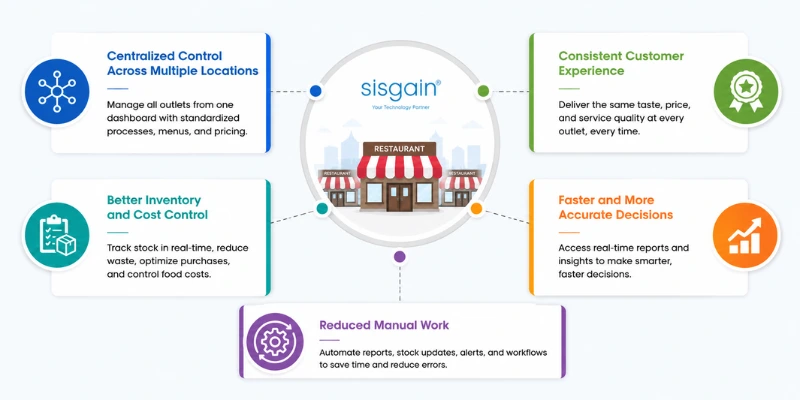
The value proposition changes completely once you're managing more than one location. It stops being about speeding up a single till and becomes about keeping five, ten, or fifty outlets behaving like one brand. Every additional branch multiplies the points where recipes drift, pricing goes out of sync, or stock counts stop matching reality — and no single manager can personally oversee all of it at once. Centralized software is what makes that consistency achievable, rather than something left to chance and good intentions.
Centralized Control Across Multiple Locations
Head office needs visibility into every branch without depending on manual updates from each one. Restaurant management software gives management a single view of all outlets while still allowing outlet-level monitoring of daily performance. Processes, menus, and pricing get standardized and pushed out from one place instead of being configured separately at every branch.
Consistent Customer Experience
Customers expect the same dish, the same price, and the same service standard whether they visit the flagship branch or a new outlet across town. Centralized menu management, standard recipes, uniform pricing, and consistent service workflows protect brand reputation as a chain scales — one bad outlet experience shouldn't be able to undo years of consistency everywhere else.
Better Inventory and Cost Control
With real-time stock visibility across locations, chains can track consumption outlet by outlet, plan purchases more accurately, monitor waste, and keep food costs under control. These are issues that get exponentially harder to manage manually once there's more than one kitchen involved.
Faster and More Accurate Decision-Making
Centralized dashboards give management sales reports, outlet comparisons, product performance, and profitability insights without waiting for someone to compile numbers by hand. Decisions that used to take days now take minutes.
Reduced Manual Work
Automated reporting, automatic inventory updates, low-stock alerts, and workflow automation cut down on repetitive admin. Integration between departments means data entered once — a single sale — automatically updates everything downstream, from stock levels to cost reports.
Key Features of Restaurant Management Software
This is the section that matters most when you're actually comparing platforms, so it's worth going feature by feature.
Multi-Location Restaurant Management
This is what separates chain-grade software from single-outlet tools: centralized management of every branch, location-specific configuration where it's genuinely needed, side-by-side performance comparison between outlets, centralized pricing control, branch-level permission settings, and reporting that rolls individual outlets up into one chain-wide view.
Point-of-Sale Management
The POS module handles order processing, billing, discounts, taxes, refunds, payment processing, table management, and takeaway or delivery orders. For chains operating in the UAE, this is also where restaurant POS systems need to account for local tax rules, multi-currency handling for tourist-heavy areas, and integration with the delivery apps that dominate the market — a generic POS built for a different region often falls short here.
Beyond the till itself, the POS is really the front door to everything else in the platform. Every order it processes is what triggers inventory deduction, kitchen routing, and reporting downstream — which is exactly why speed and reliability matter more at this layer than almost anywhere else in the system.
Menu and Recipe Management
Centralized menu management, ingredient mapping, recipe standardization, portion control, food-cost calculation, recipe-level inventory deduction, and menu pricing all sit here. This is also where a chain gets the most direct return from restaurant recipe management software — once a recipe is standardized and mapped to ingredients, every sale of that dish automatically deducts the right quantities from stock and recalculates its real cost, instead of someone estimating food cost once a quarter and hoping it's close.
Inventory Management
Real-time inventory tracking, stock transfers between locations, low-stock alerts, purchase orders, supplier management, inventory forecasting, waste tracking, and stock reconciliation all live here. For a chain, the transfer and forecasting pieces matter most: a single outlet never needs to move stock anywhere, but a chain does it constantly.
Kitchen and Order Management
Kitchen Display Systems route orders straight to the right station, show preparation status in real time, and coordinate delivery and takeaway orders alongside dine-in tickets. This cuts down on the order errors that come from handwritten tickets or instructions shouted across a busy kitchen.
Employee and Staff Management
Employee profiles, role-based permissions, attendance tracking, shift scheduling, performance monitoring, and outlet-level access control keep staffing organized without bolting on a separate HR tool for every function.
Customer and Loyalty Management
Customer profiles, purchase history, loyalty programs, targeted offers, personalized promotions, and customer segmentation give chains the data to market smarter — rather than blasting the same generic discount code to every single customer regardless of what they actually order.
Reporting and Analytics
Sales, revenue, product performance, outlet performance, food-cost, inventory, employee performance, and customer analytics all pull from the same underlying data. That way, the numbers a general manager sees on the floor match the numbers head office sees in a boardroom — not two different exports that don't quite agree.
CRM, Accounting, Delivery, and Third-Party Integrations
Integration with accounting software, CRM, payment gateways, online ordering platforms, delivery apps, marketing tools, ERP systems, and BI platforms is what keeps a restaurant's tech stack from turning into a pile of disconnected tools that each need their own manual data entry.
How Restaurant Management Software Supports Different Restaurant Operations
Not every restaurant format needs the same emphasis from the platform.
Dine-in restaurants lean on table management, reservations, POS, kitchen coordination, and customer relationship tools to manage the full guest experience from the moment a table is booked.
Quick-service restaurants need speed above everything else — fast order processing, self-service kiosks, kitchen automation, and a system built to handle high transaction volume without slowing down the line during a lunch rush.
Cloud kitchens run multiple brands out of one physical kitchen, so multi-brand menu management, online ordering integration, kitchen workflow tools, and tight inventory control matter far more than table management ever will.
Restaurant franchises need centralized standards enforced across independently operated locations: franchise-level reporting, controlled menu changes, cross-location comparison, and permission systems that let a franchisor set boundaries without micromanaging every branch's daily operations.
Benefits of Restaurant Management Software for Restaurant Chains
Framed as outcomes rather than a feature checklist, the benefits break down like this: improved operational efficiency, better food-cost management, reduced food waste, more accurate inventory, standardized operations across every location, clearer sales and revenue visibility, faster reporting, a more consistent customer experience, and easier expansion into new locations on infrastructure that already scales.
The real payoff shows up when a chain opens its fifth or tenth location. Without centralized systems, administrative overhead grows roughly in step with location count — more spreadsheets, more manual reconciliation, more people just moving numbers between systems by hand. With centralized software, opening a new outlet mostly means configuring a new node on an existing system, not building a parallel set of processes from scratch.
How Restaurant Management Software Improves Inventory and Food Cost Control
Inventory and food cost are usually the two line items that make or break margins for a chain, so this deserves a closer look.
Real-time stock tracking shows exactly what's on hand at every location, updated as sales happen rather than after a manual count at closing time. Ingredient-level consumption tracking breaks that down to the individual ingredient, not just the finished dish. Automated stock deduction means every recipe sold reduces the right ingredients from stock without anyone touching a spreadsheet. Purchase and supplier management ties reordering directly to actual consumption patterns instead of gut-feel ordering. Food waste monitoring flags spoilage and over-production trends before they turn into a recurring cost. Food cost calculation stays current in real time rather than being recalculated once a month after the fact. Inventory forecasting predicts what a location will need based on historical sales and seasonal patterns. And inter-outlet stock transfers let excess stock at one branch cover a shortage at another, instead of both situations ending in waste and emergency purchasing.
A simple example: Outlet A has excess stock of a fast-moving ingredient. The central system flags the surplus. Stock gets transferred to Outlet B, which is running low. Inventory records at both locations update automatically — no manual reconciliation, no guessing at either end.
The Role of Recipe Management in Restaurant Chains
Standardized recipes matter more the moment you have more than one kitchen making the same dish. Without a shared recipe standard, "the same dish" quietly turns into three or four slightly different dishes depending on which chef happens to be on shift that day.
A centralized recipe database keeps every kitchen working from the same instructions. Ingredient and portion standardization keeps cost and taste consistent regardless of who's cooking. Automatic food-cost calculation updates the moment ingredient prices change, so a chain always knows its real margin on a dish rather than an estimate from six months ago. Consistent taste and quality is what actually keeps customers coming back to any location in the chain, not just their nearest one. Recipe-based inventory deduction connects every sale directly back to stock levels, and menu profitability analysis shows which dishes are actually making money once true ingredient cost is factored in — not just which ones sell the most units.
This is really the chain that matters: menu connects to ingredients, ingredients connect to inventory, inventory connects to purchasing, purchasing connects to food cost, and food cost connects to profitability. A properly built module for restaurant recipe management software is what makes that chain visible and actionable, instead of something that only exists in theory.
How AI Is Changing Restaurant Management Software
AI works best in this space as a decision-support layer, not a replacement for the people actually running the operation.
AI-powered sales forecasting predicts demand and surfaces patterns that inform staffing and purchasing decisions before they're needed, not after the shortage has already happened. AI inventory forecasting predicts ingredient requirements, flags potential shortages early, and helps reduce overstocking. AI-powered menu insights identify which items are genuinely performing well versus which ones just look busy on paper, and surface real profitability by dish rather than by order count. Automated customer insights handle segmentation and purchase-pattern analysis at a scale no manager could realistically do by hand across dozens of locations.
AI assistants for restaurant operators are increasingly used to summarize daily sales, inventory status, outlet performance, food costs, and exceptions that need attention — compressing what used to be a morning of report-reading into a two-minute summary. That's the honest use case: AI surfaces what a manager needs to look at. The manager still decides what to do about it. Chains exploring this layer often work with an established AI development company in Dubai to build forecasting and insight tools that plug directly into their existing POS and inventory data, rather than adopting a generic AI add-on that doesn't understand restaurant-specific patterns like seasonal menus or multi-brand cloud kitchens.
Essential Integrations for Restaurant Management Software
A restaurant management platform is only as useful as what it connects to. The core integrations worth checking for include POS integration, accounting and finance software, CRM platforms, payment gateways, online ordering systems, food delivery platforms, ERP systems, HR and payroll tools, and business intelligence or analytics platforms.
An integrated technology ecosystem cuts down on duplicate data entry and keeps numbers consistent across every system a chain uses, instead of finance working off one export, operations working off another, and the two never quite lining up at month-end. For chains further along their tech journey, this is usually the point where it's worth partnering with a digital transformation company in UAE that can connect restaurant management software to the broader business stack — accounting, HR, supply chain — rather than treating each integration as a one-off project handled by whoever's available.
Cloud-Based vs. On-Premise Restaurant Management Software
| Factor | Cloud-Based | On-Premise |
|---|---|---|
| Accessibility | Anywhere | Primarily on-site |
| Updates | Usually centralized | Managed internally |
| Scalability | Easier | More infrastructure required |
| Maintenance | Provider-managed | Business-managed |
| Initial infrastructure | Lower | Higher |
| Multi-location management | Strong fit | Possible but complex |
For a growing chain, cloud-based deployment is generally the better fit. Adding a new location mostly means configuring a new node in the existing cloud system, rather than installing and maintaining new on-site servers at every outlet — which matters a great deal when a chain is trying to expand quickly without its IT overhead growing at the same rate. This is also why so many UAE operators are moving toward cloud-based hospitality management software Dubai vendors offer, since it lets a group manage new openings, seasonal outlets, and even franchise partners from a single dashboard instead of a server room per location.
How to Choose the Right Restaurant Management Software
Define Your Restaurant's Operational Requirements
Start with the specifics: number of locations, restaurant formats, order volume, inventory complexity, delivery operations, and any franchise requirements that need to be built in from day one rather than bolted on later.
Evaluate Multi-Location Capabilities
Check whether the system genuinely supports centralized administration, location-level controls, cross-location reporting, and central menu management — or whether "multi-location support" just means you can log in from more than one place.
Check Integration Capabilities, Scalability, Security, Reporting, and Mobile Access
Beyond the core features, look closely at integration capabilities, how well the system scales as you add outlets, security and user-permission controls, the depth of reporting and analytics, and whether managers can actually run the business from a phone when they're not sitting at a desk.
Check Customization Options
Off-the-shelf software works well until a chain's workflow doesn't match the template it was built around — an unusual franchise reporting structure, a regional integration that isn't standard, or a purchasing process genuinely different from a typical restaurant's. That's usually the point where custom software development in Dubai becomes worth considering, instead of forcing an entire operation to bend around a rigid, one-size-fits-all product.
Consider Vendor Support and Implementation, and Calculate Total Cost of Ownership
A platform is only as good as the support behind it during rollout and afterward, and the sticker price rarely tells the full story. Total cost of ownership includes implementation, training, and ongoing maintenance — not just the license fee on the invoice.
Restaurant Management Software Implementation Roadmap
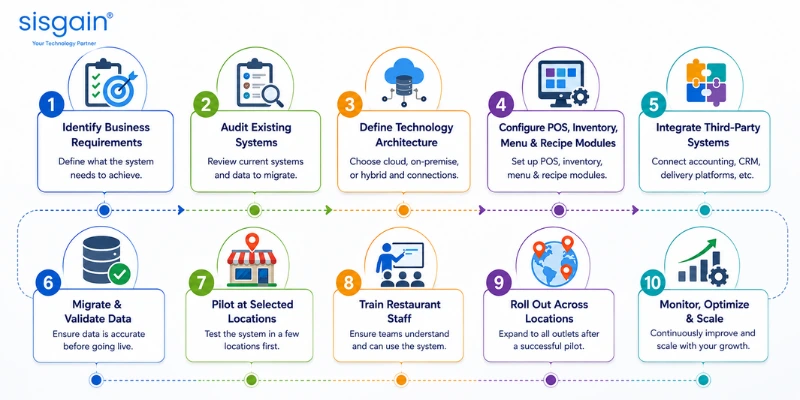
A rushed rollout across every location at once is one of the most common ways implementations go wrong. A phased approach works better in practice:
- Identify business requirements — get specific about what the system needs to do before evaluating vendors.
- Audit existing restaurant systems — know exactly what you're replacing and what data needs to migrate.
- Define the technology architecture — cloud, on-premise, or hybrid, and how it connects to existing tools.
- Configure POS, inventory, menu, and recipe modules — build the foundation before layering on integrations.
- Integrate third-party systems — accounting, CRM, delivery platforms, and anything else the business depends on daily.
- Migrate and validate data — check that historical data actually transferred correctly before going live.
- Pilot at selected locations — test with a small group before wider rollout.
- Train restaurant staff — the best system fails if the team using it every day doesn't understand it.
- Roll out across locations — expand once the pilot has proven the system works under real operating conditions.
- Monitor, optimize, and scale — implementation isn't a one-time event; the system should keep improving as the chain grows.
The practical recommendation is straightforward: pilot first, then scale. Deploying a new system across every outlet simultaneously, without validating it against real operational conditions first, is how small configuration issues turn into chain-wide problems overnight.
How Much Does Restaurant Management Software Cost?
There's no single honest number here. Cost depends on the number of locations, number of users, POS terminals, which modules you need, custom features, integrations, cloud versus on-premise deployment, data migration, implementation, training, and ongoing maintenance and support.
Off-the-Shelf vs. Custom Restaurant Management Software
Off-the-shelf software makes sense when requirements are fairly standard and speed to deployment matters more than a perfect fit. Custom development makes more sense when a chain has complex workflows, a long list of specific integrations, a unique franchise model, specialized reporting needs, or operations that genuinely don't match what pre-built software assumes about how a restaurant runs.
Restaurant Management Software ROI: What Should Chains Measure?
Rather than chasing a guaranteed ROI figure, track the metrics that actually reflect operational health: sales per outlet, average order value, food cost percentage, inventory variance, food waste, order processing time, labor cost, customer retention, outlet-level profitability, and time saved on reporting.
The principle worth holding onto: the best restaurant management system should move these numbers in the right direction. It shouldn't be judged on how many features are listed on the pricing page.
Common Mistakes to Avoid When Selecting Restaurant Management Software
A handful of mistakes show up again and again in chains that end up switching platforms within a year or two: choosing software based only on POS features, ignoring multi-location requirements until after signing the contract, underestimating how many integrations will actually be needed, failing to standardize recipes and inventory before implementation, ignoring how usable the system actually is for floor staff, not planning data migration properly, choosing a system that can't scale past the current location count, focusing only on upfront cost instead of total cost of ownership, and skipping a pilot deployment entirely.
Future of Restaurant Management Software
The direction of the category is fairly clear even without overreaching on predictions: more AI-powered decision support layered on top of existing workflows, predictive inventory management that gets ahead of shortages instead of reacting to them, more automated workflows connecting departments, omnichannel ordering that treats dine-in, delivery, and pickup as one system instead of three separate ones, increasingly digital kitchen operations, deeper customer personalization, real-time business intelligence instead of monthly reports, IoT-enabled equipment monitoring, early experiments with voice-enabled restaurant assistants, and tighter integration between POS, ERP, CRM, and analytics platforms that today often still operate as separate tools.
As demand grows, more chains are turning to specialized food and beverage software development in Dubai providers who understand region-specific requirements — VAT compliance, Arabic-English bilingual interfaces, and the delivery-platform integrations that matter in this market — rather than adapting generic international software after the fact.
Conclusion
Managing a single restaurant is largely about running good service on any given day. Managing a restaurant chain is a different discipline entirely: making sure quality, cost control, and customer experience hold steady across every location, every shift, and every manager, without head office having to manually check in on each one. That's the gap restaurant management software is built to close.
One theme keeps coming back across this guide: disconnected systems create disconnected operations. A POS that doesn't talk to inventory, a recipe that exists only in a chef's memory, or a sales report that takes days to compile all point to the same underlying problem — data that isn't flowing where it needs to. Centralizing that data, from the order screen down to the ingredient level, is what lets a chain standardize recipes, control food cost, spot underperforming outlets early, and expand into new locations without a matching jump in administrative overhead.
None of this means chasing the platform with the longest feature list. The chains that get the most value from their technology are the ones that start with a clear picture of their own operational requirements — number of locations, order volume, delivery mix, franchise structure — and then evaluate software against that picture, rather than the other way around. Whether that leads to an off-the-shelf platform or a custom-built one, the underlying goal stays the same: fewer manual processes, more consistent operations, and decisions backed by real data instead of guesswork.
As restaurant technology moves further toward AI, predictive inventory, and omnichannel ordering, the chains best positioned to benefit will be the ones that already have a solid, centralized foundation in place. If your current setup can't support that foundation, working with an experienced app development company in Dubai to build or extend your platform — whether that's a custom POS layer, a recipe and inventory module, or a full multi-location system — is often what turns restaurant technology from a back-office cost center into a genuine competitive advantage.