
Why This Decision Costs UAE Businesses More Than They Expect
A Dubai-based logistics company we've spoken with spent AED 480,000 building a desktop dispatch system in 2022. Eighteen months later, when their drivers needed to check routes from their phones in Sharjah traffic, the whole system had to be rebuilt from scratch. That's not a rare story. It's what happens when a software decision gets made around today's team size instead of next year's growth.
The UAE's digital economy strategy is pushing every sector — healthcare, logistics, retail, government — toward faster, more connected operations. Dubai's government alone has moved over 130 services to fully digital delivery, and businesses across the Emirates are following the same path, often without asking a basic question first: should this software live on a desktop, in a browser, or in the cloud?
That question isn't academic. It determines your hosting bill, your compliance exposure, how fast your team can onboard a new hire in Abu Dhabi while headquarters sits in Dubai, and whether your systems can survive a busy Ramadan retail season or a hospital's overnight shift change. Get it wrong, and you're not just paying more — you're rebuilding later, usually at the worst possible time.
This guide breaks down desktop, web, and cloud applications in plain terms, compares them across the metrics that actually matter for UAE operations, and gives industry-specific recommendations you can act on today.
What Is a Desktop Application?
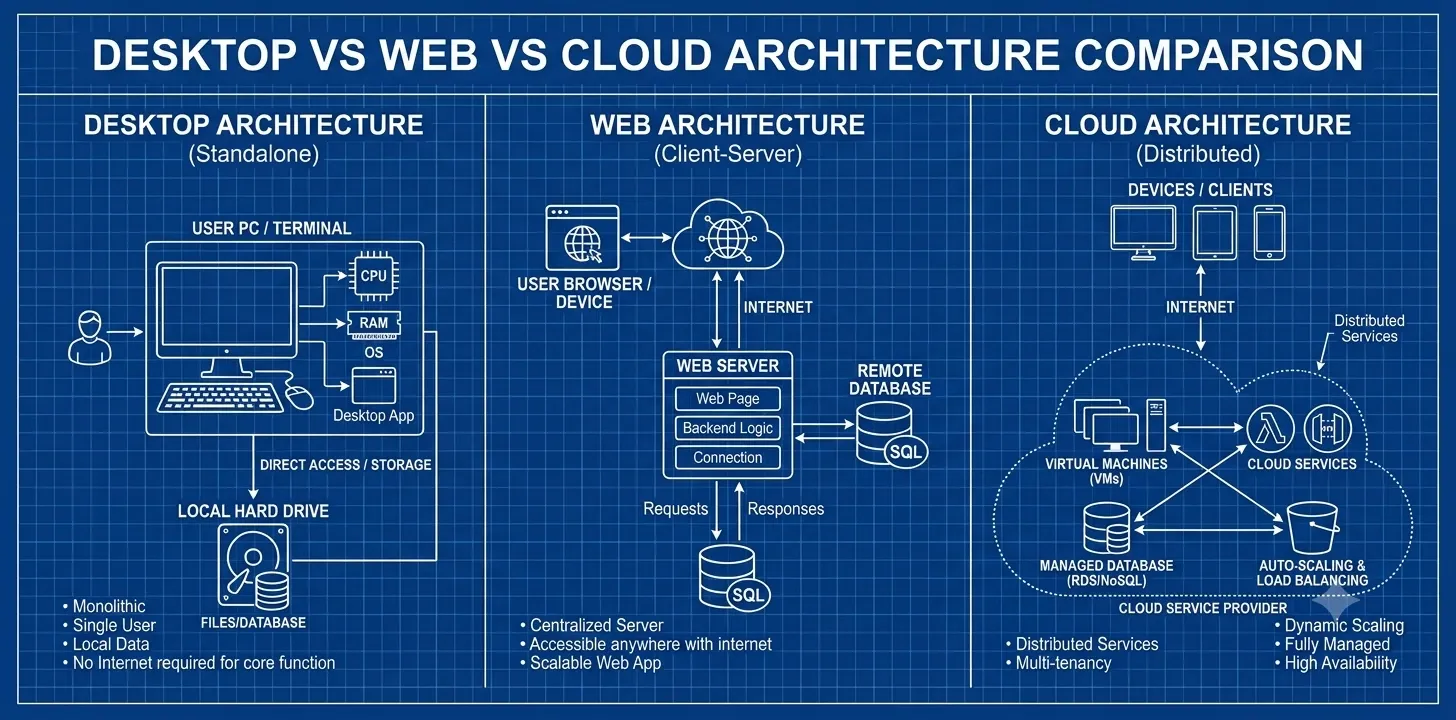
A desktop application is software installed directly onto a device's operating system — Windows, macOS, or Linux — and it runs using that device's own processing power rather than pulling resources from a remote server. Think of the accounting software that only opens on the office computer, or the CAD tool an engineering firm installs on workstations built specifically to handle it.
Advantages
- Runs without an internet connection, which matters on construction sites or in warehouses with patchy signal
- Uses the device's hardware directly, so processing-heavy tasks (rendering, modeling, large dataset crunching) run faster
- Full control over data storage location, which can simplify certain compliance conversations
- No recurring hosting fees since the software isn't relying on external servers
Disadvantages
- Updates have to be pushed to every single machine individually, which gets expensive fast once you're past a handful of devices
- Employees can't access the software from home or another branch without extra VPN or remote-desktop setup
- Hardware failures mean data loss unless separate backup systems are in place
- Scaling to new users means new licenses, new installations, and new IT overhead every time
Best Use Cases
Desktop applications still make sense where performance and offline access outweigh mobility. A manufacturing plant running real-time machinery diagnostics, an architecture firm doing heavy 3D rendering, or a hospital's radiology department processing large imaging files are all better served by local processing power than a browser tab competing for bandwidth.
Examples
AutoCAD, QuickBooks Desktop, and many legacy ERP systems used by UAE manufacturing firms are classic desktop applications — installed once, running locally, and rarely touching the internet except to sync occasional updates.
What Is a Web Application?
A web application runs inside a browser — Chrome, Safari, Edge — and doesn't require installation on the user's device. The actual code executes on a remote server, and the browser simply displays the results. This is the architecture behind most SaaS tools businesses use daily.
How It Works
When someone opens a web application, their browser sends a request to a server. The server processes that request, often pulling data from a database, and sends back the rendered page. Every interaction — clicking a button, submitting a form — repeats this same request-response cycle, which is why a stable internet connection matters more here than with desktop software.
Advantages
- Accessible from any device with a browser, whether that's a Dubai office desktop or a laptop in Fujairah
- Updates deploy centrally — push a fix once, and every user gets it immediately, no individual installs required
- Lower upfront hardware requirements since the heavy processing happens server-side
- Easier for teams with staff working across multiple emirates or remotely
Disadvantages
- Performance depends heavily on internet quality, which can be inconsistent in certain industrial or rural zones
- Limited offline functionality unless specifically built with offline-first architecture
- Browser compatibility issues can crop up across different devices and operating systems
- Server costs scale with usage, so a sudden spike in traffic (say, a retail flash sale) needs to be planned for in advance
Best Industries
Retail e-commerce platforms, customer portals, HR systems, and booking platforms tend to fit web applications well, since these all benefit from broad accessibility without needing constant heavy local processing.
Examples
Gmail, most e-commerce storefronts, and internal HR portals used by UAE enterprises are web applications. The user never installs anything — they just log in through a browser.

What Is a Cloud Application?
Cloud applications take the web application model further. Rather than relying on a single server, they're built on distributed cloud infrastructure — AWS, Azure, Google Cloud — that automatically allocates resources based on demand. A cloud application can also work with limited offline functionality through local caching, syncing once connectivity returns.
Cloud Architecture
Cloud applications typically run on a microservices structure, where different functions (payments, notifications, user authentication) operate as independent services rather than one monolithic codebase. This means a spike in checkout traffic during a Dubai Shopping Festival sale doesn't have to slow down the rest of the application — the cloud infrastructure adds server capacity to just that function, automatically, then scales back down once demand drops.
Advantages
- Scales automatically during demand spikes without manual server provisioning
- Built-in redundancy across data centers reduces downtime risk
- Supports remote and hybrid teams natively, which matters given how spread out UAE workforces often are across free zones and emirates
- Pay-as-you-go pricing models mean businesses aren't paying for idle server capacity
Disadvantages
- Ongoing subscription and infrastructure costs can add up over years, even if they're lower upfront
- Data residency becomes a real conversation — some UAE regulations require certain data to stay within the country or region
- Vendor lock-in is a genuine risk if the architecture isn't built with portability in mind
- Requires more specialized DevOps expertise to manage properly than a simple web app
Use Cases
Multi-branch retail chains, logistics companies tracking fleets across the GCC, fintech platforms processing transactions at scale, and healthcare networks syncing patient records across facilities all benefit from cloud-native architecture.
Examples
Salesforce, Microsoft 365, and most modern fintech platforms operating in the UAE run on cloud infrastructure, distributing workloads across multiple servers rather than relying on one machine.
Desktop vs Web vs Cloud Applications: Full Comparison
|
Factor |
Desktop |
Web |
Cloud |
|
Development Cost |
High (per platform) |
Moderate |
Moderate to High initially |
|
Maintenance |
High (per device) |
Low to Moderate |
Low (centrally managed) |
|
Security |
Strong (local control) |
Moderate (server-dependent) |
Strong (with proper configuration) |
|
Performance |
Excellent (local hardware) |
Good (bandwidth-dependent) |
Excellent (auto-scaling) |
|
Accessibility |
Limited to device |
High (any browser) |
Highest (any device, anywhere) |
|
Scalability |
Poor |
Moderate |
Excellent |
|
Offline Support |
Full |
Minimal to None |
Partial (with caching) |
|
Deployment |
Slow (manual installs) |
Fast |
Fast |
|
Updates |
Manual, per-device |
Centralized, instant |
Centralized, instant |
|
Integration |
Limited |
Good |
Excellent |
|
Compliance |
Easier for strict data residency |
Moderate |
Requires careful region selection |
|
Remote Work |
Poor without VPN |
Good |
Excellent |
|
Best Business Size |
Small teams, fixed location |
SMEs, growing teams |
SMEs to Enterprise |
|
Customization |
High |
Moderate to High |
High |
|
Time to Market |
Slow |
Fast |
Moderate |
|
Future Readiness |
Declining |
Stable |
Growing |
|
ROI |
Long-term for niche use |
Moderate, steady |
Strong at scale |
Which Application Type Is Best for UAE Businesses?
There's no universal answer here — the right architecture depends on what the business actually does day to day, not what's trending. Here's how it typically breaks down by sector.
Healthcare: Cloud, with strict UAE data residency configuration. Patient records need to sync across facilities while meeting Dubai Health Authority and DoH Abu Dhabi requirements.
Retail: Web or cloud, depending on scale. A single boutique might only need a web-based POS and inventory system; a multi-branch chain needs cloud infrastructure to sync stock levels in real time.
Manufacturing: Desktop for floor-level machinery control, cloud for supply chain and inventory oversight. Most manufacturing firms end up running a hybrid of both.
Construction: Web applications for project management and cloud for document sharing across sites, since teams are rarely all in one location.
Government: Cloud, but almost always a private or government-community cloud rather than public cloud, due to sovereignty requirements.
Education: Web applications for student portals and learning management, cloud for institutions running multiple campuses.
Hospitality: Cloud, without much debate. Booking systems, guest management, and multi-property coordination all depend on real-time synchronization.
Logistics: Cloud is close to mandatory for GCC-wide fleet tracking and route optimization.
Real Estate: Web applications for listings and CRM tools; cloud for firms managing properties across multiple emirates.
Finance: A careful mix. Core transaction processing often needs to stay on secured, sometimes on-premises or private cloud infrastructure to satisfy Central Bank of the UAE requirements, while customer-facing portals run on the web.
Development Cost Comparison
Cost is rarely just the invoice from the development firm. It's the invoice plus everything that follows — hosting, licensing, scaling, and the slow creep of maintenance work nobody budgeted for.
|
Cost Factor |
Desktop |
Web |
Cloud |
Enterprise |
Hybrid |
|
Initial Cost |
AED 80,000 - 300,000+ |
AED 40,000 - 150,000 |
AED 60,000 - 250,000 |
AED 250,000 - 1,000,000+ |
AED 150,000 - 500,000 |
|
Maintenance Cost (Annual) |
15-25% of build cost |
10-20% of build cost |
15-20% of build cost |
20-25% of build cost |
18-22% of build cost |
|
Hosting |
None (local install) |
AED 5,000 - 30,000/year |
AED 15,000 - 100,000+/year |
Custom, usage-based |
Mixed local + cloud |
|
Licensing |
Per-device, one-time or annual |
Per-user subscription |
Usage-based or tiered |
Custom enterprise agreements |
Combination model |
|
Infrastructure |
Client hardware only |
Shared server infrastructure |
Dedicated cloud resources |
Dedicated + redundant |
Both on-prem and cloud |
|
Scaling Cost |
High (new licenses + hardware) |
Moderate |
Low (automatic) |
Planned, budgeted |
Moderate to Low |
|
Long-Term ROI |
Strong for single-location, stable teams |
Steady for growing SMEs |
Strong at scale, weaker for tiny teams |
Strong if fully utilized |
Balanced |
Businesses evaluating Software Application Development Costs in 2026 often underestimate the maintenance line the most — it's rarely the headline number that breaks a budget, it's what shows up eighteen months in.
Need expert guidance choosing the right application architecture? SISGAIN helps UAE businesses build secure, scalable, and future-ready software solutions.
How to Choose the Right Architecture
Business Goals: A startup chasing rapid customer acquisition needs different software than a manufacturing firm optimizing a fixed production line. Define the actual business outcome before picking a technology stack to serve it.
Budget: Desktop software often looks cheaper upfront and gets expensive at scale. Cloud looks pricier upfront and gets cheaper per user as the business grows. Match the model to your growth curve, not just this year's budget.
Security: Regulated industries — healthcare, finance, government — need to map data flows against UAE compliance requirements before choosing infrastructure, not after.
Compliance: Some data simply cannot leave UAE borders under current regulations. This alone eliminates certain cloud providers or requires a UAE-based data center from day one.
Growth: If you expect to double headcount in two years, architecture that scales with minimal rework saves real money later.
Remote Teams: A business with staff spread across Dubai, Abu Dhabi, and Sharjah has effectively already answered the desktop-vs-cloud question.
Integration: Check what your software needs to talk to — accounting systems, payment gateways, government portals — before locking in an architecture that can't integrate cleanly.
Existing Infrastructure: Rebuilding from zero rarely makes sense if 70% of current systems can be modernized instead of replaced outright.
Migration Strategy
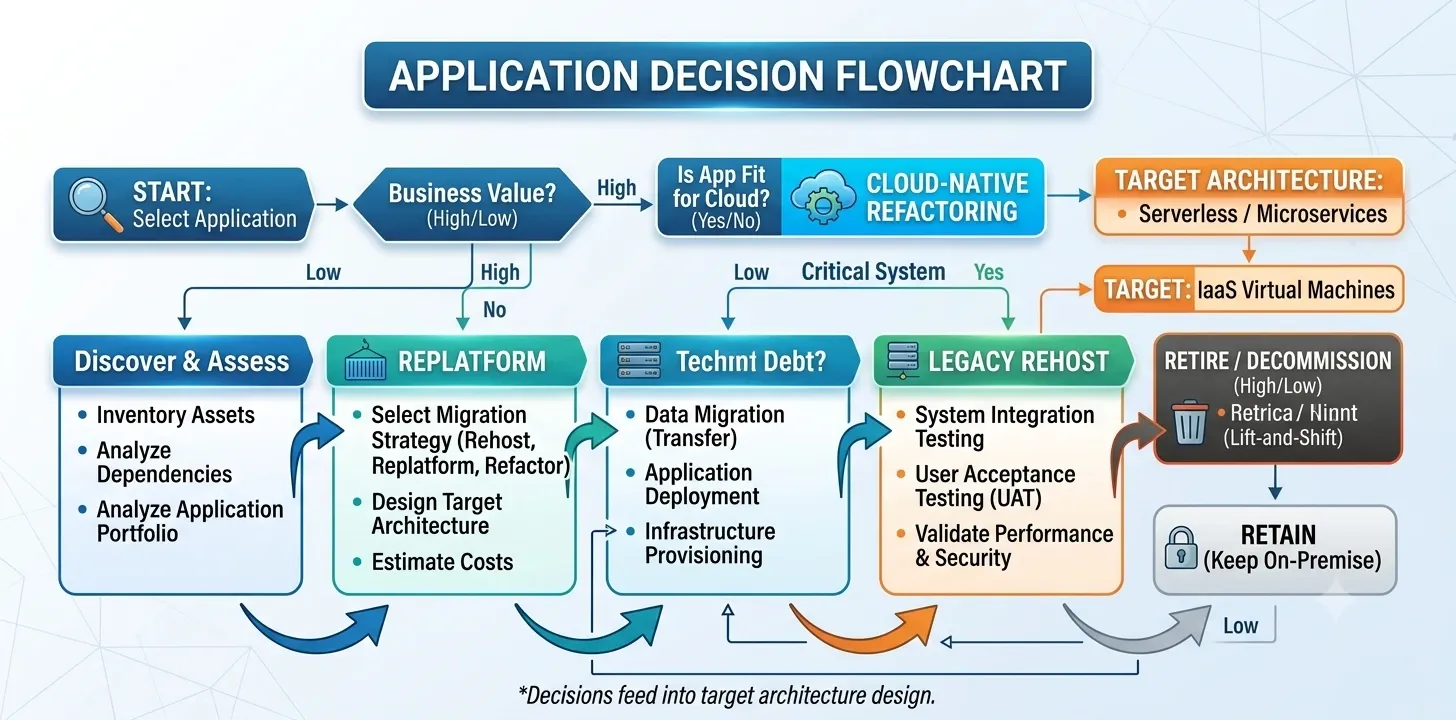
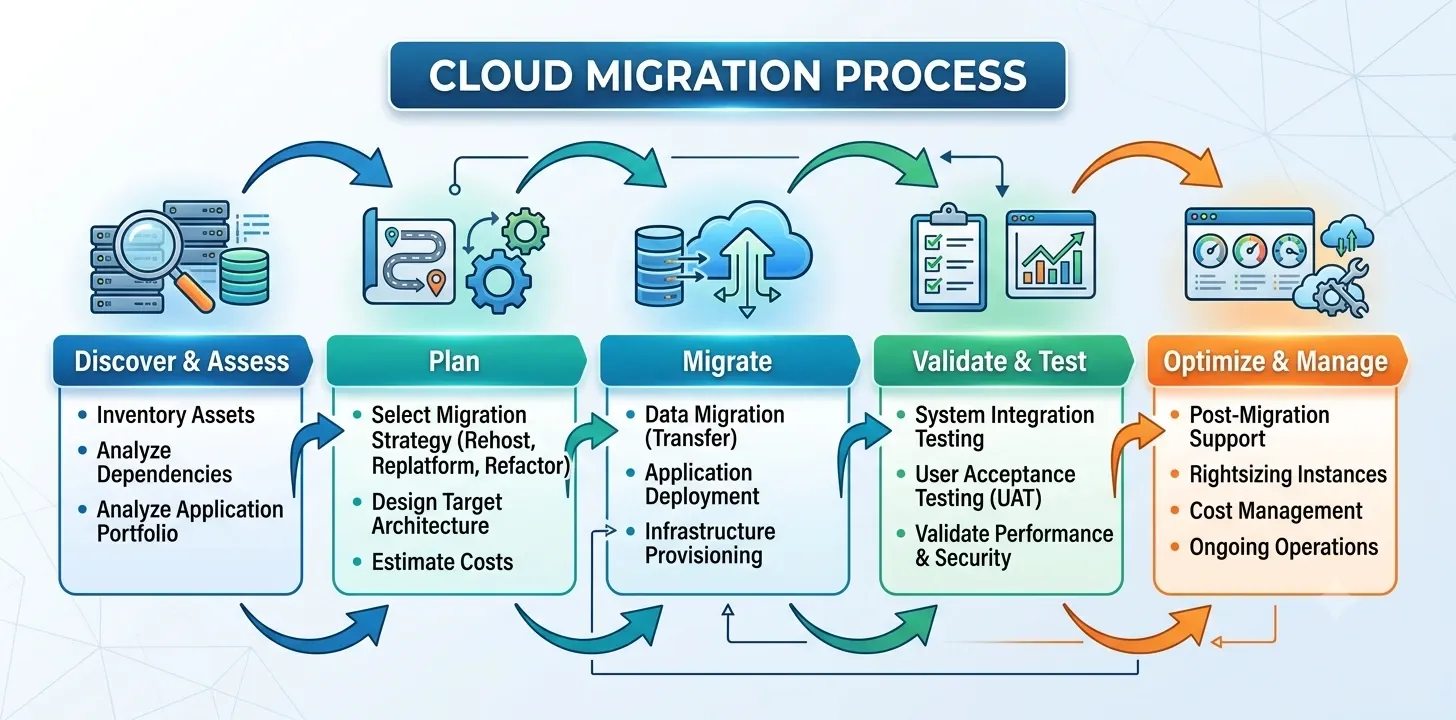
Moving from one architecture to another is rarely a weekend project, and treating it like one is where most migration budgets go sideways.
Desktop to Web
This usually means rebuilding the user interface entirely while porting over business logic. The biggest risk is underestimating how much desktop-specific functionality (offline mode, deep hardware integration) doesn't translate directly to a browser.
Desktop to Cloud
A more involved jump. Data structures often need re-architecting for distributed access, and legacy desktop databases rarely map cleanly onto cloud-native storage without a proper migration plan.
Web to Cloud
Generally the smoothest of the three paths, since web applications already share some architectural DNA with cloud systems. The main work is decoupling the application into services that can scale independently.
Legacy Modernization
Many UAE enterprises are sitting on 10-15 year old systems that still technically work. Modernization doesn't always mean a full rebuild — sometimes wrapping legacy systems with modern APIs buys years of extra life at a fraction of the cost.
Migration Challenges
Data loss risk during transfer, downtime during cutover, staff retraining, and underestimated testing time are the four issues that derail most migration timelines. None of them are exotic — they're just consistently under-planned for.
Security Considerations
Security isn't a single feature you bolt on — it's a set of decisions that touch every layer of the architecture.
Data Encryption: Data should be encrypted both at rest and in transit, regardless of architecture. Cloud platforms typically offer this by default; desktop systems need it configured deliberately.
Authentication: Multi-factor authentication has moved from "nice to have" to baseline expectation, particularly for any system touching financial or medical data.
Authorization: Role-based access control ensures a warehouse staff member and a finance director aren't operating with the same system permissions.
Backups: Desktop systems need a deliberate backup strategy since data lives locally. Cloud systems usually build this in, but "usually" isn't "always" — verify it contractually.
Disaster Recovery: A documented recovery plan with a defined recovery time objective matters more than the architecture choice itself. Even the best cloud setup fails without one.
Compliance: UAE businesses need to track multiple overlapping frameworks depending on sector and data type.
- GDPR applies if the business handles any EU citizen data, regardless of where the company is based.
- ISO 27001 certification is increasingly requested by UAE enterprise clients as a baseline trust signal.
- UAE-specific regulations, including Dubai's Data Protection Law and sector rules from the Central Bank and Dubai Health Authority, often dictate exactly where data can physically reside.
Firms looking to Secure, and Optimize Your Entire Infrastructure typically find that security gaps trace back to configuration choices made at launch, not flaws in the underlying platform itself.
Future Trends
AI-powered software is moving from a differentiator to a baseline expectation, particularly in customer service and predictive maintenance applications.
Low-code platforms are letting UAE SMEs build functional internal tools without a full development team, though they hit real limits once customization needs grow complex.
Cloud-native architecture is becoming the default starting point for new builds rather than something retrofitted later.
Serverless computing removes the need to manage underlying infrastructure at all, charging only for actual execution time — a meaningful cost advantage for applications with unpredictable traffic.
Edge computing is gaining traction for manufacturing and logistics use cases where processing needs to happen physically close to the data source rather than round-tripping to a distant server.
Hybrid cloud setups, combining private infrastructure for sensitive data with public cloud for everything else, are becoming the practical answer for regulated UAE industries rather than an either-or choice.
Multi-cloud strategies are reducing vendor lock-in risk, letting businesses distribute workloads across providers.
AI automation is reshaping how businesses handle repetitive operational tasks, from invoice processing to customer query routing.
Companies exploring custom software development are increasingly building with these trends as a starting assumption rather than an afterthought bolted onto legacy systems.
Need expert guidance choosing the right application architecture? SISGAIN helps UAE businesses build secure, scalable, and future-ready software solutions.
Common Mistakes Businesses Make
- Choosing architecture based on current team size instead of where the business will be in three years.
- Ignoring UAE data residency requirements until a compliance audit forces an expensive mid-project pivot.
- Underestimating maintenance costs, which often exceed the initial build cost within two to three years.
- Building desktop software for a workforce that's about to go remote or hybrid.
- Skipping a proper security audit before launch, treating it as a post-launch task instead.
- Assuming cloud is always cheaper without modeling actual usage patterns and long-term subscription costs.
- Not planning for integration with existing accounting, HR, or government portal systems from the start.
- Over-customizing early, building features nobody asked for while core functionality still has gaps.
- Choosing a vendor based on price alone, without checking their track record supporting similar UAE-regulated businesses.
- Delaying migration decisions too long, letting legacy systems become so entangled with daily operations that modernization gets riskier every year it's postponed.
- Failing to document a disaster recovery plan, discovering the gap only after an actual outage.
Final Verdict
Choose Desktop if your operations are location-fixed, performance-critical, and rarely need remote access — think manufacturing floors, specialized engineering work, or single-location clinics with heavy imaging needs.
Choose Web if your business needs broad accessibility, moderate scalability, and a faster, more budget-friendly path to market — this covers most SMEs, retail operations, and service businesses across the UAE.
Choose Cloud if your business spans multiple locations, needs to scale unpredictably, or operates in a sector — logistics, hospitality, fintech — where real-time synchronization across teams isn't optional.
Most mid-size and enterprise UAE businesses end up somewhere in between, running a hybrid setup that keeps sensitive processing local while pushing everything else to the cloud. That's not indecision — it's usually the correct answer once the full picture is on the table.
Conclusion
The desktop, web, and cloud decision isn't really about technology preference — it's about matching architecture to how a business actually operates, where its data needs to live, and how fast it plans to grow. A manufacturing firm and a multi-branch retail chain have almost nothing in common operationally, and their software shouldn't either.
What consistently separates UAE businesses that scale smoothly from those that end up rebuilding mid-flight is whether this decision got made deliberately, with real input on compliance, growth plans, and team structure, rather than defaulting to whatever felt familiar or cheapest at the time.
SISGAIN has spent years helping UAE businesses across healthcare, logistics, retail, and finance work through exactly this decision — mapping the right architecture to the actual business first, then building it properly the first time. Whether that ends up being a desktop system, a web platform, a cloud-native build, or some hybrid of the three depends entirely on what the business needs, not what's trending this year.