
A distributor's invoice is only as accurate as its weakest data source. One wrong tax code, one delivery quantity that doesn't match the warehouse, one customer record with no TRN, and the whole document can bounce.
I've spent 19 years delivering enterprise IT projects, and distribution businesses are where this problem shows up fastest. They run thousands of invoice lines a week across ERP, warehouse, sales and finance systems, and a PDF that "looks right" has always been enough. Under UAE e-invoicing, it isn't.
This guide walks through how to connect ERP, inventory and finance workflows so that e-invoices are right the first time, and what to fix before your Accredited Service Provider (ASP) ever sees a document.
Quick Answer
UAE e-invoicing requires distributors to issue structured electronic invoices in the PINT AE format, exchange them through an Accredited Service Provider (ASP), and have tax data reported to the Federal Tax Authority (FTA). PDFs, scans, emails and Word files don't qualify. The practical approach is to generate invoices directly from approved ERP orders and confirmed deliveries, after validating customer, item, VAT and quantity data.
What UAE E-Invoicing Actually Requires
The UAE Ministry of Finance (MoF) and the FTA have set up a decentralised model where invoice data moves between service providers, and tax data is reported to the FTA at the same time. Four ideas matter most for a distributor.
Structured invoices, not documents. An e-invoice is machine-readable data in the PINT AE standard. It is not a PDF, a scanned image, an email or a Word file. If your current process ends with someone exporting a PDF from the ERP, that step has to change.
The five-corner exchange model. In plain terms: you (the supplier) send invoice data to your ASP. Your ASP validates it and passes it to the buyer's ASP, which delivers it to the buyer. In parallel, your ASP reports the Tax Data Document to the FTA. Five parties, one flow.
Statuses come back. Every exchange and reporting step returns a Message Level Status. Someone in your business needs to watch them.
Records must be retained and retrievable. Invoices, credit notes and supporting data need to be producible when the FTA asks.
Where the deadlines stand. Per the MoF timeline, businesses with annual revenue of AED 50 million or more had to appoint an ASP by 30 October 2026, with implementation due by 1 January 2027. Businesses below that threshold must appoint an ASP by 31 March 2027 and implement by 1 July 2027. If you're in the first group, that first date was yesterday, so ASP onboarding should already be moving. If you're in the second group, you have time, but not as much as it feels like. Always confirm dates against the latest MoF and FTA announcements.
If you want the broader picture of what a modern ERP does for UAE businesses, including VAT automation, our guide on how ERP software benefits UAE businesses is a useful companion.
Why Distributors Feel This Harder Than Most
A service company issues a few dozen invoices a month. A distributor issues thousands, and each one depends on data from several places:
- Sales orders with agreed pricing, discounts, promotions and rebates
- Warehouse confirmation of what was picked, packed and dispatched
- Item master data: SKU, unit of measure, tax classification
- Customer master data: legal name, address, TRN/TIN, payment terms
- Finance rules for credit limits, VAT and receivables
When those sources disagree, the invoice is wrong. In a paper-and-PDF world, you could fix it with a credit note next week. In a structured, validated world, the ASP can reject it before it leaves your door.
Here is a pattern I see again and again. A food distributor ships 100 cartons to a supermarket chain. The warehouse can only dispatch 80 because of a stock shortfall. The sales order still says 100, so the ERP invoices 100. The buyer receives 80, disputes the invoice, and finance raises a credit note for 20. That's two documents, one dispute, a delayed payment and an audit trail that tells a messy story. With e-invoicing, the same mismatch means two structured documents reported to the tax authority instead of one clean one.
The fix isn't a smarter PDF. It's invoicing from confirmed deliveries.
The End-to-End Flow: From Sales Order to FTA Report
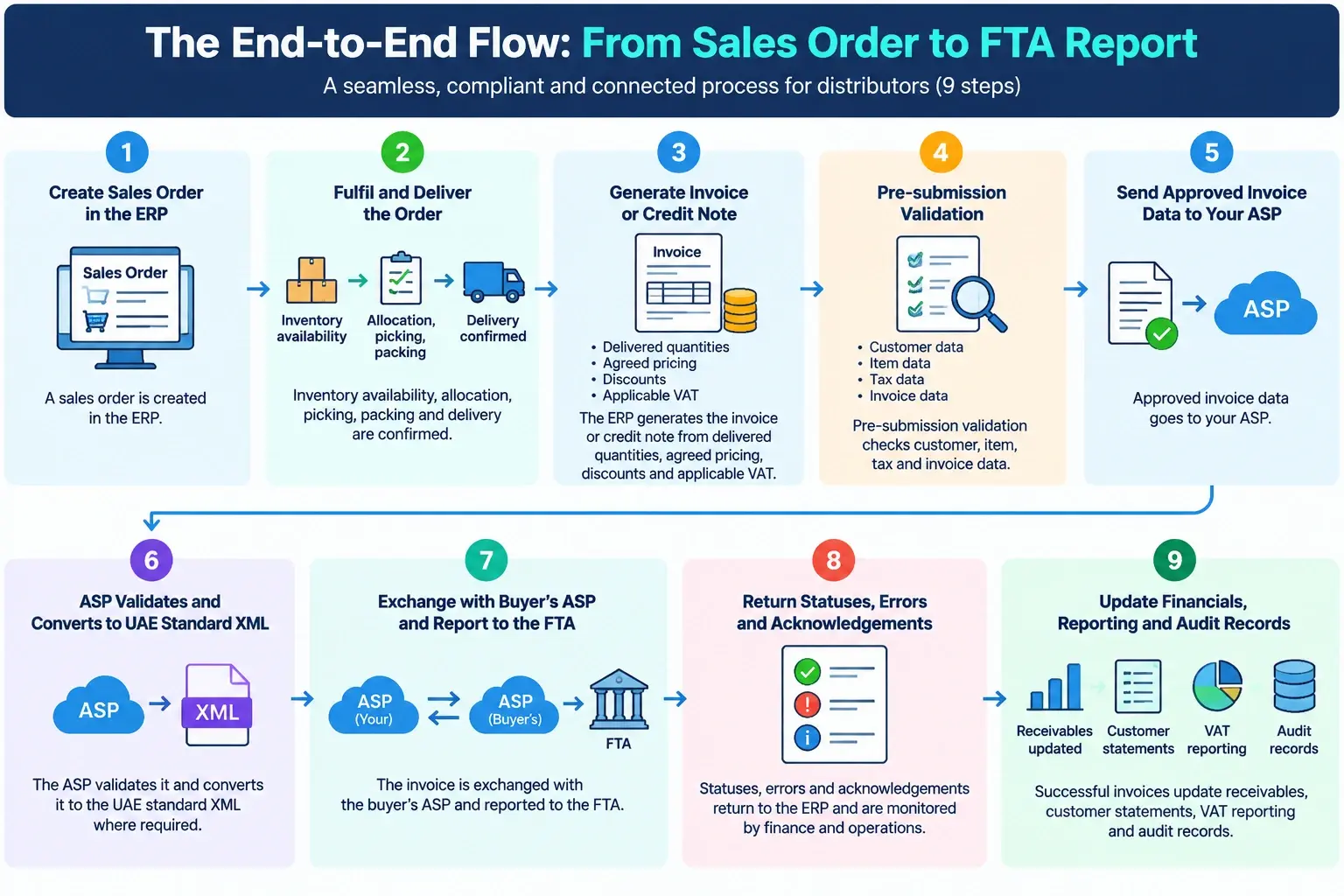
The flow we design for distributors has nine steps:
- A sales order is created in the ERP.
- Inventory availability, allocation, picking, packing and delivery are confirmed.
- The ERP generates the invoice or credit note from delivered quantities, agreed pricing, discounts and applicable VAT.
- Pre-submission validation checks customer, item, tax and invoice data.
- Approved invoice data goes to your ASP.
- The ASP validates it and converts it to the UAE standard XML where required.
- The invoice is exchanged with the buyer's ASP and reported to the FTA.
- Statuses, errors and acknowledgements return to the ERP and are monitored by finance and operations.
- Successful invoices update receivables, customer statements, VAT reporting and audit records.
Step 4 is the one teams underestimate. Catching a bad TRN or tax code inside your own system takes seconds. Catching it after an ASP rejection takes a ticket, a handover and usually a day.
Connecting the ERP: Invoice From Approved Documents, Not Re-Keyed Data
The ERP is your system of record, so e-invoicing should trigger from approved business documents. Nobody should be recreating invoices by hand.
The integration points that matter most:
- Sales order to invoice linkage
- Delivery-based invoicing for physical goods
- Credit notes for returns, price adjustments, damaged goods and rebates
- Customer and item master data synchronisation
- VAT and tax-code mapping
- Invoice numbering and document-reference controls
- Payment status and reconciliation updates
- Error queues and resubmission workflows
One thing worth saying plainly: many distributors run an ERP that was never built to produce PINT AE data. You have three realistic options: configure what you have, extend it through an integration layer to your ASP, or modernise the platform. If your ERP is older and heavily customised, our post on modernizing legacy systems in Dubai covers how to decide.
If you're weighing a custom build or extension, our ERP software development services in Dubai team works on exactly this. For the ERP-to-ASP connection itself, software integration services cover API design, retries and status handling.
Connecting Inventory: Invoice What Was Actually Delivered
Inventory accuracy is where distributor e-invoicing succeeds or fails. The invoice must reflect what was supplied, so stock movements have to support it.
Controls to put in place:
- Stock availability checks before order confirmation
- Pick, pack and dispatch confirmation before an invoice is released
- Batch, lot, expiry and serial capture where relevant
- Reconciliation of delivered quantity against invoiced quantity
- Automated handling of partial deliveries, back orders and returns
- Stock adjustment controls for damaged, rejected or returned goods
- A clean link between goods receipts, sales returns and credit notes
A worked example. An electronics distributor in Sharjah receives an order for 500 units of a router model. The warehouse dispatches 420 and holds 80 on back order. With delivery-based invoicing, the ERP raises an invoice for 420 at the agreed price, applies VAT on 420, and keeps the remaining 80 open. When the second shipment leaves, a second invoice follows. Every invoice ties to a dispatch record. If the buyer later returns 10 faulty units, the credit note references the original invoice and the return receipt, so the audit trail holds together.
Now compare that with invoicing at order confirmation. You'd bill 500, deliver 420, and spend the next week explaining the gap. If you want to see how stock, picking and dispatch logic fits together in a proper system, read our guide to how a warehouse management system works. If you're ready to build or upgrade one, take a look at our warehouse management software development services.
Connecting Finance and VAT: Every Invoice Needs an Accounting Trail
Finance workflows make sure every e-invoice has a clear accounting, VAT and receivables trail.
- Automated journal posting for invoices, credit notes and adjustments
- Item-level VAT calculation and validation before submission
- Receivables creation and customer balance updates
- Credit-limit checks before order release and invoicing
- Payment allocation and reconciliation
- Structured invoice data feeding VAT return preparation
- An audit trail from sales order to delivery, invoice, ASP submission, FTA reporting and payment
A small example. A customer sits at their credit limit. Without a check at order release, the invoice goes out, the receivable lands on a blocked account, and collections chase a balance that should never have been created. With the check in place, the order is held before stock moves and before an invoice exists.
Fix Your Master Data First
If I could give a distributor only one piece of advice, this would be it. Most e-invoicing failures I see trace back to master data, not to the integration itself.
|
Data area |
Control to implement |
|
Customer data |
Mandatory legal name, address, TRN/TIN and contact validation |
|
Item data |
Standardised SKU, description, UOM, tax classification and price controls |
|
Pricing |
Validation of price lists, discounts, promotions and credit notes |
|
VAT |
Correct treatment and tax-code mapping per transaction type |
|
Inventory |
Delivery-quantity and stock-movement reconciliation before invoicing |
|
Documents |
Unique invoice references and complete supporting data retention |
|
Exceptions |
Error dashboard, ownership rules and a correction workflow |
A five-point readiness check you can run this week:
- Export your active customer list. How many records have a blank or invalid TRN/TIN?
- Check that legal names and addresses match what's on the customer's trade licence or tax registration.
- Pull your top 200 SKUs by volume. Does every one have a unit of measure and tax classification?
- Look for duplicate items and duplicate customers. They cause duplicate invoices and confused statements.
- Name one owner for each data area. If nobody owns it, it won't get fixed.
It isn't glamorous work. It's also the work that decides whether go-live is calm or chaotic.
Who Owns What After Go-Live
A clear operating model prevents the "whose problem is this?" email chain.
- Sales operations: create and check sales orders and delivery documentation
- Warehouse team: confirm allocation, dispatch, returns and stock movements
- Finance team: approve invoices, monitor VAT, manage receivables, resolve exceptions
- Tax/compliance team: review reporting status and maintain audit evidence
- IT/integration team: monitor interfaces, API failures, retries and system errors
- ASP: validate, exchange and report e-invoices through the approved network
Pair that with a simple review rhythm: a weekly review of failed or pending invoices during hypercare, a monthly review of VAT, receivables and inventory reconciliation exceptions, and a quarterly master-data and tax-code review. Keep an eye on MoF and FTA announcements too, since requirements can change.
If you're automating the approval, exception and escalation steps, our business process automation services can help build those workflows into the ERP rather than around it.
Test Before You Go Live
Test the boring days and the ugly days. The nine scenarios we cover:
- Master data validation (customer, item, tax completeness)
- Sales-to-invoice flow
- Inventory reconciliation (invoiced vs dispatched)
- VAT validation
- Credit-note processing (returns, adjustments, reversals)
- ASP submission and acknowledgement
- Error handling (identify, correct, resubmit)
- Finance posting (receivables, VAT, ledgers)
- Audit and retention (records retrievable on request)
High volume deserves its own test. A system that handles 50 invoices in UAT can behave very differently at month-end with 5,000. For structured test planning and load testing, see our QA and testing services in Dubai.
A Six-Phase Rollout Plan
|
Phase |
Key activities |
Outcome |
|
1. Assessment |
Process review, data-gap analysis, ERP and ASP readiness |
Approved blueprint |
|
2. Design |
Integration design, data mapping, PINT AE field mapping, exception workflows |
Design sign-off |
|
3. Build |
ERP configuration, API integration, validation rules, dashboards |
Integrated workflow |
|
4. Testing |
Unit, integration, user acceptance and exception testing |
Validated solution |
|
5. Onboarding |
ASP contracting, EmaraTax-related onboarding, user training |
Operational readiness |
|
6. Go-live |
Pilot transactions, monitoring, hypercare, production rollout |
Compliant live operation |
Build in contingency time for ASP onboarding and exception resolution. In my experience, that's where timelines slip, rarely in the build itself.
Risks and How to Reduce Them
|
Risk |
Impact |
Mitigation |
|
Incomplete customer or item data |
ASP rejection, delayed invoicing |
Mandatory validation, cleansing, ownership rules |
|
Incorrect VAT classification |
Tax errors, compliance exposure |
Tax-code mapping, approval controls, periodic review |
|
Inventory mismatch |
Invoice disputes, extra credit notes |
Delivery reconciliation, warehouse confirmation |
|
ASP connectivity failure |
Delayed submission |
Monitoring, retry logic, escalation procedures |
|
High transaction volume |
Processing delays |
Batch controls, performance testing, exception dashboards |
|
User adoption gaps |
Manual workarounds |
Role-based training, standard operating procedures |
|
Regulatory changes |
Compliance gaps |
Ongoing monitoring of MoF and FTA updates |
Of these, user adoption is the one people forget. If a sales coordinator can still raise a manual invoice outside the system "just this once", they will.
What Distributors Gain Beyond Compliance
Compliance is the reason you start. These are the reasons it's worth doing properly:
- Faster invoicing: invoices follow confirmed deliveries, with less manual rework.
- Fewer errors: automated checks catch pricing, VAT, customer-data and quantity mistakes early.
- Better cash flow: validated invoices reach customers sooner, which supports earlier payment.
- Fewer disputes: invoicing from dispatch removes the biggest argument about what was delivered.
- Stronger audit readiness: one trail from order to payment.
- Scalability: the model extends to more customers, branches, warehouses and, later, wider GCC operations.
- Lower processing cost: the MoF cites potential invoice-processing cost reductions of up to 66% when e-invoicing is implemented effectively. Treat that as an upper bound, not a promise.
It's also worth being honest about why these projects stall. Many supply chain initiatives underperform because process, data and systems aren't aligned. We unpack that in why supply chain management projects fail, and e-invoicing is no different.
What to Do Next
Open your customer and item masters this week and run the five-point check above. It takes an afternoon and tells you more about your readiness than any vendor demo will.