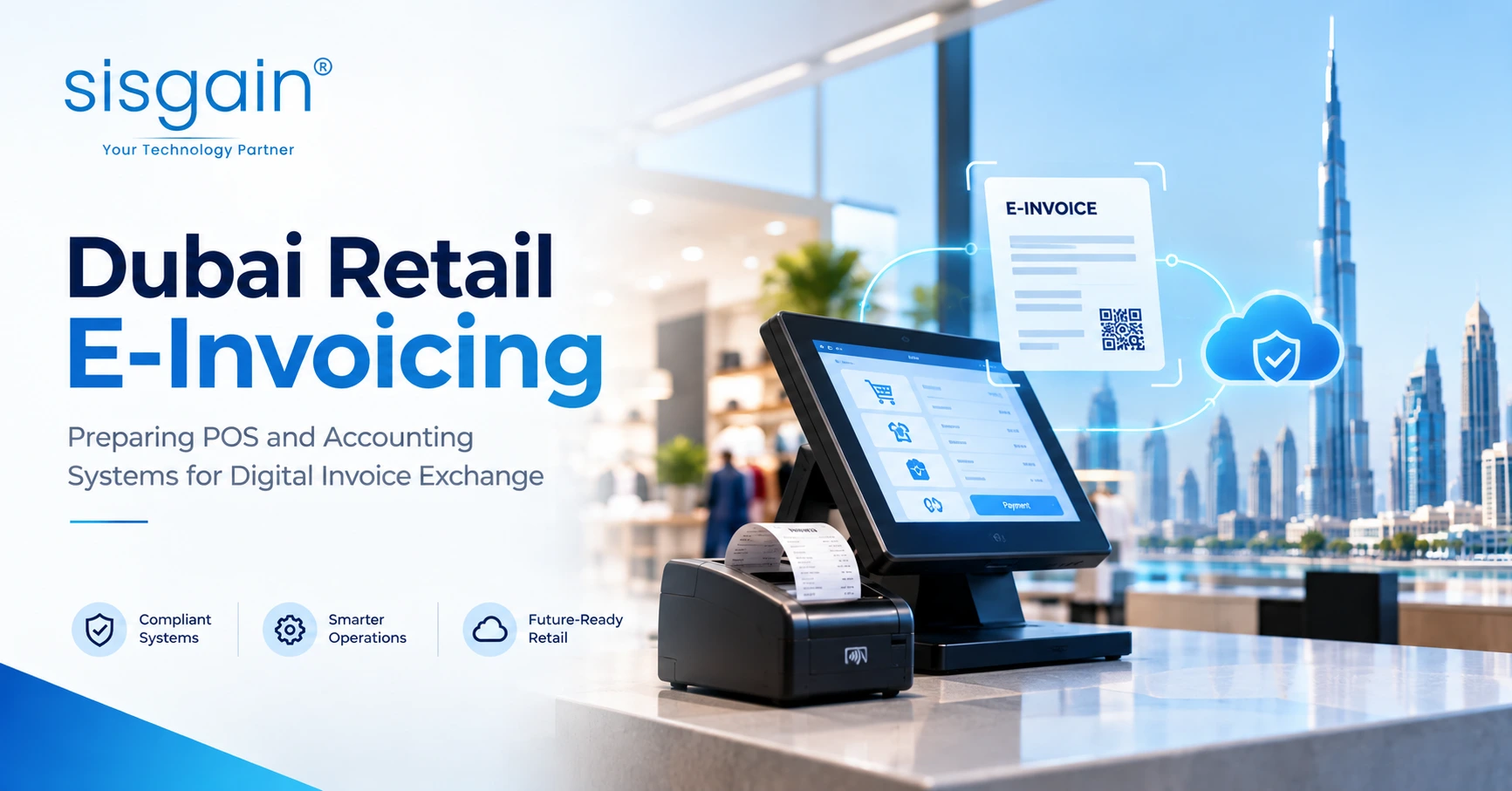

If you run a retail business in Dubai, you probably think of an invoice as something your POS prints and your accounting system records. That mental model has a short shelf life. Under the UAE's e-invoicing framework, an invoice becomes a structured piece of data that moves through an accredited network and is reported to the Federal Tax Authority (FTA).
Over the past few months, our team worked with a Dubai retailer to get its POS and accounting stack ready for this shift. The surprise was not the regulation itself. It was how much of the work sat in places nobody had looked at in years: discount logic, customer records, return workflows. This guide shares what we learned, so you can skip the painful parts. If you need hands-on help, our team offers ERP software development in Dubai built around exactly these integration needs.
Quick answer: UAE e-invoicing replaces PDF or printed tax invoices with structured Peppol PINT-AE XML, exchanged through an FTA-accredited service provider (ASP). Businesses with annual revenue of AED 50 million or more must go live by 1 January 2027. Smaller businesses must appoint an ASP by 31 March 2027 and go live by 1 July 2027. For retailers, readiness means clean master data, correct VAT logic at the POS, an integration layer to the ASP, and linked credit-note workflows.
Where things stand today
The Ministry of Finance moved the Phase 1 ASP appointment deadline from 31 July to 30 October 2026, but kept the 1 January 2027 go-live date. That leaves Phase 1 retailers with roughly nine weeks between appointing an ASP and going live. Phase 2 retailers have more breathing room, but the work is the same, and starting early is far cheaper than rushing.
Here is the timeline at a glance:
|
Group |
Appoint an ASP by |
Go live by |
|
Revenue AED 50 million or more |
30 October 2026 |
1 January 2027 |
|
Revenue below AED 50 million |
31 March 2027 |
1 July 2027 |
|
Government entities |
Per MoF guidance |
1 October 2027 |
Before you rely on these dates, confirm them on the official Ministry of Finance e-invoicing page. Timelines in regulated programmes can change.
What UAE e-invoicing actually requires
The framework is built on a five-corner Peppol-based model. In plain language, your system does not email an invoice to your customer. It sends structured data to your accredited service provider, which validates it, passes it across the network to the buyer's provider, and reports it to the FTA.
|
Area |
What it means for you |
|
Format |
Structured XML in the UAE's PINT-AE format. No QR code or barcode is used. |
|
Exchange model |
Five-corner, decentralised continuous transaction control and exchange |
|
Service provider |
You must use an FTA-accredited ASP as your access point |
|
Scope (initial) |
B2B and B2G transactions |
|
Reporting |
Invoice data is reported electronically to the FTA through the network |
But what about my walk-in customers?
This is the first question every retailer asks us. The initial scope covers B2B and B2G transactions, so a standard over-the-counter sale to a consumer is not the same as a sale to a VAT-registered business buyer. In practice, though, your POS still has to tell the two apart at the moment of sale, capture buyer details when they are needed, and route the right transactions into the e-invoicing queue. Check the latest MoF guidance on scope with your tax adviser, then design your POS rules around it.
Why your POS and accounting systems need a rethink
In the old world, invoice creation was an output. In the new one, it is a controlled process with eight steps:
- Sales capture at the POS
- Customer identification
- VAT calculation
- Invoice generation in the ERP
- Validation
- Transmission to the ASP
- Acknowledgement or rejection
- Archival and audit trail
If any step relies on a person fixing things manually after the fact, you will feel it on day one of go-live. We have seen retail finance teams spend more time chasing exceptions than posting entries. The goal of readiness work is to move those fixes upstream, to the point where the data is first created.
Case study: a Dubai retailer's readiness assessment
Here is how the engagement went, with the client anonymised.
The situation. A multi-store Dubai retailer ran a POS feeding an ERP and accounting system. Invoices were produced as print and PDF outputs. Nobody was unhappy with the process, which is exactly why it needed a hard look.
What we did first. We ran discovery sessions with retail operations, finance, IT and tax. We mapped the full sales-to-invoice journey and reviewed every transaction type the stores handle: standard sales, split payments, returns, exchanges, discounts, promotions and credit notes. We also looked at who touches an invoice after it is created, because manual interventions are where compliance risk hides.
What we found.
- PDF-only outputs were not enough. The existing invoices could not be sent as structured data. PINT-AE XML generation had to be added.
- Data quality was the biggest risk. Customer, product, tax, discount and return data all needed cleansing before any integration testing made sense.
- Returns were the weak spot. Retail returns and corrections need a clear link to the original transaction and must follow compliant credit-note rules.
- Visibility was missing. There was no dashboard for failed validations, rejected invoices or transmission delays.
What we recommended. A middleware layer between the POS/ERP and the chosen ASP, rather than a direct connection. [Client-approved detail: add one anonymised before/after example here, such as a specific integration challenge and how it was resolved.]
Experience note from the team: the retailers who struggle most are not the ones with old systems. They are the ones who assume e-invoicing is a software switch rather than a data-quality project.
The five-dimension readiness check
We assess every client across five areas. You can run a rough version of this internally today.
|
Area |
What to examine |
Typical outcome |
|
Process |
Creation, approval, correction and issuance workflow |
Redesign for structured generation and transmission |
|
Data |
Customer, product, tax and invoice data quality |
Master-data cleanup and validation rules |
|
Technology |
POS, ERP, APIs, XML generation |
Integration layer or ASP connector needed |
|
Compliance |
PINT-AE fields, VAT rules, FTA reporting |
Compliance mapping and validation rules |
|
Operations |
Store procedures, exception handling, support |
Training, runbooks and a support model |
The target architecture: keep stores and compliance separate
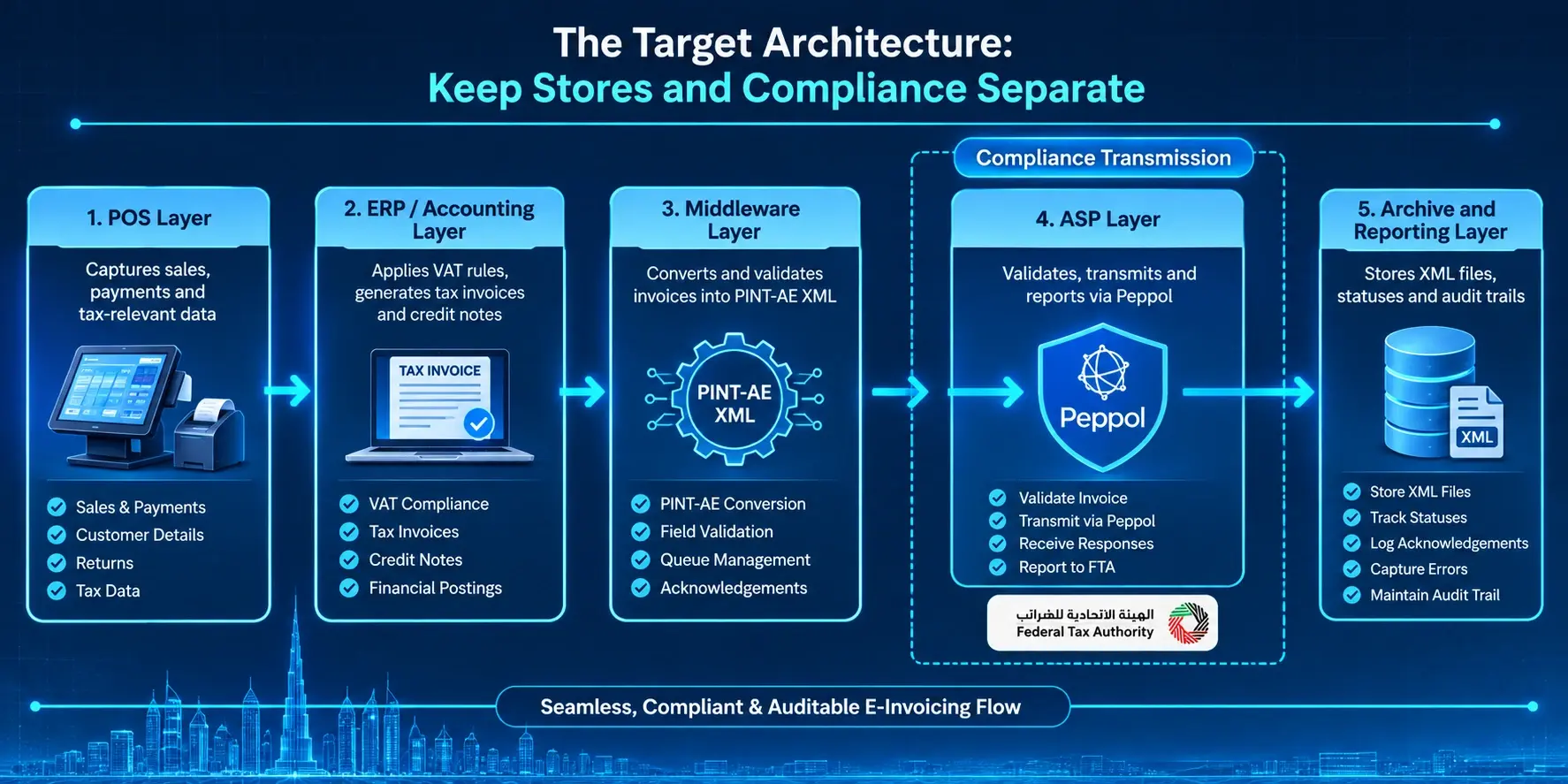
The cleanest design we have used splits retail operations from compliance transmission across five layers:
- POS layer: captures sales, payments, customer details, returns and tax-relevant data.
- ERP/accounting layer: applies VAT rules, generates tax invoices and credit notes, and keeps financial postings.
- Middleware layer: converts approved invoices into PINT-AE XML, validates mandatory fields, manages queues and handles acknowledgements.
- ASP layer: validates, transmits, receives and reports through the Peppol network to the FTA.
- Archive and reporting layer: stores XML files, statuses, acknowledgements, errors and audit trails.
Why we recommend middleware
A direct POS-to-ASP link can work. But in a high-volume retail environment, middleware gives you three things a direct link rarely does: validation before anything leaves your network, retry logic when the network or ASP hiccups, and one place to monitor everything. If your stores already run a modern setup, our guide to how retail POS and inventory software fits together is a useful companion for planning the integration points.
If you are weighing build options, a specialist software integration services partner in Dubai can scope the middleware against your existing stack.
Invoice data mapping: where rejections come from
Most rejected invoices trace back to a field that was empty, inconsistent or mapped to the wrong tax category. Build your mapping workbook around these groups:
- Supplier details: legal name, TRN, address and electronic address
- Buyer details: identification and electronic address where applicable
- Document data: invoice number, issue date, due date, currency, document type
- Line items: description, quantity, unit price, discounts, tax category, VAT rate, line amount
- Totals: taxable amount, VAT amount, payable amount
- References: payment details, credit-note links, prior invoice references
Our advice: do the mapping with finance and store operations in the same room. Finance knows what the tax rule says. Store teams know what the POS actually does.
A practical requirements checklist
Your POS should:
- Capture complete transaction-level data
- Apply the right VAT treatment at item, promotion, discount and return level
- Capture buyer information for qualifying B2B sales
- Generate unique references and keep sequence integrity
- Link returns, refunds and exchanges to the original sale
- Stop incomplete invoices from entering the e-invoicing queue
- Show store teams any transmission failures
Your accounting/ERP should:
- Generate compliant tax invoices and credit notes
- Maintain VAT codes, rates, exemptions and tax-point rules
- Produce PINT-AE XML or hand off cleanly to middleware
- Track status: created, validated, accepted, rejected, transmitted, delivered, reported
- Keep immutable audit logs and archives
- Reconcile POS sales, ERP invoices, ASP submissions and FTA outcomes
If your ERP is the weak link, our overview of how ERP supports UAE businesses explains what a modern setup should handle.
The retail edge cases nobody plans for
A retail counter is messier than a B2B billing desk. Plan explicitly for:
- Returns and exchanges: a return must point back to the original invoice. An exchange may need a credit note plus a new invoice.
- Split payments: the invoice total and the payment records must reconcile.
- Promotions and discounts: line-level and basket-level discounts change the taxable amount, so VAT must be recalculated correctly.
- Mixed-tax baskets: standard-rated, zero-rated and exempt items can sit in one sale.
One team lesson: write these scenarios down as test cases before you write any code. They become your acceptance criteria later.
Roadmap and testing: standard track vs compressed track
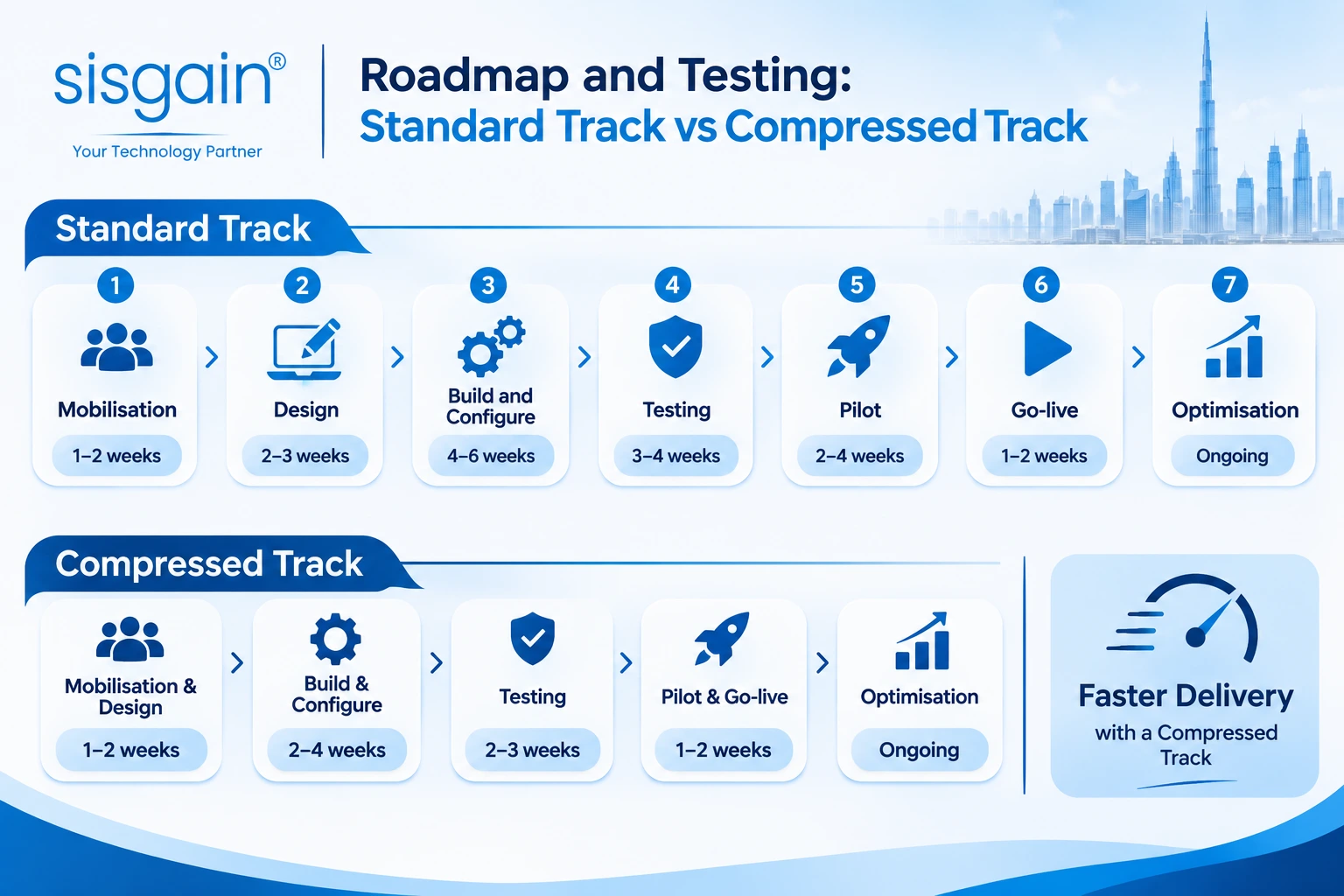
The standard roadmap we use looks like this:
|
Phase |
Duration |
Key activities |
|
1. Mobilisation |
1-2 weeks |
Confirm scope, form the team, shortlist ASPs |
|
2. Design |
2-3 weeks |
Data mapping, architecture, VAT mapping |
|
3. Build and configure |
4-6 weeks |
Configure ERP/POS, build middleware, integrate ASP |
|
4. Testing |
3-4 weeks |
Unit, integration, VAT, regression, UAT, exceptions |
|
5. Pilot |
2-4 weeks |
Selected stores or invoice types |
|
6. Go-live |
1-2 weeks |
Roll out, monitoring, hypercare |
|
7. Optimisation |
Ongoing |
Exception handling, reconciliation, controls |
Add it up and the standard track runs roughly 13 to 21 weeks. That is comfortable for Phase 2 retailers. It is tight for Phase 1.
If you are in Phase 1 with about nine weeks left, run phases in parallel, pilot with a limited set of stores or invoice types, prioritise your highest-volume and highest-risk scenarios, and put daily monitoring in place from the first day. Be honest with leadership about what will be fully automated at go-live and what will run with a manual fallback.
Your testing should cover: mandatory PINT-AE fields and XML structure, VAT scenarios, full retail scenarios, POS-to-ERP-to-middleware-to-ASP flows, failure cases (malformed data, missing buyer information, duplicates, network failures, rejected submissions), user acceptance by finance and store teams, and end-to-end reconciliation.
Top risks and how to reduce them
|
Risk |
What happens |
Mitigation |
|
Incorrect VAT mapping |
Rejections and compliance exposure |
Validate tax codes, rates and tax-point rules before go-live |
|
Poor customer master data |
Missing or invalid buyer details |
Cleanse data and enforce validation at entry |
|
ASP onboarding delays |
Missed deadline |
Select the ASP early and start technical onboarding at once |
|
High transaction volume |
Queue backlog |
Load-test and use asynchronous processing |
|
Returns and credit notes |
Wrong corrections or duplicate documents |
Design linked credit-note workflows and test every return scenario |
If your POS or accounting platform is old enough that these fixes feel like patching a leaking boat, it may be worth reading about modernising legacy systems in Dubai before you invest further.
For smaller retailers (Phase 2)
You have until 31 March 2027 to appoint an ASP and until 1 July 2027 to go live. Use that time well: clean your data now, shortlist ASPs early, and make sure your POS can capture the data you will need. If you are still choosing a system, our guide to choosing a POS system for a small business is a good place to start.
Your next steps
- Confirm which compliance phase your revenue puts you in.
- Select and contract an accredited service provider.
- Finalise the invoice data-mapping workbook and VAT rules.
- Approve the target integration architecture.
- Configure POS/ERP and build the middleware.
- Test end to end with your ASP, then run a controlled pilot.
- Set up monitoring, reconciliation and support before go-live.
Want a head start? Download our UAE Retail E-Invoicing Readiness Checklist [link to be added once the asset is ready] and use it to score your own systems.
Final thoughts
E-invoicing is not a technology purchase. It is a data discipline that touches your stores, your finance team and your systems at the same time. The retailers who do well treat it as a short, focused transformation project: clean the data, connect the systems, test the ugly cases, and watch the dashboards.
If you would like a second pair of eyes on your readiness, the team at SISGAIN Technologies works with retail software development in Dubai clients on exactly this kind of POS, ERP and integration planning. Book a consultation and we will walk through your invoice lifecycle with you.