
Retail chains rarely fail because they can't ring up a sale. They struggle because sales, inventory, pricing, returns, warehouse stock, online orders, and customer data live in five different systems that don't talk to each other. A cashier sees one number. The warehouse sees another. The website shows a third. Nobody's wrong, exactly — the data is just out of sync.
This guide breaks down how modern retail management software connects those workflows, what multi-store retailers actually need from a platform, and how to evaluate one before you sign a contract or start a build.
Quick Answer: What Is Retail POS and Inventory Software?
Retail POS and inventory software is an integrated system that processes in-store transactions while automatically updating stock, product, customer, sales, and order data across every connected location. For a retail chain, that means centralized visibility across stores, warehouses, e-commerce channels, and any other fulfillment point — instead of a spreadsheet someone updates on Friday afternoons.
What This Guide Covers
- How retail POS and inventory software actually works, step by step
- Why chains outgrow basic checkout systems around store two, five, or fifty
- The features that matter for multi-location operations
- POS vs. inventory software vs. ERP vs. retail management software
- Omnichannel order management and industry-specific use cases
- Where AI genuinely helps — and where it doesn't
- Implementation, security, and 2026 UAE compliance considerations
- A 20-question buying checklist and the KPIs that actually measure value
1. What Is Retail POS and Inventory Software?
Retail POS and inventory software combines point-of-sale transaction processing with inventory tracking. It records sales, returns, stock movements, product data, and customer activity, and it's supposed to keep all of that consistent across every store and channel a retailer operates.
Most retail technology stacks split into three layers, and understanding the difference matters before you evaluate anything.
POS software handles checkout: payments, receipts, refunds, discounts, promotions applied at the register, and cashier activity logs. It's the layer customers actually see.
Inventory management software tracks stock on hand, receiving, transfers between locations, adjustments, reorder levels, purchase orders, and stock counts. It answers the question "what do we actually have, and where?"
Retail management software is the broader operational layer that connects POS and inventory with procurement, customer and loyalty data, pricing and promotions, e-commerce, order fulfillment, reporting, and — often — finance and ERP systems. This is the layer that lets a regional manager see sell-through by SKU across 40 stores without pulling data from four separate exports.
Retail chains that treat these as one interchangeable "system" tend to buy tools that solve the wrong problem. A strong POS doesn't fix a broken inventory feed, and a good inventory tool doesn't fix disconnected retail management workflows built around connected operations.
Why Integration Beats Adding More Software
The instinct when something breaks is usually to add a tool. A store manager needs better reporting, so someone buys a dashboard app. Returns are a mess, so a returns-management plugin gets bolted on. Six months later, the chain has more software and less clarity, because none of it shares a data model.
Integration isn't a nice-to-have layered on afterward — it's the actual product. A retail chain doesn't need five specialized tools; it needs one governed flow of data that five specialized tools can read from and write to.
2. Why Retail Chains Outgrow Basic POS Systems
Single-location retailers can survive on a POS system that just processes sales. Chains can't, and the breaking point usually shows up somewhere between store two and store fifty.
Common growth triggers include separate stock records by location, manual inventory reconciliation between stores and the warehouse, delayed visibility when stock moves from warehouse to shelf, inconsistent pricing across outlets, promotion conflicts between head office and local managers, spreadsheet-driven replenishment, weak SKU-level performance data, painful inter-store transfers, fragmented customer history, and — increasingly — mismatches between what the website says is in stock and what's actually on the shelf.
The Hidden Cost of Disconnected Operations
None of this shows up as one dramatic failure. It shows up as staff time spent reconciling numbers that should already match, delayed decisions because nobody trusts the report in front of them, stockouts on fast-moving SKUs sitting next to overstock on slow ones, dead stock quietly eating margin, and a customer experience that varies depending on which store someone walks into.
Returns Are an Inventory Problem First
Retailers tend to file returns under "customer service," but a return touches almost every other system in the business. It affects available stock, determines whether an item goes back to resalable inventory or gets flagged as damaged, updates customer purchase history, and — if it originated online — has to reconcile against an omnichannel order.
The scale of this is bigger than most people assume. U.S. retailers expected to process $849.9 billion in returned merchandise in 2025, about 15.8% of total sales — down slightly from 16.9% in 2024, according to the National Retail Federation's 2025 Retail Returns Landscape report. Online orders return at a much higher rate: NRF put e-commerce returns at roughly 19.3% of online sales, more than double the in-store rate. For a retail chain running both channels, that gap alone is a reason inventory and returns can't be managed as separate workflows.
3. How POS and Inventory Software Work Together
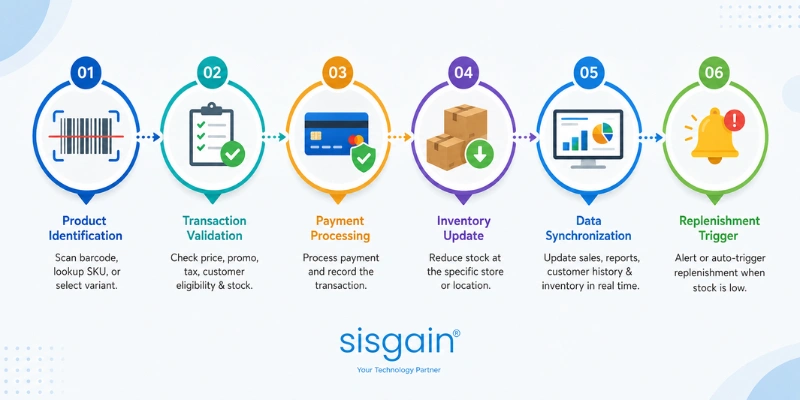
What Happens After Someone Buys a Product?
- Product identification. Barcode scan, SKU lookup, or variant selection identifies exactly what's being sold.
- Transaction validation. The POS checks price, applicable promotion, tax, customer eligibility, and — critically — available stock before the sale completes.
- Payment processing. The transaction runs against the chosen payment method and gets recorded.
- Inventory update. Stock decreases at the specific store or fulfillment location that sold the item.
- Data synchronization. The transaction should update sales reporting, customer history, store performance metrics, inventory availability elsewhere in the network, and any financial integrations — all close to real time.
- Replenishment trigger. Once stock crosses a defined threshold, the system generates an alert, a recommendation, or an automatic procurement workflow.
Quick Answer: How Does POS Software Update Inventory?
POS software updates inventory by linking every completed sale, return, cancellation, adjustment, or fulfillment event to a specific SKU and location. The catch is that accuracy depends on all of those event types following the same synchronization rules — not just sales. A system that updates stock on checkout but handles returns through a separate manual process will drift out of accuracy within weeks.
4. What Data Actually Needs to Synchronize?
Real-time inventory is only useful if the right events feed into it.
|
Data Type |
Why It Has to Synchronize |
|
Product master data |
Keeps SKUs and product details consistent everywhere |
|
Prices |
Stops one outlet from charging a different price than the website |
|
Promotions |
Makes sure offers apply the way head office intended |
|
Sales |
Drives current reporting and stock deduction |
|
Returns |
Restores or correctly reallocates inventory |
|
Transfers |
Tracks stock that's in transit, not lost |
|
Goods receiving |
Updates what's actually available to sell |
|
Adjustments |
Keeps counts accurate after shrinkage, damage, or correction |
|
E-commerce orders |
Prevents overselling stock that's already spoken for |
|
Customer records |
Supports consistent service and loyalty across channels |
|
Purchase orders |
Connects what's ordered with what's expected on shelves |
Master Data Governance: The Part Software Can't Fix
No platform automatically cleans up bad product data. SKU naming standards, a clear product hierarchy, consistent units of measure, variant structures, location codes, supplier records, and clear ownership of pricing decisions all have to exist before software can enforce them. This is the unglamorous work that determines whether a new system actually works or just digitizes the same chaos faster.
5. Essential Features for Multi-Store Retailers
Fast checkout and payment. Barcode scanning, product lookup, split payments, digital receipts, discounts, refunds, and — this matters more than vendors admit — the ability to keep processing sales when the internet drops.
Centralized multi-location inventory. Store-level stock, warehouse inventory, in-transit stock, and online availability, all visible from one place down to the SKU. This is where multi-location retail operations start to need custom logic rather than an off-the-shelf template.
Low-stock alerts and reorder rules. Minimum and maximum thresholds, safety stock, supplier lead times, and purchase recommendations that account for how fast a specific SKU actually moves at a specific location.
Multi-store management. Central catalog control, location-level permissions, price books, store-specific promotions, and regional reporting that rolls up without manual consolidation.
Omnichannel order management. Click-and-collect, ship-from-store, endless-aisle ordering, in-store returns for online purchases, and one unified order status regardless of channel.
Customer and loyalty management. Purchase history, loyalty points, member pricing, vouchers, and segmentation that follow the customer across every store and channel — the kind of unified profile that lives in centralized customer profiles and loyalty workflows.
Procurement and supplier management. Purchase orders, supplier records, goods receiving, lead time tracking, and invoice matching, ideally tied into the broader retail procurement and finance workflows.
Analytics and dashboards. Sales by store, by SKU, by category; sell-through; stock aging; promotion performance; margin analysis — reported in a format a regional manager can actually act on, not a raw export.
Security, permissions, and audit logs. Role-based access and transaction controls that show exactly who did what, when, and from which terminal.
Integration capabilities. Native integrations for common tools, plus open APIs for everything else, ideally supported by dedicated POS software integration services rather than a one-time data dump.
6. POS vs. Inventory Software vs. ERP vs. Retail Management Software
|
System |
Main Purpose |
Typical Users |
Strengths |
Limitations |
|
POS |
Checkout and payments |
Store staff, cashiers |
Fast, purpose-built for transactions |
Limited or no cross-location inventory logic |
|
Inventory software |
Stock tracking and replenishment |
Warehouse, ops managers |
Detailed stock visibility and control |
Often disconnected from sales and finance |
|
ERP |
Finance, procurement, enterprise operations |
Finance, ops leadership |
Deep financial and operational control |
Not built for real-time retail checkout |
|
Retail management software |
Connects POS, inventory, customers, orders |
Retail operations, IT, leadership |
Cross-functional visibility |
Requires solid integration architecture to work well |
When a Retailer Needs More Than a Standalone POS
The signal isn't store count on its own — it's whether decisions are being made on data that's already out of date by the time someone reads it. If a manager is manually cross-checking three reports to answer "can we fulfill this order," that's the moment a broader platform earns its cost.
7. How Multi-Store Retailers Actually Manage Inventory
Centralized inventory doesn't mean one warehouse holds everything — it means every location, warehouse, and channel reports into a single, current view. That view needs to account for store transfers in transit, warehouse replenishment schedules, cycle counts, safety stock per location, and demand that genuinely varies store to store (a coastal location and a mall location rarely sell the same mix, even in the same chain).
Inventory accuracy is less a software feature and more a process discipline: receiving has to be logged correctly, cycle counts have to happen on schedule, adjustments need a reason code and an approver, and returns processing has to feed back into available stock rather than sitting in a queue.
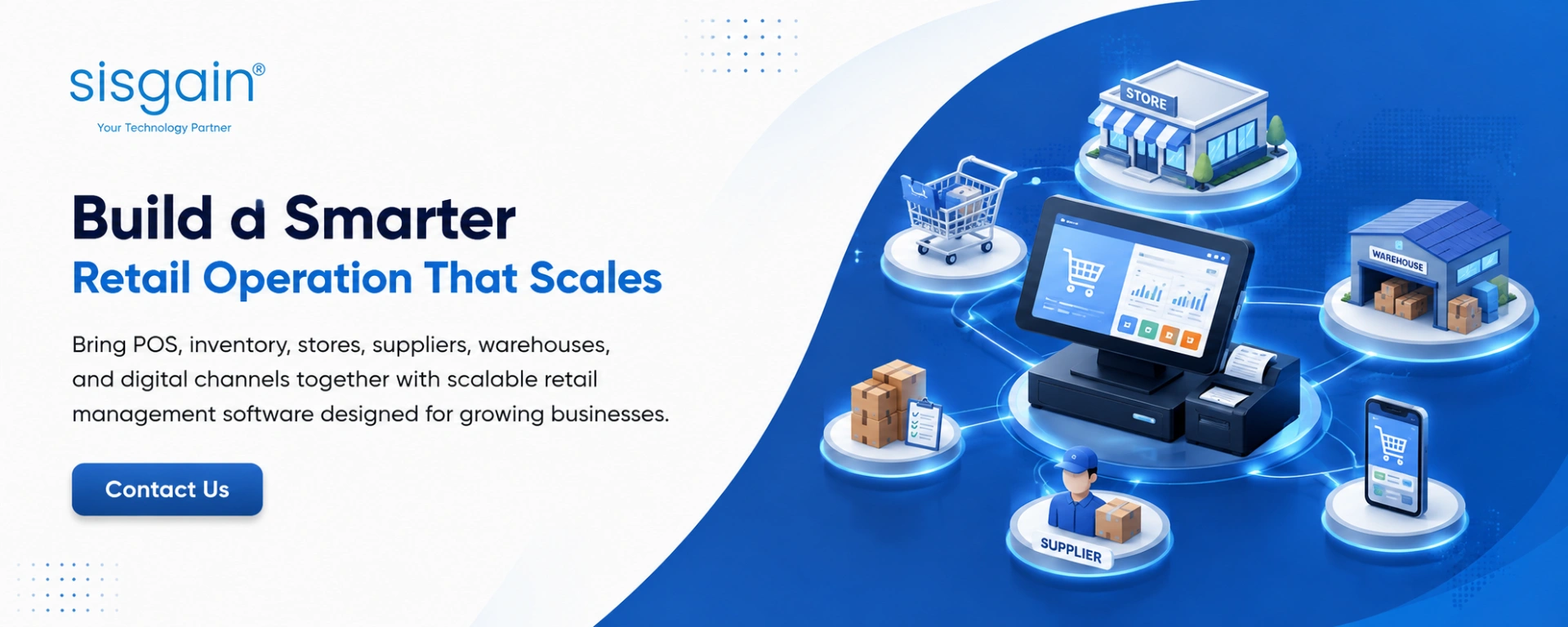
8. Omnichannel Retail: Connecting Stores, E-Commerce, and Fulfillment
Customers don't experience — or care about — a retailer's software architecture. They expect stock information, pricing, and loyalty status to be consistent whether they're in a physical store, on the website, on a mobile app, or ordering through a marketplace.
The common scenarios that break without proper integration: buy online, pick up in store; buy online, return in store; ship from store when the nearest warehouse is out; reserving inventory for a customer; and showing accurate store-level stock online instead of a single blended number. Getting these right usually means automating retail business processes across stores and digital channels rather than handling each scenario as a manual exception.
9. AI-Powered Retail Software: Where It Actually Helps
AI in retail gets oversold constantly, so it's worth being specific about where it earns its place as a decision-support layer rather than a headline feature.
Demand forecasting. AI-assisted models can weigh historical sales, seasonality, store-level demand, product velocity, and promotional effects to produce a forecast that's harder to build manually across dozens of locations.
Intelligent replenishment. AI can generate reorder recommendations, but they still need human review — especially for new products, one-off promotions, or supply disruptions the model hasn't seen before.
Operations automation. This is where AI-powered retail software tends to show real value: flagging inventory anomalies, catching exceptions before they become stockouts, and surfacing alerts that would otherwise get buried in a report nobody opens.
AI agents for operational tasks. AI agents for retail operations can investigate a stock discrepancy across locations, summarize store performance without a manual pull, flag a delayed purchase order, or catch an unusual pattern in return volume — tasks that used to eat an analyst's morning.
None of this works on messy data. AI recommendations should be explainable, auditable, tied to specific permissions, and built on governed data — otherwise a retailer is just automating the guesswork it already had.
10. What Should Actually Be Automated?
Start with repetitive, rules-based work: reorder alerts, purchase approvals within set thresholds, routine price updates, transfer approvals, low-stock notifications, exception reporting, and return routing. This is the core of retail workflow automation done well — it removes the tedious 80% and leaves humans focused on judgment calls.
What shouldn't be fully automated: high-value inventory adjustments, unusual pricing changes, major procurement decisions, and anything with a pattern of frequent exceptions. Automation without a human checkpoint on high-risk actions tends to create bigger problems than the manual process it replaced.
11. Retail Use Cases by Industry
Fashion and apparel — heavy on size-color variants, seasonal inventory turnover, frequent transfers between stores, and a return rate that runs well above the retail average because customers can't try before they buy online.
Grocery and convenience — high transaction volume, perishable stock with expiry pressure, and replenishment that has to happen daily, not weekly.
Electronics — serial number tracking, warranty management, product bundles, and high per-unit value that makes shrinkage a bigger financial risk.
Beauty and cosmetics — loyalty-driven repeat purchases, frequent promotions, and a large SKU count from product variants.
Pharmacy and regulated retail — batch tracking, expiry management, restricted-item workflows, and compliance requirements that most general retail platforms weren't built to handle out of the box.
Home furnishings and specialty retail — large catalogs, complex custom orders, delivery logistics, and long supplier lead times that make demand forecasting harder than a typical retail SKU.
12. Cloud-Based POS Infrastructure
Chains need to think about infrastructure the way they think about store operations: what happens when something fails. That means designing around centralized cloud services, reliable store connectivity, sensible local device architecture, offline operation when connectivity drops, clean data synchronization once it's restored, and a backup and recovery plan that's actually been tested — not just documented. This is the practical core of cloud-based retail POS infrastructure built to scale with store count rather than strain under it.
What Happens When Store Connectivity Fails?
A register that can't process a sale during an outage isn't a minor inconvenience — it's lost revenue and a bad customer experience in the same moment. Offline resilience should be treated as a hard buying requirement, not a bonus feature: transactions need to queue locally and sync cleanly once connectivity returns, without creating duplicate records or stock mismatches.
13. Retail POS Security and Data Protection
Security needs to be designed into retail operations from the start, covering role-based access, audit logs, device security, payment security, API security, encryption, backup, and a documented incident response plan — the foundation of retail POS security that holds up under an actual breach attempt, not just a compliance checklist.
Before signing with a vendor, retail leaders should ask directly: What access controls exist, and can they be customized per role? What gets logged, and for how long? Where is data stored, and does that matter for local regulatory requirements? How often is data backed up, and what's the actual recovery time? And critically — who is responsible for what when something goes wrong?
14. POS Integration: ERP, CRM, E-Commerce, and Beyond
A retail platform is only as connected as its integration architecture. Common integration points include ERP, accounting, CRM, loyalty programs, e-commerce platforms, payment gateways, BI tools, warehousing systems, and marketplaces — each one a potential point of failure if handled with brittle, one-off connections.
The choice between API-first and point-to-point integration matters more than it sounds. Point-to-point connections are fast to build and painful to maintain — every new system means another custom connection, and every change risks breaking something downstream. API-first architecture costs more upfront but scales without multiplying complexity, which is why most chains eventually move toward it through dedicated POS software integration services.
15. Custom Software vs. Off-the-Shelf POS
Off-the-shelf software wins on standardized workflows, faster deployment, and lower initial complexity — a strong fit for retailers whose operations look like most other retailers'.
Custom retail software earns its cost when a chain has genuinely unique workflows, complex integration requirements, franchise-specific rules, specialized inventory models, or scale that off-the-shelf platforms weren't built to handle. Many chains end up with a hybrid: a commercial platform for the standard 80%, paired with custom retail software development for the parts of the operation that actually differentiate the business.
The more useful question isn't "custom or off-the-shelf." It's: which parts of the operating model create real competitive advantage, and which parts are just checkout and inventory that any decent platform already handles?
16. UAE Retail Chains: Localization Requirements
Localization needs to be an architecture decision made before implementation, not a patch applied after launch. For UAE retail chains, that means VAT-ready transactions, correct tax calculations, proper credit note handling, AED currency support, regional payment methods, bilingual interfaces where required, and e-commerce integrations that already account for local tax rules.
UAE E-Invoicing: What's Actually Changing in 2026–2027
The UAE is rolling out mandatory business-to-business e-invoicing in phases, and retail chains above the revenue threshold need to start planning now, not in late 2026. The pilot and voluntary adoption phase opens July 1, 2026. Businesses with annual revenue of AED 50 million or more must appoint an Accredited Service Provider — the deadline was extended in May 2026 from July 31 to October 30, 2026 — with mandatory go-live from January 1, 2027. Smaller businesses have until March 31, 2027 to appoint a provider, with mandatory implementation from July 1, 2027, and government entities following from October 1, 2027. Under the framework, invoices need to be issued as structured, machine-readable XML rather than PDFs or scanned documents, and B2C transactions remain outside the mandate for now, though that scope could expand later.
For a retail chain, this means checking whether a POS or retail management platform can generate the required structured invoice formats, route them through an Accredited Service Provider, and adapt as the FTA issues further technical guidance — rather than treating it as a finance-team problem to solve separately.
Questions to Ask Before Implementation
Can tax workflows be configured to match current UAE requirements without custom development? Can the system generate the records the FTA will expect? Will integrations hold up as compliance rules shift over the next two years? And how, specifically, are returns and credit notes handled under the new structured-invoice model?
17. Product Identification, SKUs, and Barcode Readiness
Reliable retail software starts with reliable product identification — SKU governance, barcode standards, variant structures, bundles, units of measure, and serial numbers where the product category requires them. GS1 barcode standards remain the global reference point for retail product identification, and chains that skip this groundwork tend to discover the gap during their first large-scale stock count, when barcodes don't match records cleanly enough to trust the count.
Barcode readiness affects far more than the checkout line — it determines whether inventory counts, receiving, transfers, returns, and e-commerce listings all point to the same product record or quietly drift into five slightly different versions of it.
18. Buying Checklist: 20 Questions Before You Select a Platform
Scale — How many stores can it realistically support? How many SKUs? How many concurrent users and transactions at peak?
Inventory — Can you see stock by location and status? Does it handle transfers, counts, adjustments, and damaged stock as first-class workflows, not workarounds?
Commercial control — Can pricing and promotions be managed centrally while still allowing local exceptions where needed?
Integration — Which integrations are native? Which require custom API work?
Reliability — Does it support offline operation, and how clean is synchronization once connectivity returns?
Security — What permission structures and audit controls are actually available, not just advertised?
Data ownership — Who owns the data, and how easily can it be exported if the relationship ends?
Implementation — What's included for migration, training, hardware setup, and ongoing support — and what costs extra?
19. Implementing Without Disrupting Operations
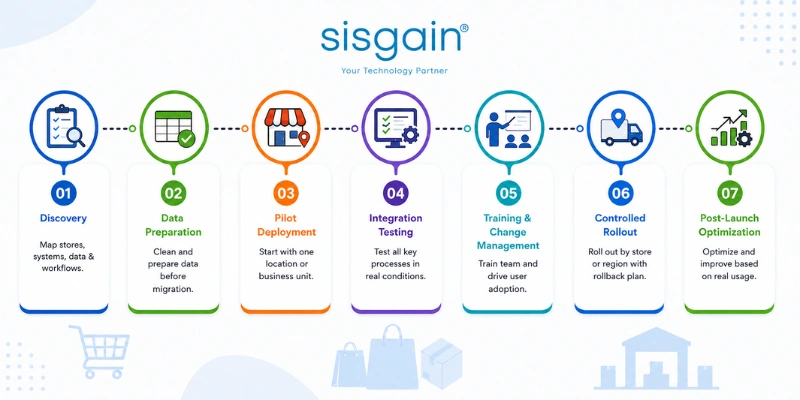
Treat implementation as an operational change program, not a software install.
Discovery — map every store, warehouse, existing system, integration, dataset, and workflow before touching configuration.
Data preparation — clean SKUs, product records, supplier data, customer records, and pricing before migration, not after.
Pilot deployment — start with one controlled location or business unit, not a full rollout on day one.
Integration testing — test sales, returns, transfers, purchase receiving, e-commerce orders, and ERP synchronization under real conditions, not just a demo environment.
Training and change management — the best system fails if store staff route around it.
Controlled rollout — expand store by store or region by region, with a clear rollback plan.
Post-launch optimization — treat go-live as the start of the process, not the finish line, and revisit configuration as real usage surfaces gaps. This kind of phased approach is core to retail software development solutions built for chains rather than single stores.
20. Measuring the Business Value: KPIs That Actually Matter
Skip the generic ROI promises and track what actually moves.
Inventory KPIs — inventory accuracy, stockout rate, overstock value, dead-stock value, stock-turn rate, sell-through rate.
Sales KPIs — sales by store, sales per square foot, sales by category, promotion performance.
Operational KPIs — checkout time, order fulfillment time, return processing time, manual reconciliation hours saved.
Control KPIs — shrink variance, unauthorized adjustments, pricing discrepancies caught before they hit a customer.
AI and automation KPIs — exceptions detected before they became problems, manual tasks eliminated, recommendation acceptance rates, and measurable improvement in forecast accuracy over time.
21. Eight Expensive Mistakes Retail Chains Make When Buying POS Software
- Buying based on checkout features alone and treating inventory as a secondary concern.
- Ignoring integration architecture until it's already causing problems.
- Underestimating how much work data migration actually takes.
- Not stress-testing returns and exchange workflows before go-live.
- Skipping offline operation as a requirement, then discovering the cost during the first outage.
- Customizing heavily without any data governance in place.
- Measuring implementation success only by whether go-live happened on schedule.
- Selecting a platform without asking who owns the data once the contract ends.
Building a Connected Retail Operating System
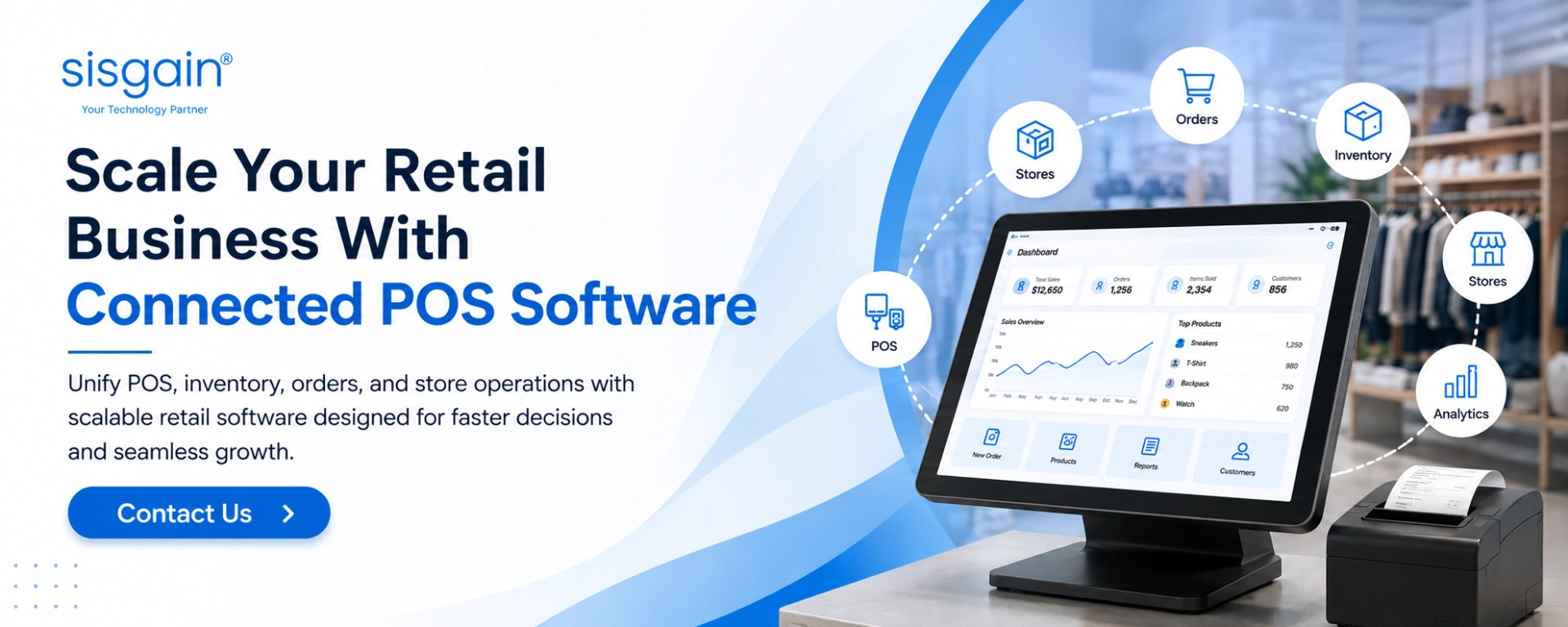
Retail POS and inventory software shouldn't get evaluated as a checkout tool. For a growing chain, the real requirement is a connected operating environment where transactions, stock, stores, customers, suppliers, warehouses, and digital channels all draw from the same reliable, governed data.
The right retail management software architecture depends on store count, product complexity, integration needs, omnichannel strategy, and where the business plans to expand next. Retailers who define those requirements clearly before picking technology tend to avoid the worst implementation risks — and end up with systems that actually scale alongside the business, instead of becoming the next thing to replace in three years.
Need to Map Your Retail Technology Workflows?
If your stores, warehouse, e-commerce platform, ERP, and customer systems are running as disconnected workflows, start with an operational assessment before selecting or building new software.
Request a Retail Software Consultation
Build Retail Software Around the Way Your Chain Actually Operates
From multi-store POS and inventory management to ERP integration, workflow automation, AI capabilities, and omnichannel operations, SISGAIN helps retailers design connected technology ecosystems around how they actually run — not how a generic platform assumes they should.