
Quick Answer: What Is a School LMS?
A learning management system (LMS) for schools is a digital platform that helps teachers create and deliver lessons, manage assessments, track student progress, communicate with parents, and give administrators actionable learning insights.
Introduction
A school LMS in 2026 needs to do far more than host online lessons and quizzes. The strongest platforms connect teachers, students, parents and administrators in one environment. They support blended learning, data-driven intervention, accessibility and secure integration with existing school systems.
That is why choosing the right LMS features matters so much. A long feature list can look impressive in a demo and still fail in the classroom. The best LMS features are the ones that fit how your school actually teaches, communicates and reports.
This guide breaks down the LMS features every school team needs, organised by feature category and by school role. It also covers advanced capabilities, UAE-specific considerations, a prioritisation framework and the mistakes to avoid.
What Is an LMS for Schools?
An LMS for schools is software used to plan, deliver, manage and track learning. Teachers publish lessons, create assignments, run quizzes, grade work and give feedback. Students access coursework and see their progress. Parents stay informed. Leaders monitor performance across classes and campuses.
If you want the full definition, benefits and a deeper look at core modules, read our Learning Management System pillar guide. Here, we focus on what to look for when you are evaluating or upgrading a platform.
Modern platforms support hybrid and asynchronous learning, live instruction, analytics and student information system (SIS) connectivity. That is the standard school teams should now expect.
Core LMS Features Every School Needs in 2026
The best LMS features for schools in 2026 include course and content management, assessments and auto-grading, gradebooks, attendance tracking, learning analytics, parent and student portals, mobile access, communication tools, SIS integration, and strong data security.
The table below summarises these school LMS features, what each should do, and who benefits most.
|
LMS Feature |
What It Should Do |
Primary Beneficiary |
|
Course and content management |
Create, upload, reuse and organise lessons, videos, PDFs, quizzes and external resources |
Teachers |
|
Assessment engine |
Support quizzes, assignments, rubrics, auto-grading, question banks and feedback |
Teachers and students |
|
Gradebook |
Consolidate scores, track mastery and sync with school records |
Teachers and academic leaders |
|
Attendance and participation tracking |
Monitor attendance, engagement, completion and overdue work |
Administrators and teachers |
|
Student and parent portals |
Give role-based access to lessons, grades, progress, announcements and communication |
Parents and students |
|
Reporting and analytics |
Identify learning gaps, at-risk students, content performance and curriculum pacing |
Academic leaders |
|
Communication tools |
Provide announcements, messaging, discussion forums and notifications |
Entire school community |
|
Mobile access |
Offer responsive web access or a dedicated app for learning anywhere |
Students, parents, teachers |
|
Integrations |
Connect with SIS, HR/ERP, video conferencing, payment and third-party content tools |
IT teams |
|
Security and access control |
Protect student data through roles, permissions, authentication, backups and audit trails |
IT and leadership |
Let us look at each one in more detail.
Course and Content Management
This is the foundation. Teachers need to build lessons quickly, reuse them across terms and sections, and organise videos, documents and quizzes in a logical structure.
Why it matters: if building a course takes too long, teachers stop using the platform. Look for drag-and-drop builders, lesson templates and a shared content library.
Assessment Engine
A strong assessment module goes well beyond simple quizzes. It should include auto-graded tests, assignment submissions, rubric-based grading, question banks and structured feedback.
Why it matters: assessment is where teacher time is won or lost. Auto-grading frees hours each week, while rubrics keep marking consistent across a department.
Gradebook
The gradebook consolidates scores from every assessment and tracks mastery over time. It should sync with official school records so teachers never enter the same marks twice.
Who benefits most: teachers and academic leaders who need a reliable view of student performance.
Attendance and Participation Tracking
Attendance is only part of the picture. Good platforms also track engagement, lesson completion and overdue work, which helps teachers spot problems early.
Who benefits most: administrators and teachers monitoring day-to-day progress.
Student and Parent Portals
Portals give each user a role-based view. Students see tasks, deadlines and feedback. Parents see attendance, grades, homework and announcements.
Why it matters: transparent progress reporting builds trust with families and reduces routine enquiries to the front office.
Reporting and Analytics
Reports should show more than completion rates. Look for dashboards that reveal learning gaps, at-risk students, underperforming content and whether teaching is keeping pace with the curriculum.
Who benefits most: academic directors and principals making intervention decisions.
Communication Tools
Announcements, messaging, discussion forums and automated notifications keep everyone aligned. Assignment updates and deadline reminders reduce missed work.
Mobile Access
Students and parents expect to use their phones. A responsive web interface is the minimum. A dedicated app adds push notifications, offline access and a smoother experience.
If you are planning a native or cross-platform app, working with an experienced mobile app development company in Dubai helps ensure the app fits local user habits, devices and bilingual needs.
Integrations
An LMS should not be an island. It needs to connect with your SIS, HR and ERP tools, video conferencing, payment systems and third-party content providers.
Who benefits most: IT teams, who avoid duplicate data entry and manual exports.
Security and Access Control
Schools hold sensitive student data. Insist on role-based permissions, strong authentication, regular backups and audit trails that show who accessed or changed what.
Learning Management System Modules by School Role
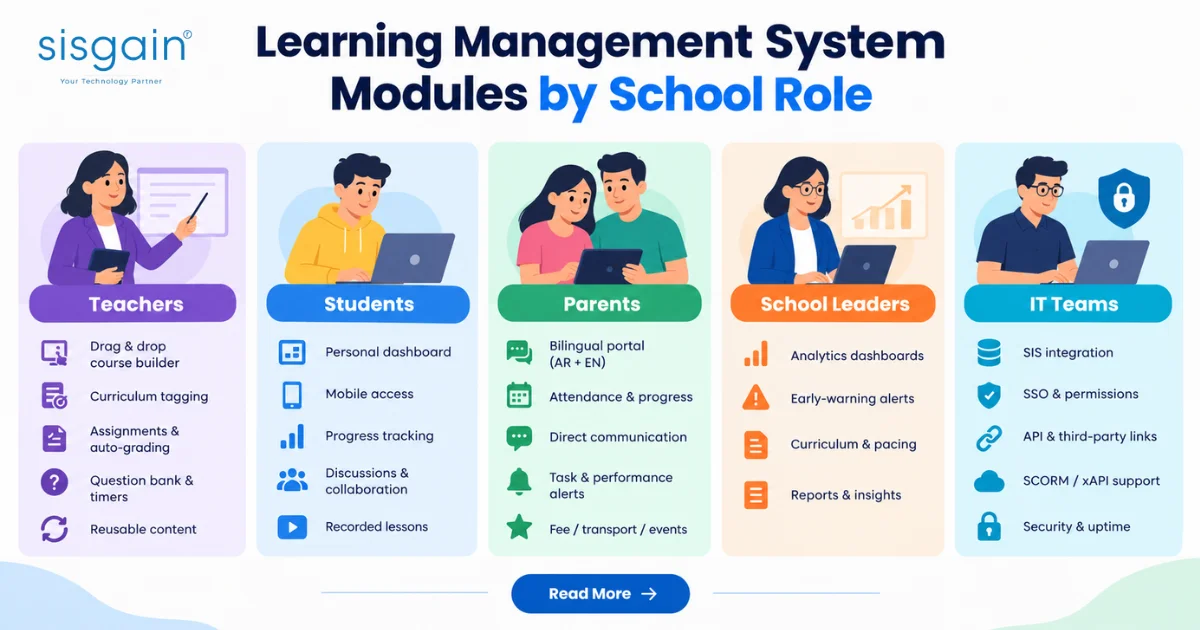
Learning management system modules are the broader functional areas of an LMS, such as assessment, analytics or communication. Each module serves different people in different ways.
Most feature lists are generic. Here is a more useful way to look at them: by the people who will use the platform every day.
LMS Features for Teachers
Teachers need speed and flexibility. Look for:
- A drag-and-drop course builder and lesson templates
- Curriculum tagging and learning-objective mapping
- Assignment creation, rubrics, feedback tools and auto-grading
- Question banks, randomised questions, timers and attempt controls
- Reusable content across terms, sections and classes
A robust quiz engine should support multiple question types, randomised ordering, time limits and attempt restrictions. These controls protect assessment integrity, especially in blended or remote settings.
LMS Features for Students
Students want clarity and convenience. Key capabilities include:
- A personal dashboard with pending tasks and deadlines
- Mobile-friendly access to lessons and assignments
- Progress tracking, feedback, badges and certificates
- Discussion forums and collaborative assignments
- Recorded lessons and downloadable resources
Students should be able to reach coursework anytime and anywhere. That flexibility is what makes blended learning practical.
LMS Features for Parents
Parents want to know how their child is doing without chasing teachers. Look for:
- A bilingual parent portal, ideally in Arabic and English
- Attendance, academic progress, homework and assessment updates
- Direct communication with teachers and administrators
- Alerts for missing work, low performance or key announcements
- Optional fee, transport or event information when integrated with the school management system
Bilingual Arabic-English communication and progress tracking are particularly important for UAE schools, where families come from many language backgrounds.
LMS Features for School Leaders
Leaders need visibility across classes, year groups and campuses:
- School-wide and class-level analytics dashboards
- Early-warning indicators for students falling behind
- Curriculum coverage and teacher pacing insights
- Attendance, completion, assessment and engagement reports
- Exportable reports for leadership reviews and inspection preparation
Analytics should show who is falling behind, which content is underperforming, and whether teaching is aligned with pacing guides. A dashboard that only shows logins is not enough.
LMS Features for IT Teams
IT teams are responsible for security, stability and integration:
- SIS integration for student records, enrolment, attendance and grades
- Single sign-on and role-based permissions
- API access and links to HR, finance, video conferencing and content libraries
- SCORM and xAPI support for external e-learning content
- Data privacy, backup, uptime and audit controls
An LMS should either include SIS functionality or integrate cleanly with your existing student records system. SCORM or xAPI support matters when you use third-party e-learning packages.
Schools that want a connected approach across systems often benefit from specialist education IT solutions in Dubai that treat the LMS, SIS and infrastructure as one ecosystem.
Advanced LMS Features That Create a Competitive Advantage
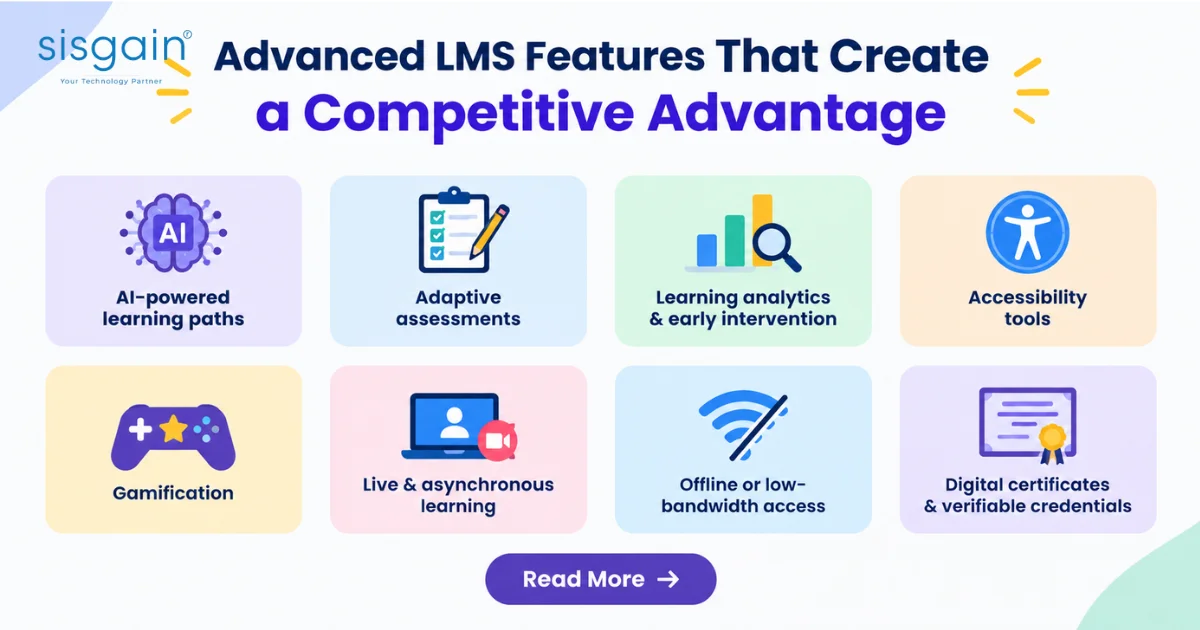
Advanced LMS features are differentiators, not mandatory basics. They add the most value once your core modules are working well.
- AI-powered personalised learning paths: recommend remediation, enrichment or next lessons based on performance.
- Adaptive assessments: adjust difficulty or question order based on how a learner responds.
- Learning analytics and early intervention: flag disengagement, repeated poor performance or missed deadlines.
- Accessibility tools: screen-reader compatibility, captions, keyboard navigation, adjustable text and WCAG-aligned design.
- Gamification: badges, points and milestones, used carefully and age-appropriately.
- Live and asynchronous learning: built-in or integrated video conferencing, recorded sessions and blended workflows.
- Offline or low-bandwidth access: important for students with unreliable connectivity.
- Digital certificates and verifiable credentials: useful for enrichment programmes, staff development and course completion.
AI-supported tools, accessibility, analytics and mobile learning now appear regularly in modern K-12 platforms. The most useful approach is educator-controlled AI, where teachers review and approve recommendations rather than handing decisions to an algorithm.
If you are exploring custom AI features, partnering with an AI development company Dubai can help you design models around your own curriculum and data, instead of relying on generic add-ons.
School LMS Features for UAE and Dubai: What to Consider
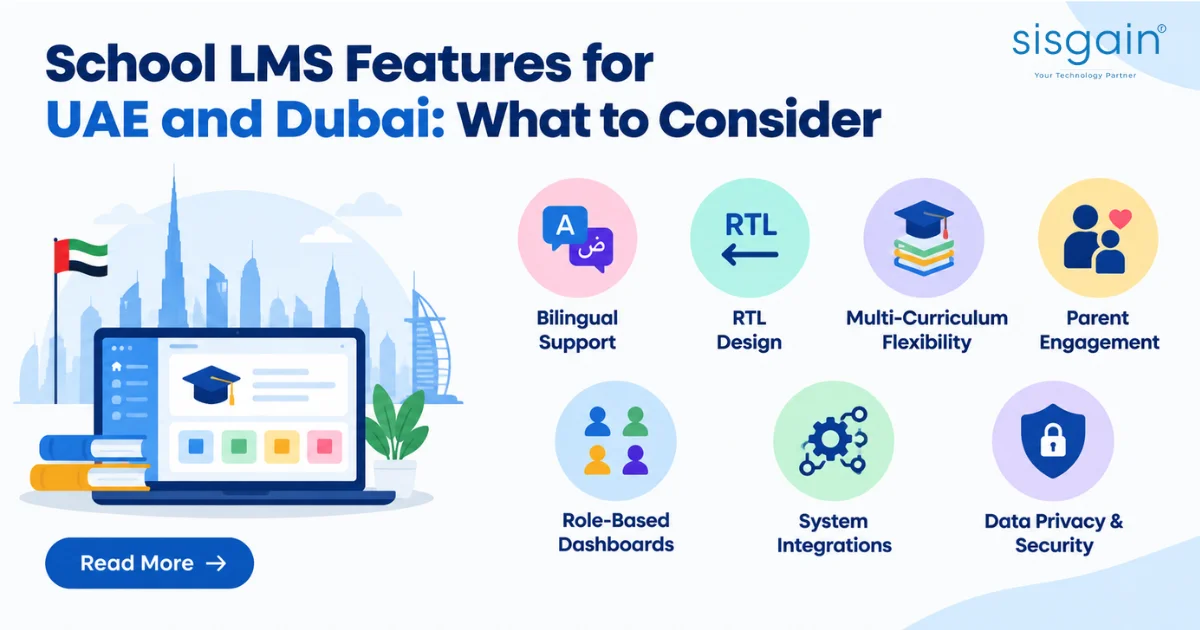
UAE schools should look for Arabic-English bilingual support, RTL design, multi-curriculum flexibility, parent engagement and secure integrations.
This section is not a compliance checklist. Requirements vary by emirate and by school, so always validate them with your education authority and your legal and IT teams.
That said, the following considerations come up repeatedly for school LMS features in the UAE:
- Arabic and English bilingual interface and content support. Both languages should work across the interface, lessons, assessments and communications.
- RTL support. Arabic lessons, assessments and messages should display correctly, not just be translated.
- Role-based dashboards. Teachers, students, parents and administrators each need their own view.
- Multi-curriculum support. UAE schools follow British, American, IB, Indian, Ministry of Education and other frameworks. The LMS should adapt to each.
- Parent engagement and transparent progress reporting.
- Integration with SIS, attendance, finance and school-management systems.
- Data privacy, access controls and reporting readiness for the relevant education authorities.
Education in the UAE is overseen by KHDA in Dubai, ADEK in Abu Dhabi and the federal Ministry of Education, each with its own expectations around reporting and bilingual provision. KHDA, for example, sets expectations for Arabic as a language of instruction in specific subjects. This reinforces why Arabic-first design matters for Dubai schools. Confirm the current requirements directly with your authority before finalising a platform.
How to Prioritise the Best LMS Features
The best LMS features for your school are the ones that match your teaching workflows, then add visibility, integration and local readiness.
Use this five-step framework to prioritise.
- Start with teaching workflows. Course creation, assessment, grading, feedback and content reuse come first.
- Add visibility. Analytics, attendance, progress tracking and early-warning reports help leaders act.
- Connect the ecosystem. SIS, parent portal, communication, video conferencing and third-party tools should work together.
- Check UAE readiness. Confirm Arabic and English support, RTL, mobile access and data governance.
- Evaluate scalability. Look at multi-campus support, role management, performance and future AI capability.
Pre-Shortlist Checklist
Before shortlisting an LMS, confirm that it supports:
- Course creation and content reuse
- Assessments, rubrics and auto-grading
- Gradebook synced with school records
- Attendance and engagement tracking
- Parent and student portals in Arabic and English
- Mobile access (responsive web or app)
- Reporting and early-warning analytics
- SIS and third-party integration
- Role-based security, backups and audit trails
- Accessibility features aligned with WCAG
If a vendor cannot demonstrate these in a live walkthrough using your own scenarios, treat that as a warning sign.
Common LMS Feature Mistakes Schools Make
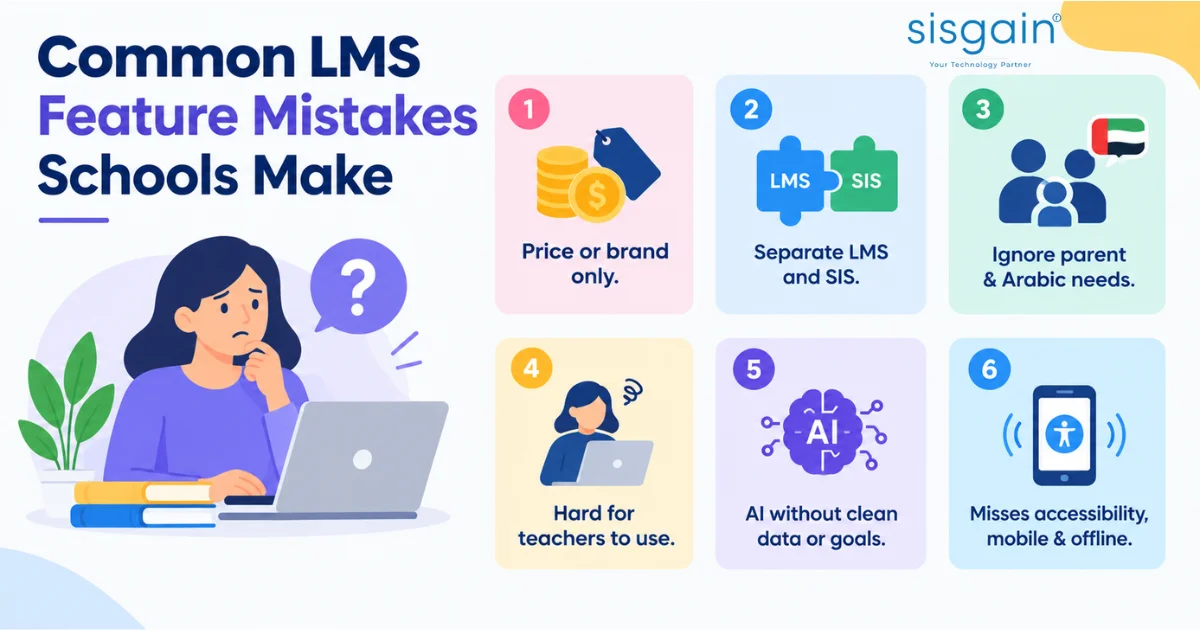
The most common mistake is choosing on price or brand alone, without testing whether teachers will actually use the platform.
Avoid these pitfalls:
- Choosing on price or brand recognition only. Cheap or famous platforms can still be a poor fit for your curriculum and language needs.
- Treating the LMS and SIS as separate systems. Disconnected data creates duplicate work and errors.
- Ignoring parent engagement and Arabic requirements. These are central in the UAE, not optional extras.
- Selecting tools teachers find hard to use. Low adoption wastes the whole investment.
- Buying advanced AI without clean data or clear outcomes. AI needs good data, teacher buy-in and defined goals.
- Overlooking accessibility, mobile experience and offline use. These shape whether every student can learn effectively.
A short pilot with a few classes and real teachers is often the best way to catch these issues before a full rollout.
Conclusion: Choose LMS Features That Serve Your Whole School
The right LMS features turn a platform from a content library into a connected learning operations system. Start with the core modules, add analytics and integrations, and bring in advanced tools like AI only when your foundations are ready. For UAE schools, Arabic-English support and parent engagement should be non-negotiable.
If you want a broader foundation first, our Learning Management System Guide explains definitions, benefits and core modules in depth. You can also explore our related Education cluster article once it is published.
Building or upgrading a school LMS in 2026? Explore how a custom LMS for UAE schools can support your teachers, students, parents and administrators. Talk to our LMS development services team to start the conversation.