
Most enterprise mobile projects don't fail because of the interface. They fail at the point where the app meets the organisation's real systems.
Abu Dhabi enterprises already run complex technology estates: ERP, CRM, HRMS, warehouse management (WMS), document management (DMS), payment platforms, identity providers, analytics tools, legacy databases, government-facing systems and a growing list of third-party APIs. A mobile app only becomes valuable when it gives the right people secure, reliable access to the business processes running on those systems.
That is the real enterprise mobility challenge. It is not putting an existing website on a smartphone. It is building a controlled digital access layer between users and the organisation's underlying business systems.
When CIOs, CTOs and IT directors evaluate enterprise mobile app development in Abu Dhabi, the questions that matter are rarely about screens or animations. They are about:
- Integration reliability: does the app behave predictably when the ERP is slow or a third-party API changes?
- Security and identity: who is accessing what, from which device, and under which permissions?
- Data consistency: does the mobile record match the system of record?
- API governance: who owns, versions and monitors the interfaces?
- Scalability: what happens when usage grows tenfold?
- Offline capability and observability: can the business keep working, and can IT see what's happening?
- Lifecycle management and compliance: who maintains this in three years, and does it meet regulatory obligations?
Abu Dhabi's digital transformation environment raises the stakes. Cloud architecture, cybersecurity, data governance, API management, digital identity, automation and interoperability are strategic priorities across both government and private sector, so a mobile app built in isolation from those priorities quickly becomes a liability.
This guide explains how a technically competent partner should approach enterprise mobile application development in the UAE, and how to evaluate one. If you're at an earlier stage, our overview of mobile application development in Abu Dhabi covers the broader service landscape.
Buyer question box
Before choosing a mobile app development company in Abu Dhabi, ask: Can the vendor demonstrate how the application will securely connect to our existing enterprise systems?
If the answer is a UI portfolio rather than an architecture diagram, keep looking.
What Makes an Enterprise Mobile Application Different?
Enterprise Mobile App vs Consumer Mobile App: What Changes at Scale?
Consumer app development optimises for engagement. Enterprise application engineering optimises for operations, control and continuity. The two disciplines share tools, but the requirements are very different.
|
Area |
Consumer App |
Enterprise Mobile Application |
|
Primary objective |
Engagement |
Business operations |
|
Backend |
Limited services |
Multiple enterprise systems |
|
Authentication |
Basic login / social login |
SSO, MFA, enterprise identity |
|
Authorization |
Basic roles |
RBAC, ABAC, approval hierarchy |
|
Integration |
Few APIs |
ERP, CRM, HRMS, WMS, DMS, payments |
|
Data |
Mostly application data |
Sensitive business data |
|
Availability |
User convenience |
Business continuity |
|
Audit |
Limited |
Detailed audit trails |
|
Offline capability |
Optional |
Often business-critical |
|
Scalability |
Users |
Users + transactions + integrations |
|
Governance |
Product-focused |
Enterprise IT governance |
The enterprise requirement is not "build an app." It is:
Make a business process mobile without exposing core systems, duplicating data, weakening security, or creating an unmanageable integration estate.
Every architectural decision in the rest of this article follows from that sentence.
How Does Enterprise Mobile App Integration With CRM and ERP Systems Work?
This is where most enterprise mobile projects are won or lost, so it deserves the most attention.
The first principle: a mobile application should generally not connect directly to an ERP or CRM database. Direct access exposes sensitive systems, bypasses business rules, creates performance risk and makes every future ERP upgrade a mobile problem too.
The preferred pattern is API-led:
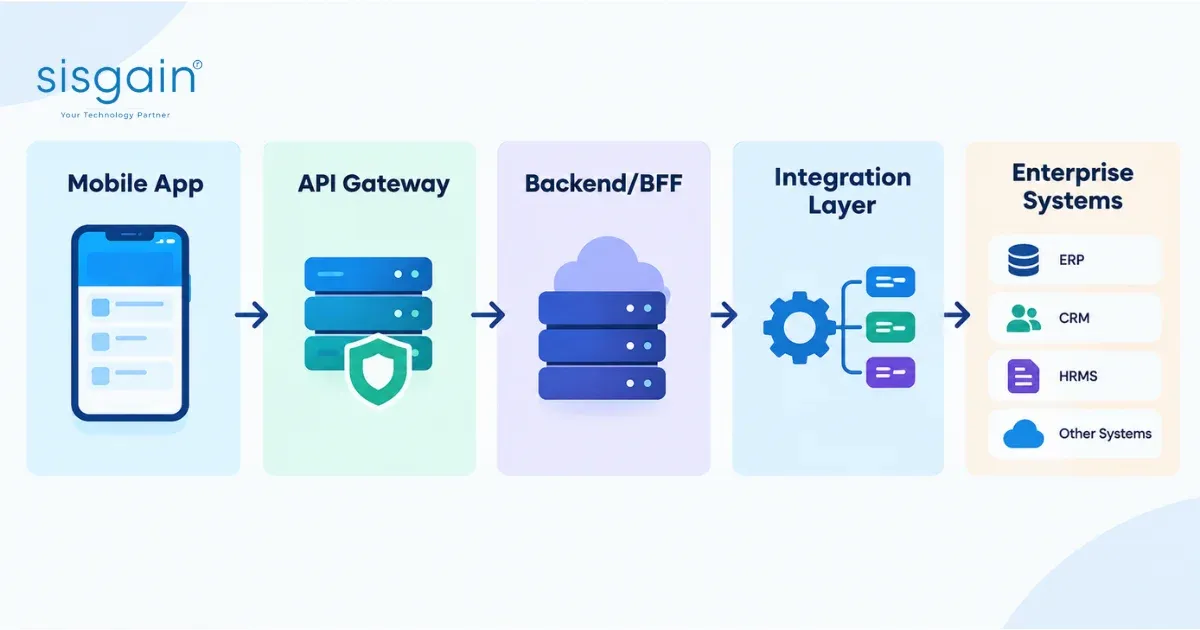
Mobile App → API Gateway → Backend/BFF → Integration Layer → Enterprise Systems
Each layer has a job. The gateway governs and protects. The backend-for-frontend shapes data for mobile. The integration layer translates between modern APIs and the systems behind them. The enterprise systems remain protected behind controlled interfaces. This keeps the mobile app decoupled from the systems of record, so either side can change without breaking the other.
CRM Mobile Integration
Platforms such as Salesforce, Microsoft Dynamics 365, HubSpot or a custom CRM are among the most common integration targets. Typical mobile use cases include:
- Customer profiles and account notes
- Sales opportunities and lead management
- Field visit logging
- Approval requests
- Customer service workflows
The key design question is which data the app needs right now versus what should stay in the CRM. A good integration exposes only what the role requires, in a payload shaped for mobile.
ERP Mobile Integration
ERP integration, whether SAP, Oracle, Microsoft Dynamics, Odoo or a custom ERP, is usually the more sensitive and technically demanding of the two. Common use cases:
- Purchase and invoice approvals
- Inventory visibility
- Procurement workflows
- Order tracking
- Finance workflows
- Supplier management
ERP systems were rarely designed for thousands of mobile requests. A well-designed integration layer protects them with caching, queuing and rate control, so a spike in mobile usage never becomes an ERP performance incident.
HRMS Integration
HR mobility, covering employee information, leave approvals, attendance, workforce management and manager workflows, is high-adoption and high-sensitivity. Employee data is personal data. Access must be tightly scoped, every action auditable, and storage on the device minimised.
WMS and Logistics Integration
Warehouse and logistics apps depend on real-world device capabilities and unreliable connectivity. Typical needs include:
- Barcode scanning
- Stock movements
- Delivery confirmation and proof of delivery
- Route updates
- Warehouse operations
These workflows almost always need offline support and reliable synchronisation, which we cover below.
Document Management Integration
Contracts, invoices, compliance documents, employee documents and digital approvals typically live in a DMS. Mobile access needs secure retrieval, controlled sharing, version awareness and a clear audit trail of who opened or approved what.
Payment Integration
Payment flows demand extra rigour:
- Payment gateway integration
- Tokenisation, so sensitive card data isn't handled by the app
- Transaction status tracking
- Reconciliation with finance systems
- Duplicate transaction prevention, a point we return to under idempotency
Government and Identity Integration
For organisations serving citizens or operating in regulated contexts, identity integration, including UAE PASS where relevant, becomes part of the architecture rather than a bolt-on. More on this in the compliance section.
When Should an Enterprise Mobile App Use Real-Time APIs vs Asynchronous Processing?
Not every operation should make the user wait. Choosing between synchronous and asynchronous integration is one of the most consequential design decisions in the project.
Synchronous (real-time) processing suits operations where the user needs an immediate answer:
- Account validation
- Customer lookup
- Approval status
- Eligibility checks
- Transaction confirmation
Asynchronous processing suits work that is heavy, slow or can safely happen in the background:
- Large document processing
- Report generation
- Bulk synchronisation
- Notifications
- Background jobs
- Large data transfers
Buyer insight: A good architecture prevents users from staring at a loading indicator while an ERP performs a complex backend operation.
The best enterprise apps accept the request, confirm receipt immediately, process in the background and notify the user when it's done. That keeps the experience fast and the ERP protected.
What Does a Scalable Enterprise Mobile App Architecture Look Like?
This is the technical centrepiece. The following reference architecture reflects patterns we'd expect to see in a well-governed enterprise mobility platform.
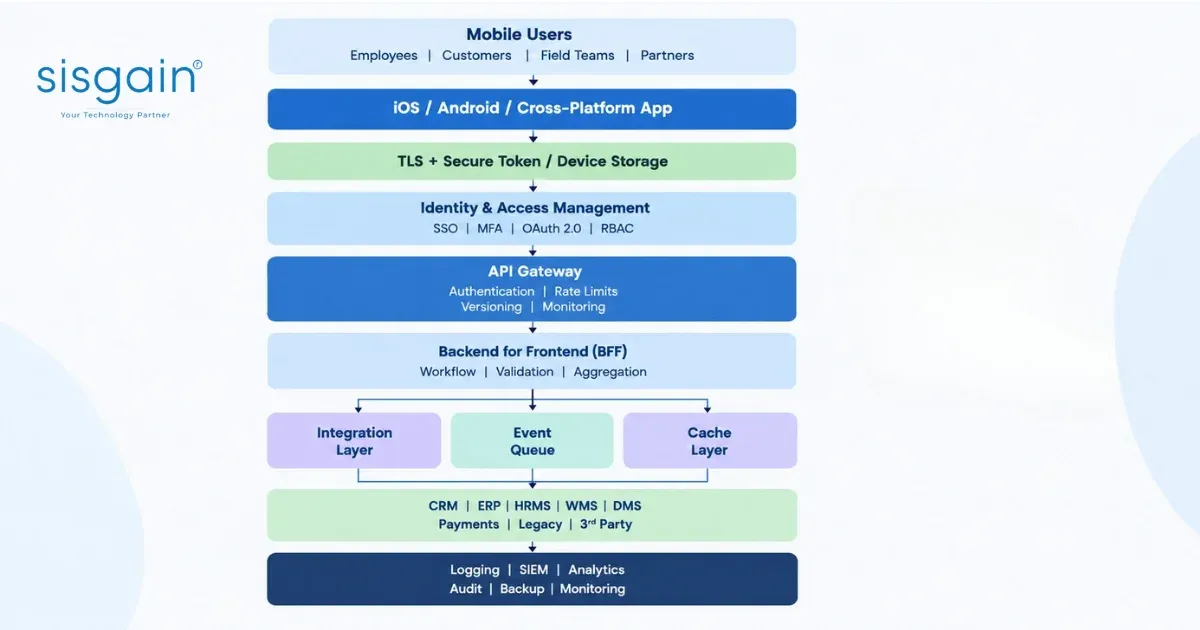
Layer-by-layer explanation
|
Layer |
Purpose |
Business Value |
|
Mobile app |
User interface |
User productivity |
|
Identity |
Authentication |
Controlled access |
|
API gateway |
API governance |
Protects backend systems |
|
BFF |
Mobile-specific backend |
Performance and flexibility |
|
Integration layer |
System connectivity |
Maintainable integrations |
|
Queue |
Background processing |
Resilience |
|
Cache |
Faster data access |
Performance |
|
Monitoring |
Operational visibility |
Faster incident response |
|
Audit |
Activity tracking |
Governance and compliance |
Mobile application layer. The app handles presentation and local interaction: native, cross-platform or PWA depending on requirements. It should hold as little sensitive logic and data as possible.
Identity layer. Authentication and authorisation start here, using SSO, MFA and standards such as OAuth 2.0 and OpenID Connect. Centralising identity means access can be granted and revoked in one place.
API gateway. The front door to your backend. It authenticates requests, enforces rate limits, routes traffic, manages API versions and provides the first layer of monitoring.
Backend-for-Frontend (BFF). A backend purpose-built for the mobile experience. It aggregates data from several systems, applies workflow and validation, and returns exactly what the app needs.
Integration layer. Adapters, middleware or an integration platform that handle the specifics of each enterprise system, such as protocols, data formats and authentication. When an ERP is upgraded, this layer changes, not the app.
Event queue. Messages and background jobs flow through queues so that spikes, slow systems and temporary outages don't cause lost transactions.
Cache layer. Frequently-read, slowly-changing data is served from cache, improving response times and reducing load on core systems.
Monitoring and audit. Logging, SIEM integration, analytics, audit trails and backup give IT and compliance teams visibility into what's happening and a record of who did what.
Build an Enterprise Mobile Application Around Your Existing Systems
Your ERP and CRM should not become the bottleneck to mobile transformation.
SISGAIN helps organisations evaluate and design:
- Enterprise mobile architecture
- CRM and ERP integration
- API architecture and BFF implementation
- RBAC and SSO/MFA
- Secure mobile workflows
- Offline synchronisation
- Third-party integrations
- Scalable backend infrastructure
Why Should Enterprise Mobile Applications Use a Backend-for-Frontend Layer?
The Backend-for-Frontend (BFF) pattern is one of the most valuable and least understood parts of modern mobile architecture.
In plain commercial terms: instead of letting the app talk to every system directly,
- Mobile → ERP
- Mobile → CRM + ERP + HRMS + Payment + DMS
you give it one controlled point of contact:
- Mobile → BFF → controlled enterprise services
The business benefits are tangible:
- Fewer API calls from the device. One request can return what previously took five, which matters on mobile networks.
- Smaller payloads and better performance. Data is trimmed to what the screen needs.
- Centralised business logic. Rules live in one place rather than being duplicated across iOS and Android.
- Controlled data exposure. The app only ever sees what the BFF chooses to return.
- Easier API evolution. Backend systems can change behind the BFF without forcing app updates.
- Reduced coupling. The mobile app isn't tied to the quirks of any single enterprise system.
For organisations running multiple apps (an employee app, a customer app, a partner portal), a BFF per experience keeps each one lean and independently evolvable.
How Should Enterprise Mobile APIs Be Designed for Security and Scalability?
Strong APIs are the contract between your mobile estate and your business systems. Treat them as products, with ownership, documentation and lifecycle management.
Use an API Gateway
A gateway centralises the cross-cutting concerns: authentication, rate limiting, throttling, monitoring, routing and API versioning. Without it, each service reinvents these controls inconsistently.
Version Your APIs
Use explicit versioning, for example /v1/orders, rather than changing existing endpoints without compatibility planning. Mobile apps in the field can't all be updated at once; some users will run older versions for weeks. Versioning lets old and new clients coexist safely.
Use Idempotency
Mobile networks are unreliable, and retries are inevitable. For payments, order creation, approvals and financial transactions, idempotency ensures that repeating the same request produces one result, not two. Without it, a timeout and retry can create duplicate payments or duplicate orders, which is exactly the kind of incident that erodes trust in a platform.
Use Event-Driven Integration
Event-driven patterns suit status changes, notifications, background synchronisation and high-volume workflows. Systems publish events; interested services react. This reduces tight coupling and improves resilience.
Maintain API Documentation
Maintain up-to-date documentation using standards such as OpenAPI. Include authentication requirements, ownership, version history, error codes and rate limits. Undocumented APIs are the root of most long-term integration pain.
Implement Observability
Monitor the signals that tell you the platform is healthy:
- Latency
- API failures
- Integration failures
- Authentication failures
- Transaction volumes
- Service availability
If you can't see it, you can't fix it before users notice.
How Does Role-Based Access Control Secure Enterprise Mobile Applications?
Role-Based Access Control (RBAC) is not simply hiding buttons.
If a restricted feature is only hidden in the interface, anyone able to call the API directly can still reach it. Permissions must be enforced at every level:
- The UI (for user experience)
- The backend
- The API
- The database or data-access layer, where appropriate
The server is always the source of truth. Client-side permissions are a convenience, never a control.
Example role model
|
User |
Allowed |
Restricted |
|
Field Engineer |
Assigned jobs, photos, service status |
Finance |
|
Sales Executive |
Assigned accounts, opportunities |
Unassigned customers |
|
Finance Manager |
Invoices, financial approvals |
HR administration |
|
Regional Director |
Regional reports and approvals |
Unrelated regions |
|
Administrator |
System configuration |
Unrestricted business-data access by default |
Note the last row: administrators should not automatically see all business data. System administration and business-data access are different privileges.
Principle of Least Privilege
Every user should receive only the access required to perform their role, and no more. Beyond basic roles, mature enterprise apps also address:
- Approval limits: who can approve what value
- Segregation of duties: the person who raises a request cannot also approve it
- Step-up authentication: additional verification for high-risk actions
- Privileged access management: tighter controls and monitoring for powerful accounts
Where roles alone aren't expressive enough (for example, "managers can approve invoices under AED X for their own department"), attribute-based access control (ABAC) can complement RBAC.
Security Architecture for Enterprise Mobile Applications in Abu Dhabi
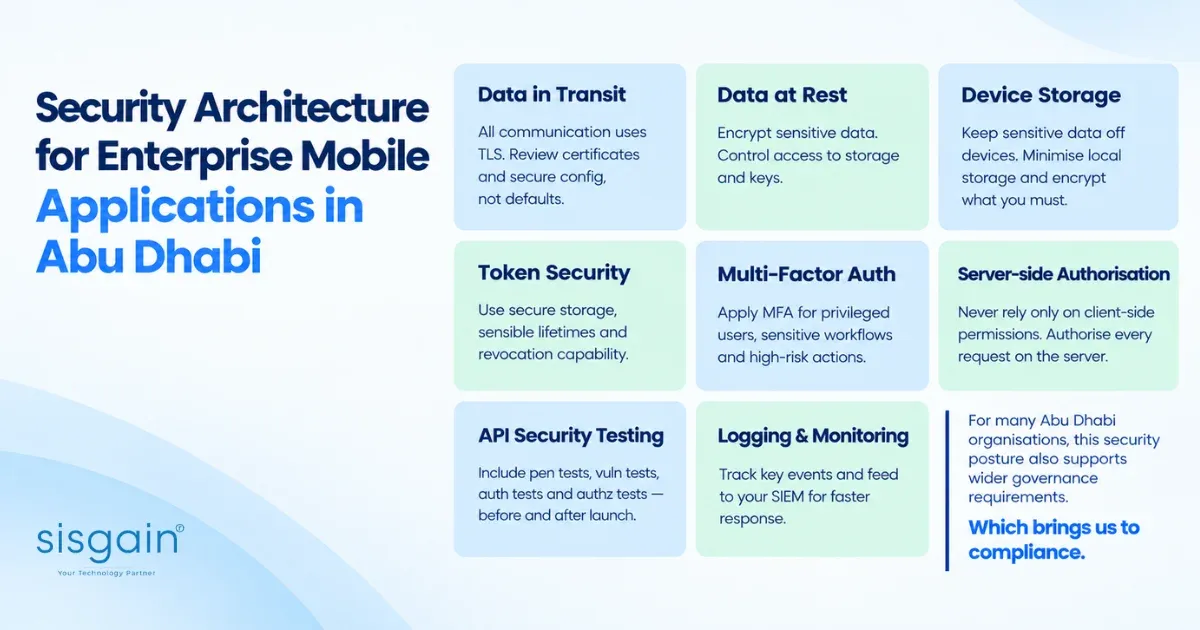
Security cannot be a checklist item added before launch. For enterprise mobile apps, it is part of the architecture. These are the areas a serious design addresses.
Data in transit. All communication uses TLS. Certificate handling and secure communication configuration should be reviewed as part of design, not left to defaults.
Data at rest. Sensitive data is encrypted wherever it is stored, with controlled access to storage and keys.
Device storage. The safest sensitive data is the data that never reaches the device. Minimise what is stored locally, and encrypt what must be.
Token security. Access and refresh tokens need secure storage, sensible lifetimes, and revocation capability when a device is lost or an employee leaves.
Multi-factor authentication. Apply MFA for privileged users, sensitive workflows and elevated-risk actions, rather than creating friction for every login.
Server-side authorisation. Never rely solely on client-side permissions. Every request is authorised on the server.
API security testing. Include penetration testing, vulnerability testing, authentication testing and authorisation testing, both before launch and on an ongoing basis.
Logging and monitoring. Track failed logins, permission changes, sensitive transactions, data exports and unusual API activity. Feed these into your SIEM so security teams can detect and respond to anomalies.
For many Abu Dhabi organisations, this security posture also supports wider governance requirements. Which brings us to compliance.
UAE Compliance and Data Governance Considerations for Enterprise Mobile Apps
Compliance should shape architecture early, but it should be approached responsibly. This section is a high-level orientation, not legal advice; your legal and compliance teams should validate requirements for your specific context.
UAE Personal Data Protection Law (PDPL)
The UAE's federal personal data protection law is a key consideration for any app that processes personal data. Areas to assess include:
- Personal-data processing and lawful basis
- Confidentiality and security controls
- Data-subject rights
- Cross-border data transfers
- Data retention and deletion
These translate into practical architecture decisions: where data is hosted, how long it is kept, how deletion requests are honoured, and what leaves the country.
Sector-specific obligations
PDPL is not the only applicable requirement. Healthcare, financial services, payments, government and other regulated sectors may carry additional obligations from their respective regulators and frameworks. In Abu Dhabi, for example, healthcare organisations typically also need to consider emirate-level healthcare information security requirements, and government-linked entities may be subject to specific information-assurance and data-management policies. Identify the full set early, because they influence hosting, identity, logging and data-sharing design.
UAE PASS Integration
UAE PASS, the national digital identity, may be relevant where the app serves citizens, residents or regulated workflows. Organisations should validate:
- Identity requirements for the use case
- The OAuth flow
- Callback handling
- Mobile integration approach
- Approval and onboarding requirements
- The security architecture around it
Treat UAE PASS as an identity provider within your architecture, not as an isolated login button.
How Do Enterprise Mobile Apps Scale Beyond the Initial Launch?
Scaling s not simply adding servers. A successful enterprise mobile app may need to scale across many dimensions at once: concurrent users, API requests, transactions, data synchronisation, document uploads, notifications, analytics, third-party API calls and even operational support.
|
Growth Scenario |
Architecture Response |
|
More users |
Horizontal scaling and load balancing |
|
More reads |
Caching and query optimisation |
|
More background work |
Queues and workers |
|
Poor connectivity |
Offline-first architecture |
|
ERP performance constraints |
Controlled integration and asynchronous processing |
|
More releases |
CI/CD and automated testing |
|
More integrations |
Standardised APIs and adapters |
|
More analytics |
Dedicated analytics/data architecture |
Scalability should be designed around business events, not simply user numbers. An application with 2,000 users can create more architectural pressure than one with 20,000 users if those users simultaneously submit approvals, synchronise field data, upload documents, or query ERP records.
Think about month-end finance approvals, shift changes in a warehouse, or a field team syncing a day's work at 6 p.m. These peaks, not the average load, determine whether the architecture holds up.
As enterprise mobile applications mature, organisations can extend these platforms with analytics, intelligent automation and AI development solutions for predictive workflows, recommendations, document processing and operational decision support. A solid integration foundation is what makes those extensions practical rather than experimental.
When Does an Enterprise Mobile App Need Offline Capability?
Offline support is often treated as a nice-to-have until the first time a field engineer loses signal mid-job. It matters most for:
- Field service
- Logistics and transportation
- Warehouses
- Construction
- Remote locations
Designing for offline means addressing:
- Encrypted local storage for data held on the device
- Sync queues that hold actions until connectivity returns
- Conflict resolution when two users change the same record
- Timestamps and versioning to establish what changed when
- Retry logic that handles intermittent failures gracefully
- Duplicate prevention so queued actions aren't applied twice
- Eventual consistency expectations that users and systems understand
The key question to ask:
What happens when the employee loses connectivity halfway through a critical workflow?
A serious enterprise architecture answers that before development begins, not after the first support ticket.
Native vs Cross-Platform Enterprise Mobile App Development: Which Should Businesses Choose?
There is no universally better answer, and any vendor claiming otherwise is selling a preference, not a recommendation.
|
Approach |
Best Fit |
Consideration |
|
Native |
Advanced device capabilities, high-performance workflows |
Higher platform-specific effort |
|
Cross-platform |
Enterprise workflows requiring iOS + Android |
Native integrations need evaluation |
|
PWA |
Lightweight employee/customer workflows |
Native capability limitations |
|
Hybrid |
Mixed requirements |
Requires careful architecture |
Platform selection should follow the business requirements, not the other way around. Evaluate:
- Device capabilities (camera, biometrics, Bluetooth, scanners)
- Offline requirements
- Security and identity needs
- Integration requirements
- Performance expectations
- Development lifecycle
- Long-term maintenance cost
Organisations evaluating shared-code mobile delivery can also assess the capabilities of a cross-platform app development company against their device, performance and integration requirements. The right choice often depends less on the framework and more on how well the backend architecture supports it.
Enterprise Mobile Application Use Cases in Abu Dhabi and the UAE
Use cases show where the architecture earns its keep.
Field Service Management
CRM, ERP, DMS and a mobile workforce come together: engineers receive assigned jobs, access service history and documents, capture photos and signatures, record parts used, and update status, often offline, with synchronisation back to the ERP and CRM.
Procurement and Approval
ERP, finance systems, RBAC and workflow combine so managers can approve purchase requests and invoices on the move, within approval limits, with a full audit trail and segregation of duties.
Sales Mobility
CRM, analytics and approval workflows give sales teams customer context, opportunity management and quote approvals in the field, with data visibility scoped to their accounts and territories.
Logistics and Warehouse
WMS integration, barcode scanning and offline sync support stock movements, picking, delivery confirmation and proof of delivery in environments with variable connectivity.
Customer Self-Service
CRM, payments, documents and notifications let customers manage accounts, pay securely, access documents and track requests, with security and idempotency built in for financial actions.
Government and Public Services
Identity, secure APIs and citizen workflows underpin services where trust, availability and compliance are paramount, and where identity integration, including UAE PASS, is often central.
What Should the Enterprise Mobile App Development Process Look Like?
A well-run enterprise mobile project is front-loaded with discovery and architecture. Skipping those steps is the most common cause of cost overruns later.
Step 1: Business workflow discovery. Identify users, workflows, pain points and business objectives. Understand what the business is trying to change, not just what screens are wanted.
Step 2: System integration audit. Map ERP, CRM, HRMS, APIs, legacy systems and third-party platforms. Establish what APIs exist, what's missing, and what needs modernisation.
Step 3: Architecture design. Define the API strategy, BFF, integration layer, authentication, data flow and scalability approach.
Step 4: Security and compliance assessment. Map data types, permissions, retention, compliance obligations and identity requirements.
Step 5: UX and mobile workflow design. Design around actual business workflows rather than reproducing desktop screens on a smaller display.
Step 6: Development. Build the application, APIs, integrations, backend and administration capabilities.
Step 7: Testing. Cover functional, API, integration, security, performance and device testing.
Step 8: Deployment. Plan CI/CD, app store and enterprise distribution, monitoring and rollback.
Step 9: Continuous improvement. Maintain monitoring, analytics, security updates, API changes, OS updates and new integrations. Enterprise mobility is a living platform, not a one-off delivery.
What Determines Enterprise Mobile App Development Cost in Abu Dhabi?
This isn't a detailed pricing guide (for that, see our dedicated resource on mobile app development cost in Abu Dhabi), but it's worth understanding what drives enterprise cost. The main factors are:
- Number of platforms
- UX complexity
- CRM integration
- ERP integration
- Number of APIs
- Authentication requirements
- RBAC complexity
- Offline capability
- Payment integration
- Government integration
- Backend complexity
- Analytics
- Security testing
- Compliance requirements
- Ongoing maintenance
An important distinction: a simple mobile application may be relatively inexpensive. An enterprise mobility platform can become a significant technology investment, because integration and governance often represent more complexity than the mobile interface itself. Quotes that look dramatically cheaper often reflect scope that hasn't been properly discovered, usually the integration work.
How to Choose an Enterprise Mobile App Development Company in Abu Dhabi
When shortlisting a mobile app development company in Abu Dhabi, look past portfolios and pitch decks. Ask questions that reveal engineering depth.
Ask potential vendors:
- Can you integrate with our existing ERP?
- Can you work with our CRM APIs?
- How will you prevent direct mobile-to-database access?
- How will RBAC be implemented?
- How will offline synchronisation work?
- How will API failures be handled?
- How will the architecture scale?
- What monitoring will be available?
- How will sensitive data be protected?
- Who owns the integrations after launch?
- How are API versions managed?
- How are security vulnerabilities remediated?
- How will the application support future ERP upgrades?
- What is the disaster-recovery approach?
- What happens when third-party APIs change?
Buyer red flags. Treat a vendor cautiously if they:
- Focus only on UI screenshots
- Cannot explain their integration architecture
- Propose direct ERP database access
- Cannot explain how RBAC would work
- Have no API governance strategy
- Ignore offline scenarios
- Cannot explain monitoring
- Provide no post-launch architecture plan
A vendor who answers these questions clearly, with diagrams and past examples, is demonstrating the competence you'll depend on after launch.
Enterprise Mobile App Integration Checklist for Abu Dhabi Businesses
Use this as a pre-project readiness check.
Business
- Business workflows identified
- User groups defined
- Approval processes documented
- Critical workflows prioritised
Integration
- CRM identified
- ERP identified
- HRMS identified
- WMS identified
- DMS identified
- Payment systems identified
- Legacy systems mapped
- API availability assessed
Security
- SSO requirement assessed
- MFA requirement assessed
- RBAC designed
- Data encryption defined
- Token management defined
- API security assessed
- Penetration testing planned
Architecture
- API gateway selected
- BFF requirements defined
- Integration architecture documented
- Queue requirements assessed
- Caching strategy defined
- Offline strategy defined
- Disaster recovery planned
Governance
- API ownership assigned
- Data ownership assigned
- Monitoring defined
- Audit requirements defined
- Compliance requirements reviewed
- Maintenance responsibilities defined
15 Questions to Ask Before Starting Enterprise Mobile App Development
Answering these internally, before you approach vendors, will sharpen your brief and your budget.
- Which systems must the application integrate with?
- Are APIs available for those systems?
- Do the APIs require modernisation?
- What data must remain server-side?
- What user roles exist?
- Is SSO required?
- Is UAE PASS required?
- Does the application need offline support?
- Which transactions require real-time processing?
- Which operations can be asynchronous?
- What are peak transaction volumes?
- What security testing is required?
- What compliance requirements apply?
- Who owns the APIs after launch?
- How will the application evolve when enterprise systems change?
Enterprise Mobile App Development Is an Architecture Decision
Across every section of this guide, one idea keeps returning:
The quality of an enterprise mobile application is determined by the architecture around the app, not simply the interface on the device.
Successful enterprise mobility depends on getting the foundations right:
- Secure identity
- Controlled APIs
- CRM and ERP integration
- Backend orchestration
- RBAC
- Data governance
- Scalable infrastructure
- Observability
- Offline capability where necessary
- Long-term integration governance
The interface is what users see. The architecture is what determines whether it works at scale, stays secure and survives the next ERP upgrade.
Planning an enterprise mobile application in Abu Dhabi?
If your organisation needs to connect employees, customers, field teams or partners with existing CRM, ERP, HRMS, WMS, payment or legacy systems, the first step should be an architecture and integration assessment, not simply a development quotation.
Discuss Your Enterprise Mobile App Architecture with SISGAIN