
Short answer: There is no universal winner. Native (Kotlin and Swift) is the stronger choice for high-assurance, hardware-heavy or highly platform-specific apps. Flutter is the stronger choice for workflow-, form- and API-driven enterprise apps that need to ship on iOS and Android quickly. Many Abu Dhabi enterprises end up with a hybrid: a shared Flutter core with narrowly scoped native modules for the sensitive parts.
Choosing between native and cross-platform development is an enterprise architecture and business-risk decision, not a developer preference. It affects security posture, compliance evidence, performance, user experience, time-to-market, maintenance cost and who owns the code in five years.
This guide covers both approaches, compares them on the factors that matter to enterprise buyers, and gives you a checklist to run before you commit.
Native vs Cross-Platform App Development: What's the Difference?
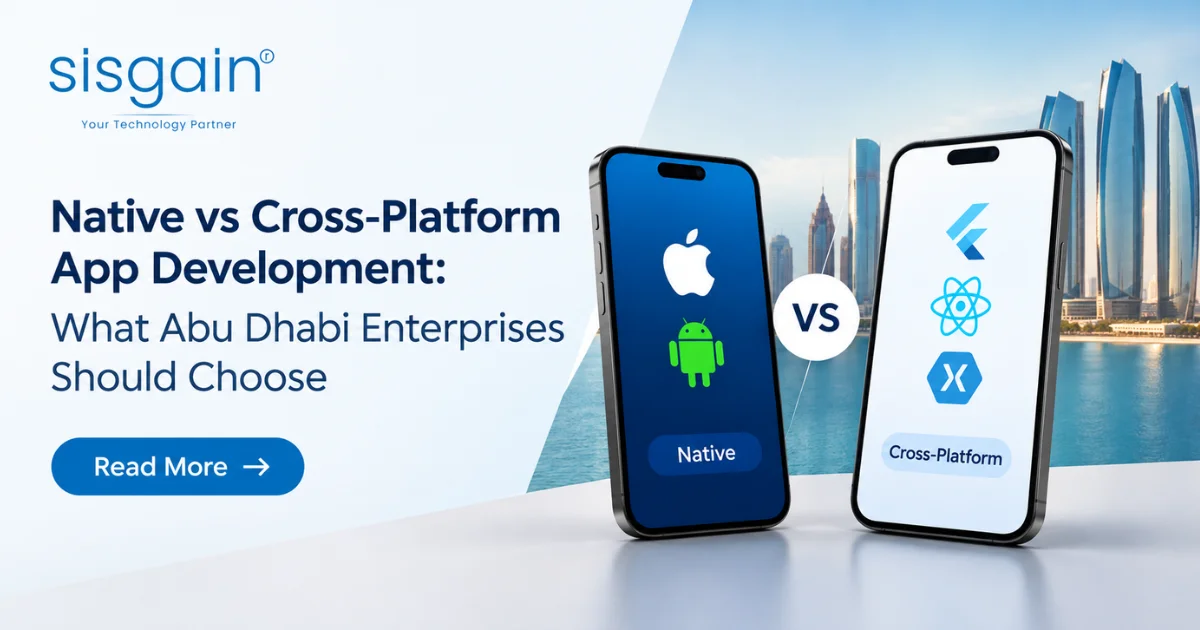
Native development builds separate iOS and Android apps with each platform's own tools. Cross-platform development builds one shared codebase that runs on both. Each approach has a different cost structure, a different risk profile and a different ceiling.
What Is Native App Development?
Native app development means writing one app for Android and another for iOS, each in the platform's own language and framework.
- Android: Kotlin, with Jetpack libraries and Jetpack Compose for UI.
- iOS: Swift, with SwiftUI (and UIKit where needed).
- Direct access to platform APIs and device capabilities, usually on the day Apple or Google releases them.
- Platform-specific UX and optimisation, so each app behaves the way its users expect.
The trade-off is plain. You build, test and maintain two implementations. For apps where platform behaviour is the product, that's worth it. Teams exploring this route can read more about native app development in Abu Dhabi.
What Is Cross-Platform App Development?
Cross-platform development uses a single codebase for both iOS and Android. Flutter, Google's UI toolkit, is the most common enterprise choice, and it's the one this article focuses on.
- Shared codebase for UI and business logic across both platforms.
- Flutter architecture: Dart code, a rendering engine that draws the interface itself, and a plugin system for platform features.
- Native integrations through Kotlin and Swift. When Flutter needs something platform-specific, it calls native code through platform channels.
- Strongest fit: forms, dashboards, workflows and API-driven applications, where most of the work is moving data and showing it clearly.
If you're comparing vendors for this route, see our cross-platform app development services in Dubai.
Native vs Cross-Platform App Development: Enterprise Comparison
Here's the side-by-side view. Treat it as a starting point for discussion, not a scorecard. No row decides the question alone.
| Decision Factor | Native | Cross-Platform / Flutter |
|---|---|---|
| Code reuse | Lower | High |
| Platform access | Direct | Native integrations where required |
| Performance control | Maximum | Strong for most business applications |
| Platform-specific UX | Excellent | Good with adaptation |
| Development speed | Two codebases | Shared codebase |
| Security-sensitive device functions | Strong direct control | Possible with native modules |
| Maintenance | Separate platform implementation | Shared core with native ownership |
| Best fit | Complex/specialised apps | Workflow/API-driven enterprise apps |
Code reuse. Native shares little code between platforms, apart from backend services and any shared logic you design deliberately. Flutter shares most of the UI and domain code, which is where the savings in build and change effort come from.
Platform access. Native code talks to the operating system directly. Flutter reaches platform features through plugins and platform channels. For common features, that's invisible. For unusual ones, someone has to write and own the native bridge.
Performance control. Native gives you the most control over rendering, memory and threading. Flutter performs well for typical business screens, lists and forms. Performance problems tend to appear in graphics-heavy or sustained background workloads, which is why a proof of concept matters (more on that below).
Platform-specific UX. Native apps inherit each platform's conventions automatically. Flutter can match them, but you have to design for it. That's fine for a consistent enterprise design system. It's a real cost if you need each platform to feel distinctly its own.
Development speed. One team and one codebase usually reach both stores faster. Two native teams can work in parallel, but they need coordination so features don't drift apart.
Security-sensitive device functions. Native has the shortest path to secure hardware and OS security features. Flutter can use the same features through native modules, as long as those modules are built and reviewed properly.
Maintenance. Native means two upgrade paths and two sets of platform-specific bugs. Flutter means one shared core, plus the native modules and plugins you depend on. Either way, someone has to own each dependency.
Best fit. Native suits complex or specialised apps. Flutter suits the large middle ground of enterprise software: workflows, approvals, dashboards, service portals and field tools.
Security and Compliance: Is Native More Secure Than Flutter?
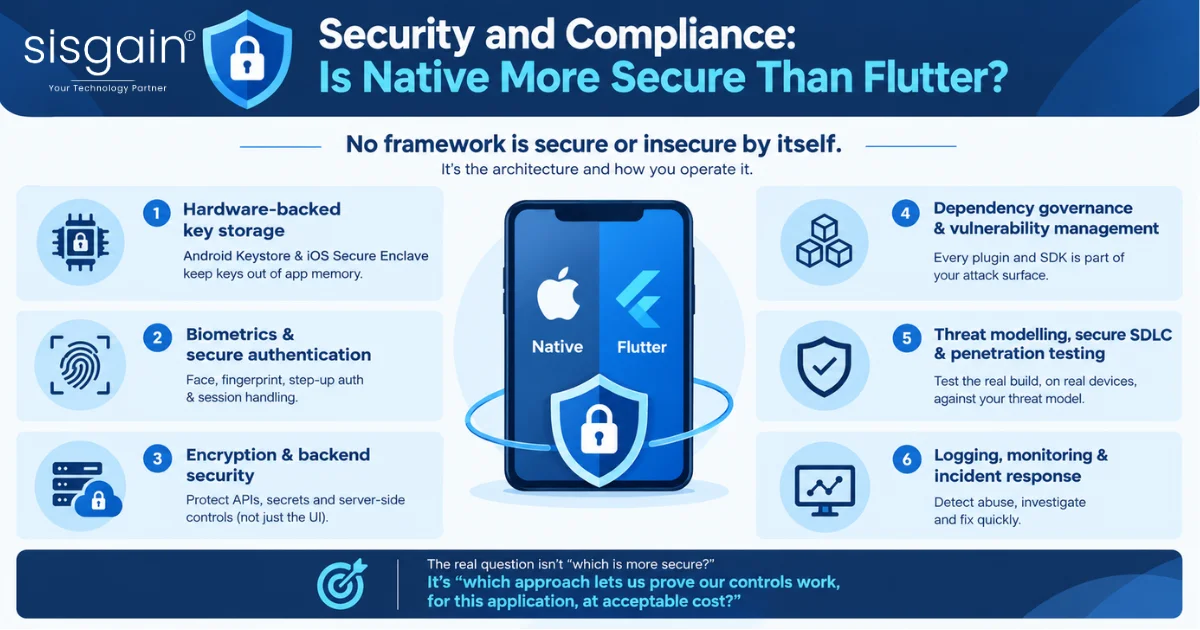
No framework is secure or insecure by itself. Application security comes from the whole architecture and the way you operate it. A well-built Flutter app with proper native security modules can be stronger than a poorly governed native app, and the reverse is also true.
Native does give you the shortest path to platform security features. But reaching those features is only one layer of the picture. These are the layers that decide the outcome:
- Hardware-backed key storage. Android Keystore and the iOS Secure Enclave keep cryptographic keys out of app memory. Both are available to native code directly and to Flutter through native modules.
- Biometrics and secure authentication. Face and fingerprint checks, step-up authentication and session handling need to be designed around your risk model, not just switched on.
- Encryption, secrets management and backend security. Most serious mobile breaches involve weak APIs, leaked secrets or poor server-side controls, not the UI framework. Keep secrets and sensitive logic on the server where you can.
- Dependency governance and vulnerability management. Every plugin and third-party SDK is part of your attack surface. This applies equally to native and Flutter apps.
- Threat modelling, secure SDLC and penetration testing. Test the actual build, on real devices, against a threat model written for your application.
- Logging, monitoring and incident response. You need to detect abuse, investigate it and fix it quickly. A framework can't do that for you.
So the useful question isn't "which is more secure?" It's "which approach lets us prove our controls work, for this application, at acceptable cost?"
Swift, Kotlin vs Flutter for Enterprise Applications
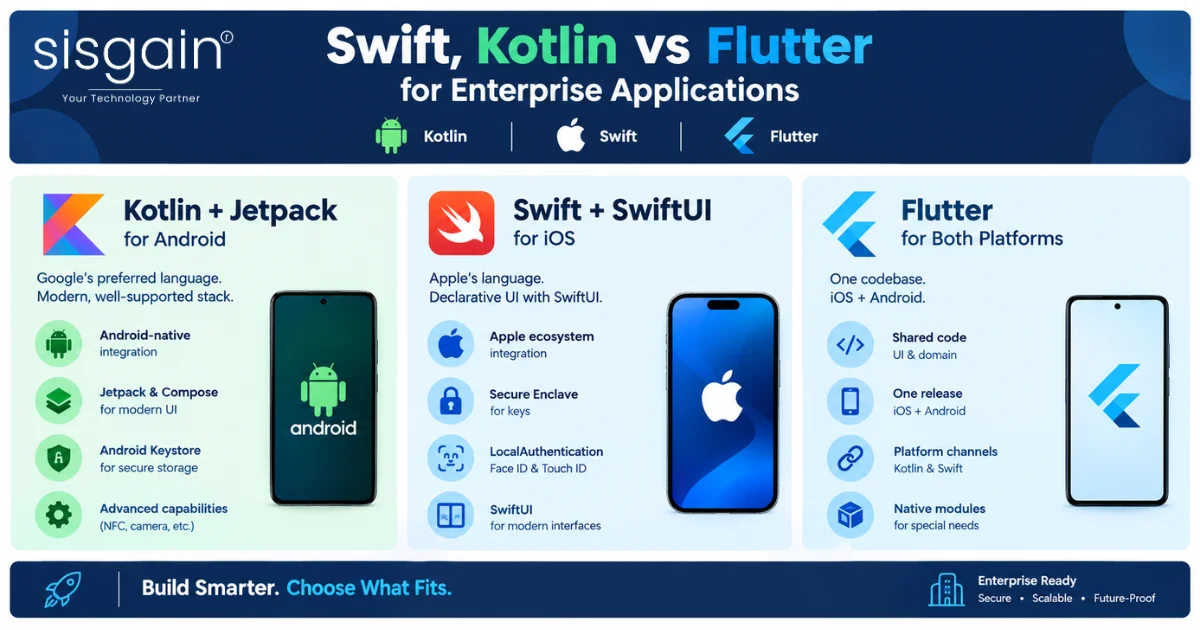
Kotlin and Swift are the native languages for Android and iOS. Flutter is a cross-platform toolkit that uses Dart. Enterprises usually compare the two paths on integration depth, team structure and long-term ownership. For a focused comparison, see our notes on Swift and Kotlin vs Flutter for enterprise.
Kotlin + Jetpack for Enterprise Android Apps
Kotlin is Google's preferred language for Android. Paired with Jetpack libraries and Compose, it gives enterprise teams a modern, well-supported stack.
- Android-native integration with system services, work profiles and device management.
- Jetpack and Compose for maintainable UI and architecture.
- Android Keystore for hardware-backed key storage.
- Platform-specific capabilities such as background services, NFC and advanced camera APIs, available as soon as Android ships them.
Swift + SwiftUI for Enterprise iOS Apps
Swift is Apple's language for iOS. SwiftUI is its declarative UI framework.
- Native Apple ecosystem integration, including Wallet, Keychain and system-level features.
- Secure Enclave for protecting keys in dedicated hardware.
- LocalAuthentication for Face ID and Touch ID flows.
- SwiftUI for consistent, modern interfaces across Apple devices.
Flutter for Enterprise Applications
Flutter lets one team ship to both platforms from a shared codebase.
- Shared UI and domain code, so a workflow change happens once.
- iOS and Android delivery on one release cadence.
- Kotlin and Swift platform channels for anything that needs the operating system directly.
- Hybrid architecture possibilities. Most of the app stays in Flutter while chosen modules stay native.
- Native modules for specialised requirements, such as secure key operations or custom hardware access.
Flutter is also commonly one component of a wider modernisation effort. If your mobile app is part of a larger programme, our digital transformation services in the UAE cover how mobile fits alongside backend, data and process change.
Enterprise App Architecture Decision: Which Approach Fits Your Application?
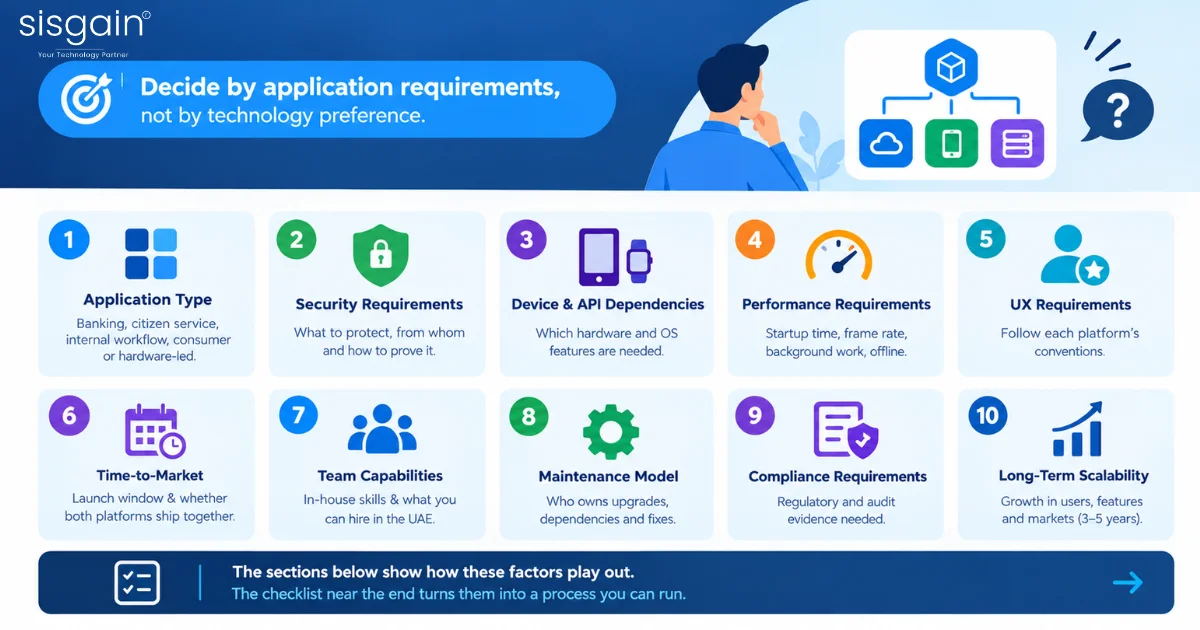
Decide by application requirements, not by technology preference. An enterprise app architecture decision works best when you score the application against ten factors before choosing a stack:
- Application type: banking, citizen service, internal workflow, consumer or hardware-led.
- Security requirements: what must be protected, from whom, and how you'll prove it.
- Device and API dependencies: which hardware and OS features the app needs.
- Performance requirements: startup time, frame rate, background work, offline behaviour.
- UX requirements: how closely the app must follow each platform's conventions.
- Time-to-market: the launch window and whether both platforms must ship together.
- Team capabilities: the skills you have in-house and the skills you can hire in the UAE.
- Maintenance model: who owns upgrades, dependencies and fixes after launch.
- Compliance requirements: the regulatory and audit evidence the application must produce.
- Long-term scalability: growth in users, features and markets over the next three to five years.
The sections below show how these factors play out. The checklist near the end turns them into a process you can run.
When to Choose Native App Development
Choose native when the application depends on deep platform capability, high-assurance security controls or a distinctly platform-specific experience. Consider it seriously if your app requires:
- Highly sensitive transactions
- Advanced cryptographic workflows
- Secure device capabilities
- Complex biometrics
- NFC or other device hardware
- Advanced camera functionality
- AR or graphics-intensive features
- Intensive background processing
- Highly platform-specific UX
- Independent iOS and Android release strategies
The more of these you tick, the stronger the case. One or two can often be handled with a native module inside a hybrid app. Five or six usually mean the whole app should be native.
Native for Banking, Wallets and Payment Applications
Banking, wallet and payment apps carry the highest consequences for failure, so the control and audit trail matter more than build speed.
- Transaction signing: keys held in hardware-backed storage and used only after strong user verification.
- Secure key storage: direct use of Keystore and Secure Enclave.
- Fraud controls: device-integrity signals, behavioural checks and server-side risk scoring.
- Authentication: biometrics and step-up flows tied to the transaction's risk.
- Auditability: clear, reviewable evidence of how each control is implemented on each platform.
A hybrid approach can also work here, if the signing, key and authentication logic stays in reviewed native modules. The point is that the security-critical path is under direct, auditable control.
Native for Advanced Hardware and Graphics
If your product's value sits in the device itself, native usually pays for itself.
- AR: ARKit and ARCore integration, with frame-accurate rendering.
- Camera: custom capture pipelines, real-time processing and document scanning.
- Bluetooth: reliable pairing, background connections and device-specific protocols.
- NFC: card reading, tag interaction and secure element access.
- High-performance graphics: sustained frame rates and tight memory control.
When Should Abu Dhabi Enterprises Choose Flutter?
Choose Flutter when the app is mainly workflows, forms, dashboards and API calls, and when launching on both platforms at once matters. Flutter fits well in these scenarios:
- Citizen-service applications with forms, status tracking and service discovery.
- Internal enterprise applications for approvals, requests and employee services.
- ERP and field-service companion apps that sit in front of existing systems.
- Dashboards that present data from backend services.
- Forms and workflows with validation, uploads and multi-step journeys.
- API-driven applications where the backend does the heavy work.
- Multi-market launches that need the same experience in several countries.
- Consistent design systems applied identically on both platforms.
- Smaller or shared development teams that can't staff two native squads.
Flutter doesn't have to be all-or-nothing. In a hybrid architecture, most of the app is shared Flutter code, while security-sensitive or platform-specific modules stay native. You get one codebase for 80% of the work and native control for the parts that need it. Teams weighing Flutter against other cross-platform frameworks can see how that comparison plays out in our guide to Flutter vs React Native for Abu Dhabi startups.
Native vs Cross-Platform App Development for Abu Dhabi Enterprises
In Abu Dhabi, the right choice depends on the sector, the regulator and the risk profile of the application. When evaluating mobile app development services in Abu Dhabi, enterprises should also consider security requirements, integration complexity, device capabilities and long-term maintenance. Here's how the decision usually looks in four common enterprise settings.
Government and Citizen-Service Applications
Government apps are mostly journeys: find a service, verify identity, fill in a form, submit, and track the outcome. That profile suits Flutter or a hybrid approach well, particularly for mobile app development services in Abu Dhabi that require consistent experiences across iOS and Android.
- Digital government services that need rapid, consistent rollout on both platforms.
- Identity journeys that integrate with national digital identity, where the app orchestrates and the identity provider does the verification.
- Forms with validation, document upload and save-and-resume.
- Service discovery that makes it easy to find the right service in Arabic and English.
- Dashboards for service status and case tracking.
- Accessibility, including screen readers, text scaling and right-to-left layouts. Test these on real devices.
- Security and data governance, including data classification, retention and residency requirements.
Financial Services and Payment Applications
Financial apps operate under tight technology and cyber-risk expectations from their regulators. Your compliance team should confirm the specific requirements that apply to your licence and your data. For mobile app development services in Abu Dhabi, architecture decisions should account for regulatory controls from the beginning rather than treating security as a post-development layer.
- Technology and cyber-risk management aligned to the regulator's expectations.
- MFA with strong, risk-appropriate authentication.
- Encryption in transit and at rest, with sound key management.
- Audit trails that record security-relevant actions reliably.
- Fraud monitoring across the app, the device and the backend.
- Penetration testing before launch and after material changes.
- Incident response with defined owners, timelines and escalation paths.
For the highest-risk functions, native or hybrid with native security modules is the safer default.
Internal Enterprise and Field-Service Applications
Internal apps are where Flutter's economics are usually strongest, especially when enterprises need scalable mobile app development services in Abu Dhabi for operational workflows across multiple teams and devices.
- Workflow-heavy applications such as inspections, approvals and work orders.
- ERP integration through well-defined APIs.
- APIs that keep business rules on the server.
- Offline behaviour so field staff can keep working with patchy connectivity and sync later.
Enterprise Cybersecurity and Governance
Whatever you pick, the mobile app has to fit into a wider security programme. Governance covers who approves releases, how vulnerabilities are handled and how evidence is kept for auditors. If you need outside help building or implementing that programme, a cybersecurity services company in Dubai can help with threat modelling, testing and ongoing monitoring.
Mobile App Development Cost: Native vs Cross-Platform
Neither approach is inherently cheaper. Cross-platform development often lowers build effort through code reuse. But scope, integrations, security and testing frequently outweigh the framework choice. For regional pricing context, see our guide to mobile app development cost in Abu Dhabi in 2026.
What Influences Native App Development Cost?
- Two platform implementations, each with its own design, build and review.
- Specialist iOS and Android resources, who are often hired separately.
- Native integrations that are direct, but still need building and testing.
- Testing on two platforms, across OS versions and devices.
- Maintenance, with two upgrade paths and two sets of platform changes every year.
What Influences Cross-Platform Development Cost?
- Shared codebase, which reduces duplicated effort on UI and business logic.
- Native modules, which add specialist work wherever the app needs platform-level features.
- Plugin and dependency management, including reviewing, updating and replacing packages.
- Testing across devices, because one codebase still runs on many different phones.
- Platform-specific adaptations, where each platform needs its own behaviour.
Why Architecture Alone Does Not Determine App Development Cost
Two apps built with the same framework can differ in cost by an order of magnitude. These are the drivers that do most of the work:
- Scope and the number of screens and user roles
- Features, especially anything novel
- Integrations with legacy systems and third-party services
- Backend complexity
- Security requirements
- Compliance and the evidence it demands
- UI/UX design and research
- Testing, including accessibility and performance
- Post-launch support and the service levels you need
For a broader breakdown that applies beyond one city or framework, read our guide to app development cost in 2026.
How to Choose a Mobile App Development Company in the UAE
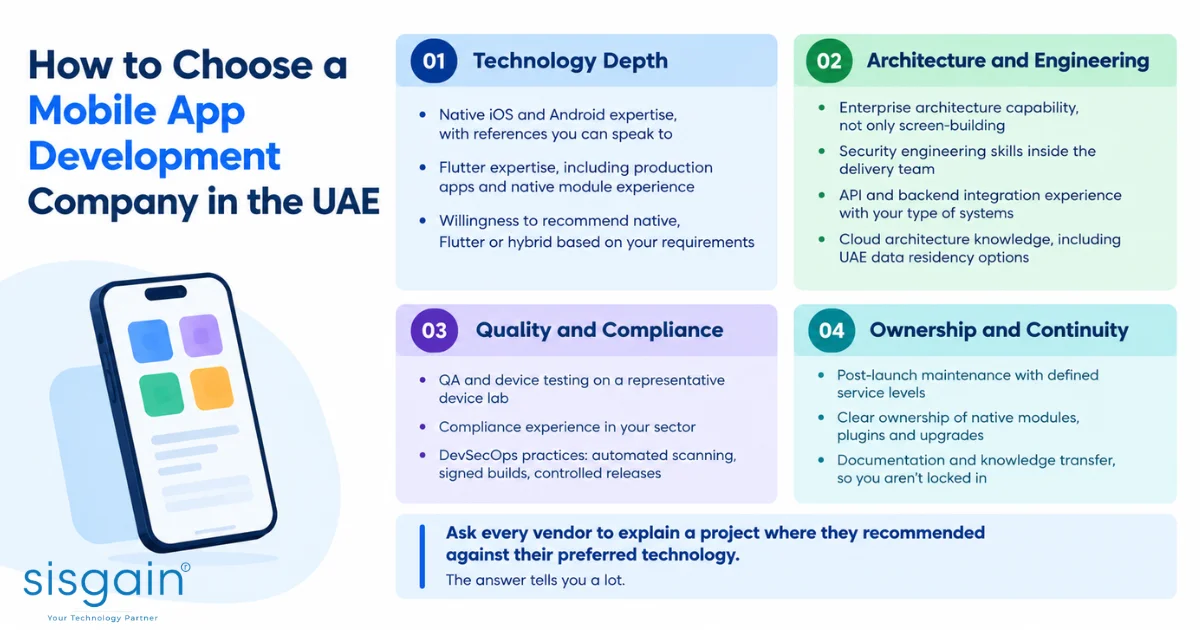
Pick a partner on evidence of capability across the whole delivery lifecycle, not on the framework they prefer. A team that only knows one technology will recommend it for every problem. Use this checklist when you evaluate vendors, and see our guide on how to choose a mobile app development company in the UAE for more.
Technology depth
- Native iOS and Android expertise, with references you can speak to
- Flutter expertise, including production apps and native module experience
- Willingness to recommend native, Flutter or hybrid based on your requirements
Architecture and engineering
- Enterprise architecture capability, not only screen-building
- Security engineering skills inside the delivery team
- API and backend integration experience with your type of systems
- Cloud architecture knowledge, including UAE data residency options
Quality and compliance
- QA and device testing on a representative device lab
- Compliance experience in your sector
- DevSecOps practices: automated scanning, signed builds, controlled releases
Ownership and continuity
- Post-launch maintenance with defined service levels
- Clear ownership of native modules, plugins and upgrades
- Documentation and knowledge transfer, so you aren't locked in
Ask every vendor to explain a project where they recommended against their preferred technology. The answer tells you a lot.
Native, Flutter or Hybrid? Enterprise Decision Matrix
Use this matrix to see where each option is strongest. ✓ means strong fit, △ means possible with extra design or effort.
| Enterprise Requirement | Native | Flutter | Hybrid |
|---|---|---|---|
| Highly specialised device APIs | ✓ | △ | ✓ |
| Shared business workflows | △ | ✓ | ✓ |
| Platform-specific UX | ✓ | △ | ✓ |
| Rapid iOS + Android rollout | △ | ✓ | ✓ |
| High-assurance security modules | ✓ | △ | ✓ |
| Complex graphics/AR | ✓ | △ | ✓ |
| Consistent enterprise design system | △ | ✓ | ✓ |
| Long-term platform flexibility | ✓ | ✓ | ✓ |
The hybrid column scores well because of how it's built. A hybrid app combines shared application code with narrowly scoped native modules where platform capabilities require them. The shared layer carries workflows, screens and business logic. The native layer carries secure key handling, biometrics, NFC or custom camera features.
Hybrid isn't free. You still need native skills, a clear boundary between the two layers, and a named owner for every native module. If that ownership isn't defined, the hybrid app inherits the maintenance cost of both worlds.
If your requirements land in the hybrid column and you want an architecture review before you commit, that's the right moment to talk to an engineering partner.
Enterprise Architecture Decision Checklist
Run these five steps before you choose a stack. Together they turn a technology debate into a decision you can defend to a steering committee or an auditor.
1. Classify the application
Decide which category it falls into, because each carries different defaults:
- Banking or payment
- Government or citizen service
- Internal enterprise workflow
- Consumer application
- Hardware-intensive product
2. Map device dependencies
List every platform feature the app needs, and mark each as standard or specialised:
- Biometrics
- Secure storage
- NFC
- Camera
- Bluetooth
- GPS
- Background execution
- Accessibility
- Push notifications
Standard features are usually fine in Flutter. Specialised ones point towards native modules or a native build.
3. Define security and compliance evidence
Decide up front what proof you'll need to produce:
- Threat model
- Secure SDLC
- SBOM (software bill of materials)
- Dependency review
- Penetration testing
- Encryption
- Logging
- Data retention
- Incident response
4. Run a proof of concept
Build the riskiest part of the app first, in the candidate technology, and measure:
- Startup time
- Frame performance
- Crash rate
- Offline behaviour
- Accessibility
- Security controls
- Representative devices and networks
Use the mid-range and older phones your users actually carry, not only flagship devices on office Wi-Fi.
5. Define ownership
Settle these before launch, not after the first incident:
- Native modules
- Dependencies
- Release approvals
- Vulnerability response
- OS upgrades
- Long-term maintenance
Native vs Cross-Platform App Development: Final Decision
Match the approach to the scenario. Here's where each option usually lands:
| Scenario | Recommended approach |
|---|---|
| Banking, payments, advanced security | Native, or hybrid with native security modules |
| Government workflows | Flutter or hybrid |
| Internal ERP and field-service apps | Flutter |
| AR, advanced camera, hardware | Native |
| Highly differentiated iOS and Android UX | Native |
| Shared enterprise workflows, rapid multi-platform delivery | Flutter |
Compliance deserves one last point. Requirements should be assessed against the complete architecture, implementation and operating model, not simply the mobile framework. A regulator or auditor will ask how you build, test, release and monitor the app. They won't ask which language the UI is written in.
Conclusion
There’s no one-size-fits-all choice between native and cross-platform app development. Abu Dhabi enterprises should choose based on security, device requirements, performance, compliance, scalability and time-to-market. For complex, hardware-intensive or high-security applications, native or hybrid can be the right fit, while Flutter is well suited for workflow-driven enterprise apps that need faster delivery across iOS and Android.
Talk to our mobile app experts to evaluate your requirements and build the right native, Flutter or hybrid solution for your enterprise. Discuss Your App Project