
Quick Answer
An LMS for a K-12 school group is a central platform that turns the approved curriculum into digital units, lessons, assessments and rubrics, delivers them consistently across every campus, and gives leadership live visibility into curriculum coverage and student mastery. In the UAE it must also support Arabic-English delivery, multiple curricula and responsible AI governance.
Introduction
Picture a group academic director in Dubai asking a simple question on a Tuesday morning: “Are all eight campuses teaching Grade 6 fractions the same way this term, and how are students doing?”
In most school groups, nobody can answer that for weeks. Each campus has its own folders, its own lesson plans and its own spreadsheets. The curriculum exists. The visibility doesn’t.
That is the real problem a group LMS solves. The content is rarely missing. What’s missing is one connected system that makes curriculum consistent, learning measurable and decisions faster. If you are weighing this for your group, this guide covers what digitization involves, what the UAE adds to the design, how to choose between build and buy, and how a rollout actually runs. If you plan to build rather than buy, a specialist education software development company in Dubai can map this against your campuses before you commit.
Why multi-campus groups outgrow campus-level tools
A tool that works for one school often breaks at group scale. The cracks show up in predictable places:
|
Area |
What breaks at group scale |
Business impact |
|
Curriculum consistency |
The same curriculum is taught differently across campuses |
Uneven outcomes and a weaker group brand |
|
Content management |
Plans live in PDFs, shared drives, chat groups and personal files |
Duplication, version errors, lost institutional knowledge |
|
Teacher workload |
Planning, grading, reporting and parent updates are manual |
Burnout and less time teaching |
|
Student progress |
Assessment data sits in separate spreadsheets |
Late intervention for struggling students |
|
Parent communication |
Updates arrive through several disconnected channels |
Lower trust and more front-office enquiries |
|
Group reporting |
Leadership sees results weeks after term-end |
Slow corrective action |
Here is a pattern we see often. A coordinator updates a unit plan after a curriculum review and shares it on a drive. Three campuses pick it up. Five keep teaching from last year’s file. Nobody did anything wrong. The system simply had no way to say which version is current.
The cost isn't an inconvenience. It’s that your best curriculum thinking never reliably reaches the classroom, and you can’t prove what did.
What “digitizing the curriculum” actually means
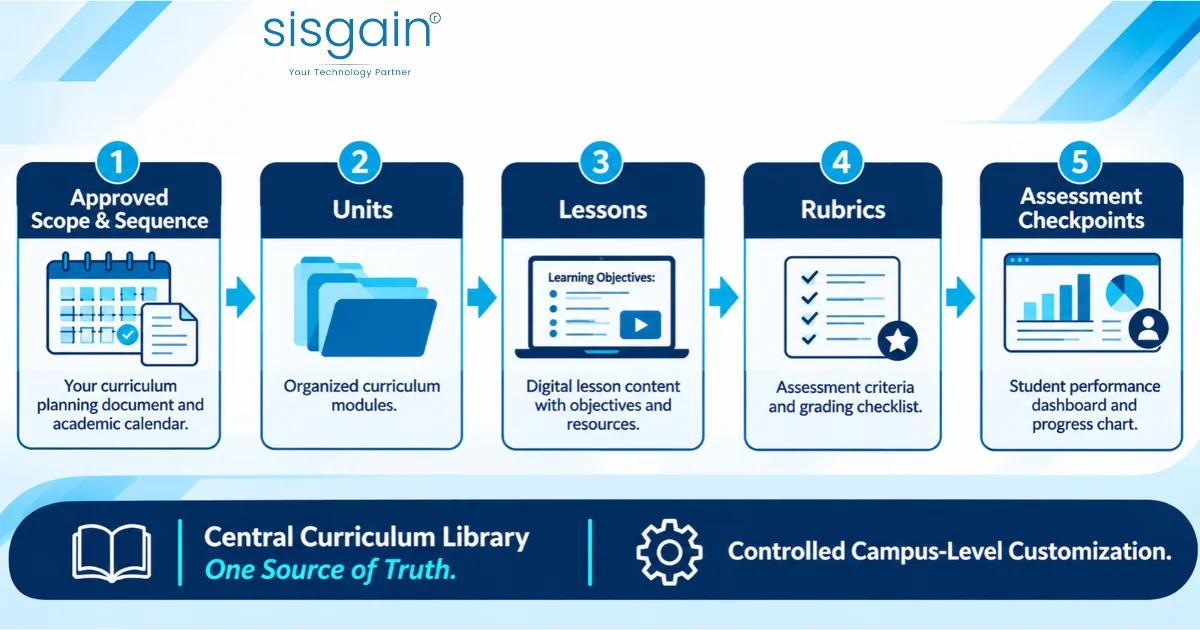
Many groups start by scanning documents into a platform. That gives you a digital filing cabinet, not a curriculum system. Real digitization follows a structure:
- Approved scope and sequence. The academic team defines what is taught, in what order, for each grade and subject.
- Units. Each term’s scope becomes units with clear learning outcomes.
- Lessons. Every lesson carries objectives, essential questions, resources, activities and differentiation strategies.
- Rubrics. Marking criteria are built in, so assessment is consistent across classes and campuses.
- Assessment checkpoints. Formative and summative assessments are tied to specific outcomes, so mastery can be tracked concept by concept.
Two design decisions matter more than any feature. First, a central library owned by the group academic team, so there is one source of truth. Second, controlled campus-level customisation, so a teacher can adapt a lesson for their class without breaking alignment with the approved unit.
If you want the module-level detail of what a school platform should include, our breakdown of LMS features every school team needs goes through each one by role.
A practical use case: one Grade 6 fractions unit across eight campuses
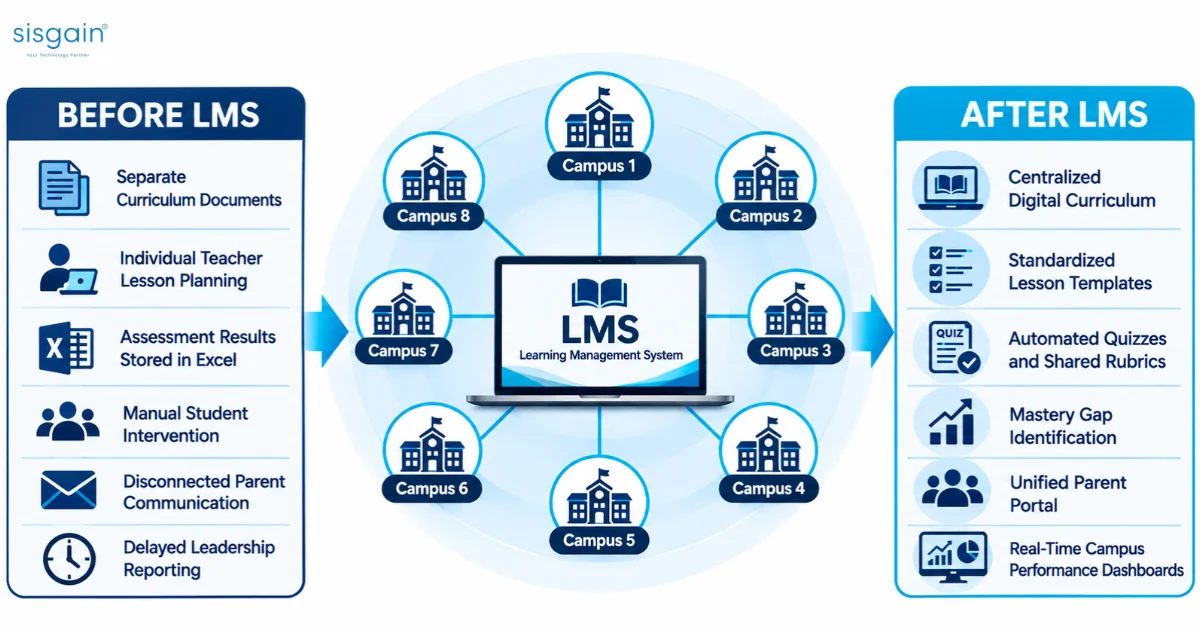
Take a UAE school group with eight campuses offering British, American and Ministry-aligned curricula. Leadership wants every campus following the approved curriculum, teachers working from consistent resources, parents seeing transparent progress, and the group able to compare performance.
|
Key Areas |
Before the LMS |
After the LMS |
|
Curriculum |
Approved documents in shared folders |
Scope and sequence digitized into units and lessons |
|
Lesson planning |
Each teacher builds plans individually |
Teachers adapt pre-approved templates |
|
Assessment |
Results in Excel files |
Auto-scored quizzes and rubric marking recorded in one place |
|
Intervention |
Based on teacher observation |
Mastery gaps flagged by concept, with a tracked support workflow |
|
Parent updates |
Several disconnected channels |
One portal with progress, attendance and homework |
|
Leadership reporting |
Weeks after term-end |
Campus-wise coverage and mastery dashboards |
Now follow a single Grade 6 fractions unit through the system:
- The academic team publishes a lesson sequence aligned to the curriculum outcomes, with a teacher-facing plan and a differentiation guide.
- Students complete practice sets and exit tickets. Quizzes are auto-scored, and the unit project is marked against a shared rubric.
- The platform notices that a group of students is below mastery on equivalent fractions. It suggests remedial activities. The teacher reviews and approves them, then records the outcome.
- Parents see a progress snapshot with attendance, homework status and teacher comments.
- The group director opens a dashboard showing mastery by class and campus, and by learning-support category.
The unit stops being a static document. It becomes something you can measure and improve every term.
The UAE layer: what changes the design
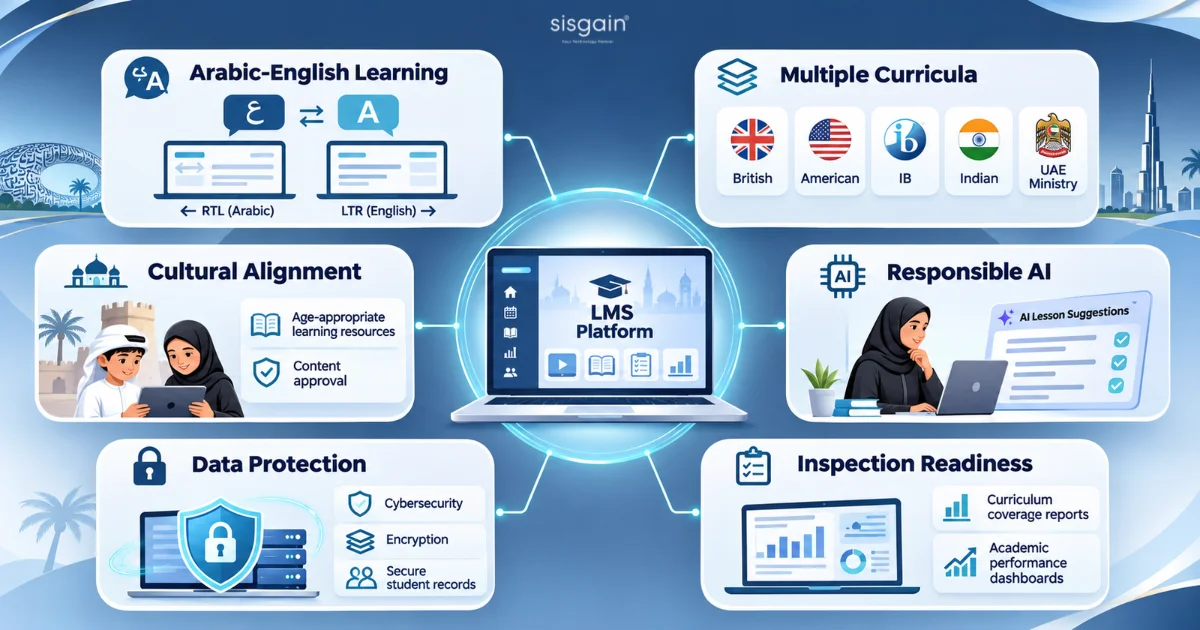
A generic LMS can run lessons. A UAE school group needs more, because education here is shaped by clear expectations on technology, privacy and responsible AI. The UAE is bringing AI literacy into K-12 curricula, and regulators such as ADEK in Abu Dhabi have set expectations for how private schools adopt digital and AI tools. Requirements differ by emirate and by authority, so confirm current rules with ADEK, KHDA and the Ministry of Education before you finalise any design.
These are the capabilities that come up again and again:
|
Requirement |
What the LMS should provide |
|
Arabic-English learning |
Full RTL and LTR support, Arabic content management, bilingual assessments |
|
Multiple curricula |
Support for Ministry, British, American, IB and Indian pathways in one group |
|
Cultural alignment |
Content review workflow, age-appropriate filters, a vetted resource library |
|
Responsible AI |
Teacher-in-the-loop AI, academic integrity controls, transparency logs, grade-based limits on student AI access |
|
Data protection |
Role-based access, encryption, audit logs, consent management |
|
Inspection readiness |
Curriculum coverage reports, assessment analytics, intervention records |
|
Screen-time sensitivity |
Blended design, printable resources, teacher-led workflows |
On AI. The useful version is an assistant that drafts lesson ideas, question banks and differentiated activities while the teacher approves everything. Students should never receive unreviewed AI output as instruction. If you want a structured way to set this up, our 90-day AI governance plan for the UAE shows how to move from policy to practice.
On data. A school group holds sensitive records on minors across many sites. Decisions about hosting, access control and data residency belong in the design phase, not after launch. Working with a provider of cloud security services in Dubai early avoids expensive rework later.
Integration: where group LMS projects succeed or stall
An LMS that doesn’t talk to your other systems creates more work, not less. The usual connection points are:
- Student information system for enrolment, classes, attendance and grades
- Single sign-on, so teachers, students and parents use one login
- Parent communication tools and notifications
- Finance, HR or transport systems where parents expect combined information
The most common failure we see is quiet. A teacher records marks in the LMS, then re-enters them in the SIS because the two don’t sync. Within a term, teachers stop trusting the LMS and go back to spreadsheets. Adoption collapses, and the dashboards leadership paid for show incomplete data.
Solve integration at the start of the project, not the end. Define which system owns each data item, how often it syncs and what happens when records conflict. If your landscape is complex, dedicated software integration services in Dubai can scope this before development begins.
Custom vs off-the-shelf for a school group
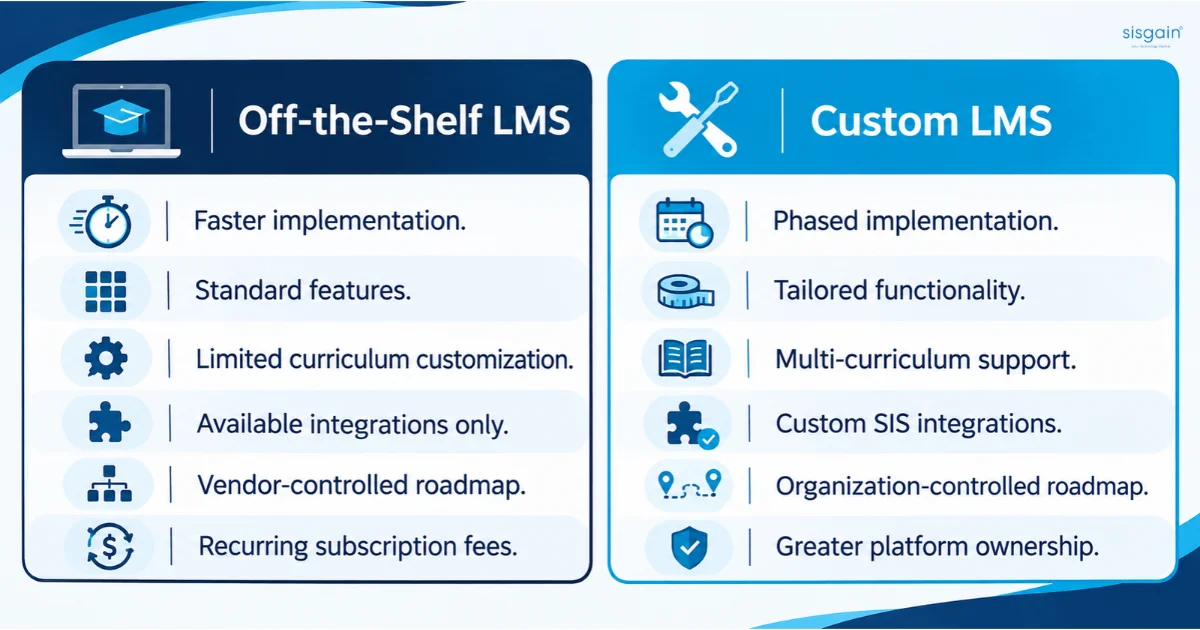
This is the decision that shapes cost, timeline and control for years.
|
Factor |
Off-the-shelf LMS |
Custom LMS |
|
Time to launch |
Faster for basic needs |
Longer, built in phases |
|
Curriculum fit |
You adapt to the product |
The product adapts to your curricula |
|
Arabic and RTL depth |
Varies, often added later |
Designed in from the start |
|
Integration with your SIS |
Limited to supported connectors |
Built to your systems |
|
Governance and AI controls |
Fixed by the vendor |
Configured to your policies |
|
Ownership |
Licence, vendor roadmap |
You own the platform and roadmap |
|
Long-term cost |
Recurring fees that scale with students |
Higher upfront, more predictable over time |
Off-the-shelf is often the right answer. If you run two or three campuses on one curriculum, with standard needs and a tight timeline, a proven product can serve you well. Custom starts to win when you run several curricula, need deep SIS integration, require strict governance over AI and data, or want the platform to become a long-term asset.
For a fuller comparison, read our guide on custom vs off-the-shelf LMS platforms. If you decide to build, choose a custom software development company in Dubai that can show how it handles curriculum models, integrations and bilingual interfaces together.
What drives cost
We don’t quote a single price for a group LMS because the range is wide. These are the factors that move the number most:
|
Cost driver |
Why it matters |
|
Number of campuses and students |
Affects hosting, support and licensing or per-student models |
|
Number of curricula |
Each pathway needs its own structure, outcomes and assessments |
|
Languages |
Real Arabic RTL support touches design, content and testing |
|
Content digitization volume |
Subjects and grades in scope drive the largest share of effort |
|
Integrations |
Every system connected adds design, build and testing |
|
AI features |
Teacher assistants, remediation and analytics need data and governance work |
|
Hosting, security and compliance |
Data residency and audit requirements shape architecture |
|
Support model |
Training, helpdesk and curriculum services after launch |
Commercial models also vary. The common ones are a per-student annual fee, a per-campus fee, a group enterprise licence, or a one-time implementation fee plus subscription. Which one suits you depends on how fast you plan to scale.
For a detailed breakdown of budgeting, see our guide to learning management system cost in the UAE. If you want a number based on your own campuses, curricula and integrations, request a scoped estimate from our team. A 60-minute discovery session is usually enough to define a pilot budget.
Implementation roadmap: 36 weeks with a 12-week pilot gate
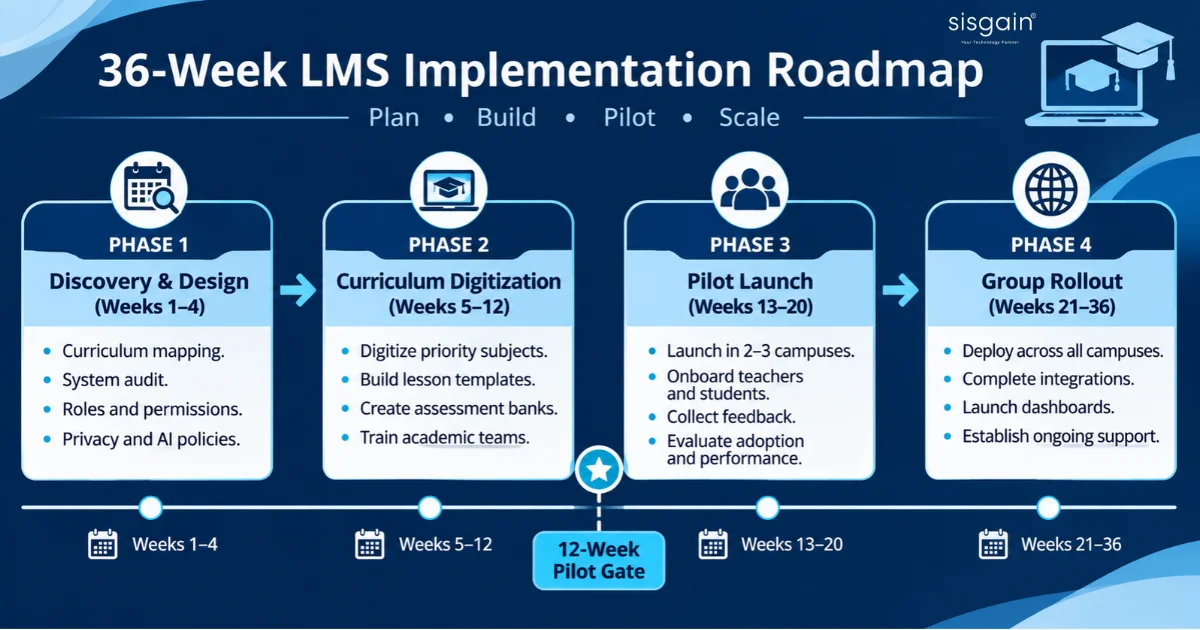
A phased rollout protects you from the biggest risk, which is scaling something teachers haven’t yet accepted.
Phase 1: Discovery and design (weeks 1–4)
- Map curricula, campuses, grades and subjects.
- Audit existing systems: SIS, attendance, finance, HR, communication tools.
- Define roles: group academic director, principal, coordinator, teacher, student, parent.
- Finalise data privacy, content governance and AI-use policies. External AI consulting services in Dubai can help if you don’t have this expertise in-house.
- Deliverable: solution blueprint and implementation plan.
Phase 2: Curriculum digitization (weeks 5–12)
- Digitize priority subjects and grades.
- Build lesson templates, rubrics, resource libraries and assessment banks.
- Train academic leads and curriculum coordinators.
- Deliverable: digital curriculum library and pilot environment.
Phase 3: Pilot launch (weeks 13–20)
- Onboard pilot teachers, students and parents in two or three campuses.
- Run lessons, assignments, assessments and analytics.
- Collect feedback and fix usability and reporting issues.
- Deliverable: pilot report covering adoption, learning and operational metrics.
Phase 4: Group rollout (weeks 21–36)
- Scale to all campuses.
- Complete SIS and communication integrations.
- Launch leadership dashboards and the parent portal.
- Set up ongoing curriculum governance and a support model.
- Deliverable: full group-wide deployment.
Start with one high-priority subject, such as Mathematics, Science, English or Arabic. You learn faster with one subject done well than with five done halfway.
KPIs to define before launch
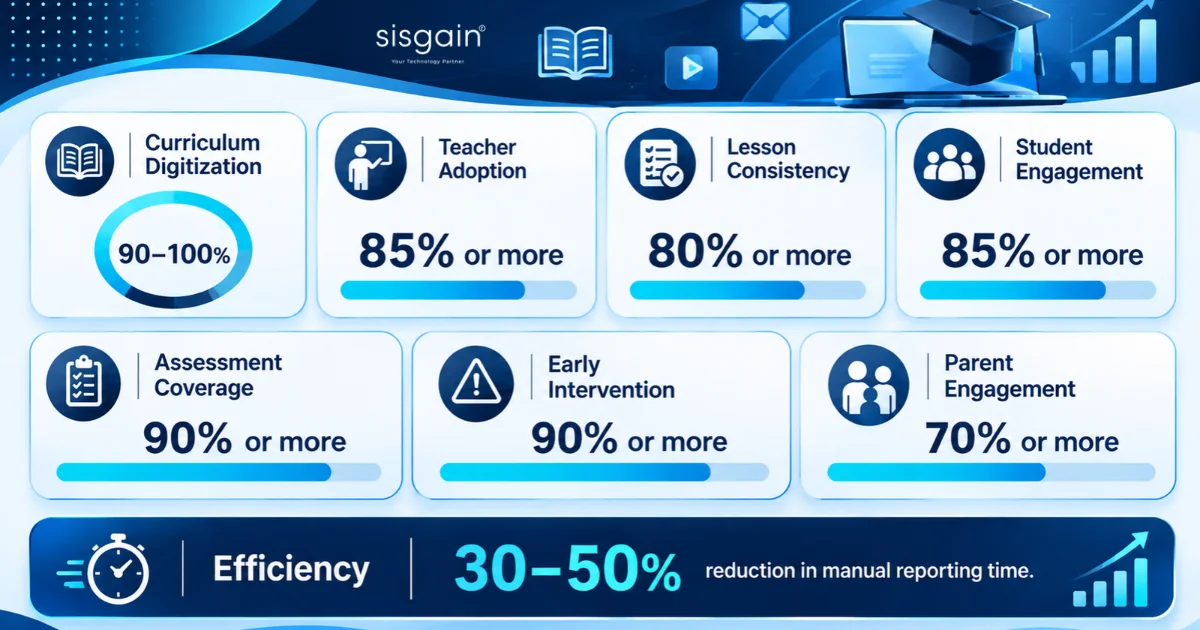
Agree these before the pilot starts, so success isn’t decided after the fact. The targets below are planning benchmarks, not guaranteed results.
|
Category |
KPI |
Planning target |
|
Curriculum digitization |
Approved curriculum digitized for priority grades |
90–100% |
|
Teacher adoption |
Weekly active teachers |
85% or more |
|
Lesson consistency |
Lessons delivered through approved templates |
80% or more |
|
Student engagement |
Weekly active students |
85% or more |
|
Assessment coverage |
Formative assessments recorded digitally |
90% or more |
|
Early intervention |
At-risk students identified within two weeks |
90% or more |
|
Parent engagement |
Parents using the progress dashboard monthly |
70% or more |
|
Efficiency |
Reduction in manual reporting time |
30–50% |
Notice that most of these measure learning and adoption, not logins. A dashboard that shows only how often people signed in tells you very little.
Mistakes we see school groups make
- Digitizing everything at once. Start with one subject and a pilot. Expand with evidence.
- No group-level curriculum owner. Without one person accountable for the central library, versions drift again within a year.
- Buying AI before the data is clean. AI built on inconsistent assessment data produces confident but unreliable suggestions.
- Treating Arabic as a translation job. Right-to-left layouts, Arabic assessments and bilingual parent communication need design and testing, not a language toggle.
- Ignoring teacher workload. If planning in the platform takes longer than planning in a document, teachers will leave it.
- Measuring logins instead of mastery. Engagement is a means. Learning outcomes are the point.
If you’re mapping where these fit in the wider market, our view on education technology trends for 2026–2027 covers what’s changing and what is still hype.
Vendor checklist: questions to ask before you shortlist
Use these in your next vendor meeting. A strong partner will answer them with demonstrations, not slides.
- Can you run a live demo using one of our own units, not a sample course?
- How does the platform handle our mix of curricula in a single group?
- Can you show a working SIS integration, and who owns each data item?
- Where is data hosted, and how are access, audit trails and consent managed?
- How is AI controlled? Can teachers approve outputs, and can we restrict student access by grade?
- How was Arabic and RTL tested, and by whom?
- What does a 12-week pilot include, and what does it cost?
- Who owns the content, configuration and source code if we leave?
- What does support look like during term time and during exams?
- Can you show how leadership dashboards will compare campuses on mastery, not just activity?
If you’d like these as a ready-to-use scoping checklist for your leadership team, ask our team and we’ll share it with you.
Conclusion: one curriculum, every campus, every learner
Your school group already has strong curriculum, teachers and campuses. The gap is a connected system that makes curriculum consistent, learning measurable, teachers more productive and leadership decisions faster.
The path is straightforward. Digitize one subject properly. Pilot it in two or three campuses. Prove adoption and learning impact. Then scale, with governance, integration and Arabic-English support designed in from day one.
If you’re ready to test this on your own campuses, book a discovery workshop with our team. We’ll map your curricula and systems, and shape a pilot proposal with clear scope, deliverables and success metrics.