
Introduction
Your IT partner affects how often staff lose hours to a frozen laptop, whether client data stays protected, and how quickly the business recovers when something breaks. Finding the best it support company in dubai is harder than it looks. Many providers describe themselves in nearly identical terms, quotes for the same scope can vary widely, and the real gaps often appear only after the contract is signed.
The most common problems are unclear service levels, vague security claims, hidden after-hours fees, and no realistic way to leave. This guide offers a 12-point framework for comparing reliable it support companies in uae on evidence rather than sales promises. Whether you are looking at an it service provider dubai based firm or a national partner, the same test applies. Each section ends with the questions to ask and the answers that should give you pause.
1. Understand Your Business IT Support Requirements
Start with your own environment, not the vendor’s brochure. List your users, locations, critical applications, cloud services, and any regulated or sensitive data you hold. Note your working hours, including whether any teams operate on weekends or across time zones. Then separate what must never stop, such as payment systems, email, and client-facing platforms, from what can wait a day.
This list becomes your yardstick. A small professional services firm has different needs from a clinic or a logistics operator with warehouses across the emirates. Once you know your requirements, you can judge whether a provider’s offer actually fits them.
2. Evaluate Technical Expertise and Service Capabilities
Ask for the service catalogue in writing. It should cover the helpdesk, network management, server and cloud administration, Microsoft 365 or Google Workspace administration, backup and disaster recovery, and hardware procurement.
Ask which certifications their engineers hold and confirm those certifications are current. Then ask how the team handles a problem nobody has seen before: the escalation path, who the second-line engineers are, and which vendor partnerships they can call on.
Providers offering IT infrastructure management services in Dubai should be able to describe their monitoring tools, change control process, and documentation standards in concrete terms. If you plan to move workloads, also ask about their experience with secure cloud migration in the UAE, including data residency, testing, and rollback plans.
3. Check SLA, Response Time and Resolution Commitments
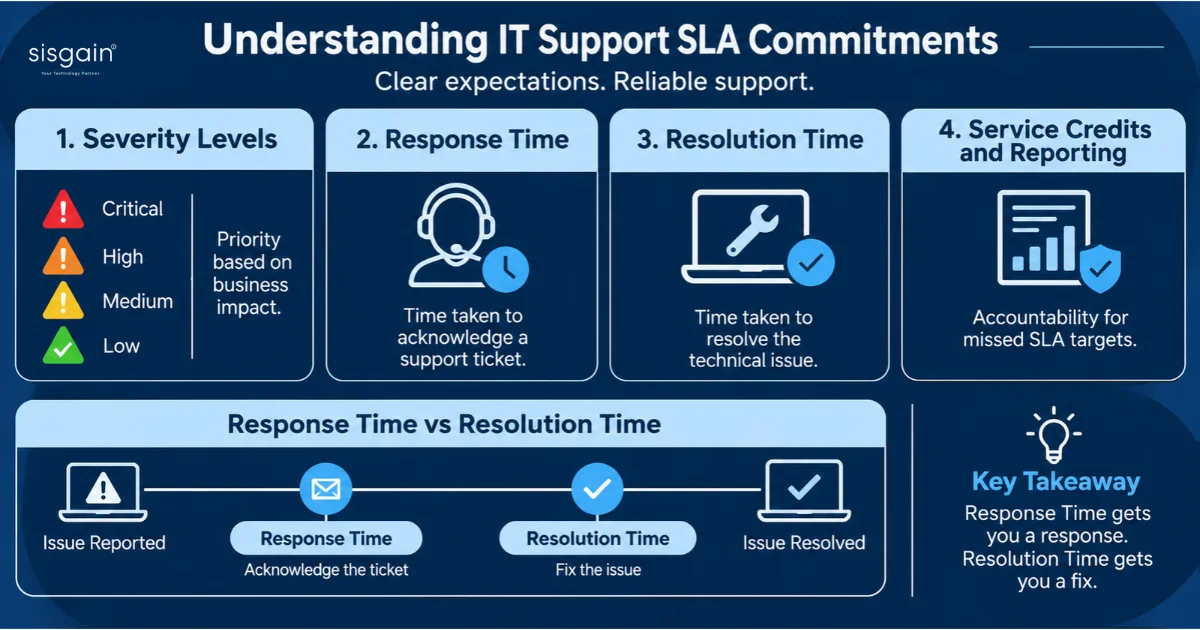
A service level agreement should define what the provider commits to and how you will know whether they met it. Look for four elements: severity definitions (what counts as critical versus minor), response times for each severity, resolution targets or escalation timelines, and service credits or other remedies when targets are missed.
Pay close attention to the difference between response and resolution. A provider can acknowledge a ticket in 15 minutes and still leave you waiting for days. Ask for a sample SLA report with anonymised figures from an existing client. If the provider cannot produce one, assume their measurement is weak.
Many businesses in the UAE compare these terms through an annual maintenance arrangement. You can review one such option in our IT AMC services to see how response commitments, coverage hours, and service reporting are typically structured.
Warning signs include SLAs that exclude most incidents, “best effort” wording for critical systems, and no commitment to notify you of breaches.
4. Verify 24/7 Support and On-Site Availability in Dubai
Many providers advertise 24/7 support, but the scope varies. Ask whether round-the-clock coverage applies to all tickets or only to priority-one incidents, and whether a person answers or an automated system does. Also ask who monitors alerts overnight and what authority they have to act without waiting for morning approval.
If your business needs physical attention, confirm the on-site response time within Dubai and whether it is guaranteed in the contract. Ask how many engineers are based locally and how long it takes them to reach your site.
Providers offering On demand IT support Services in Dubai should be able to explain how they dispatch engineers and what happens during traffic peaks or public holidays.
5. Assess Cybersecurity and Data Protection Capabilities
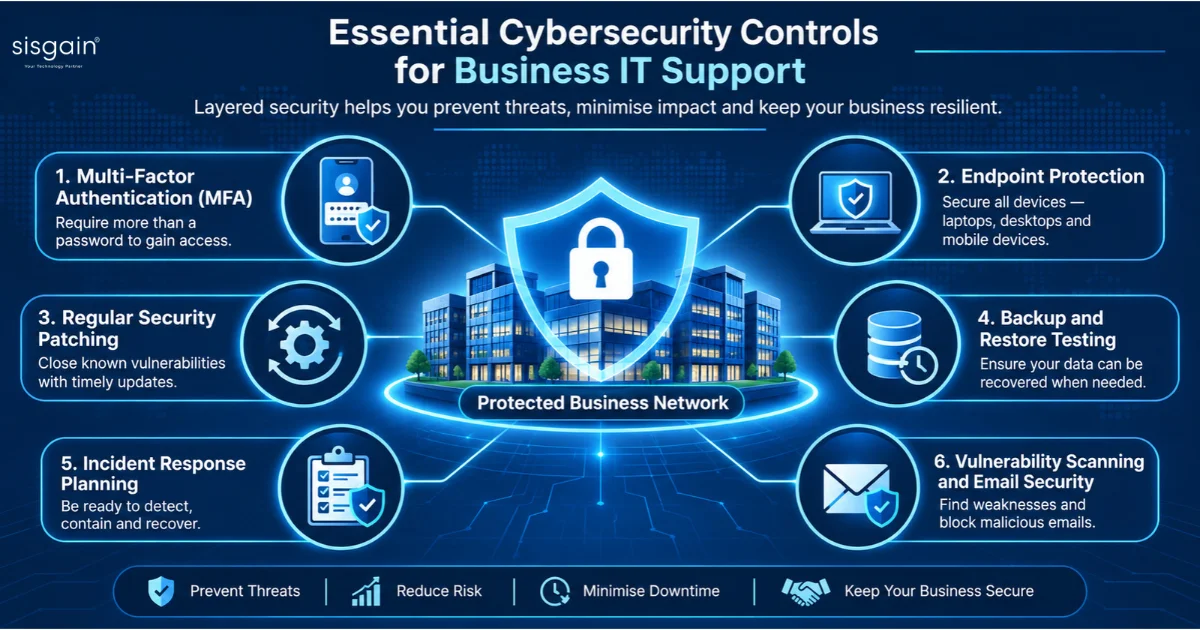
Security should be assessed as a set of working controls, not a line on a website. Ask whether multi-factor authentication is enforced for all admin accounts, how endpoints are protected and patched, and how often backups are restored in a test. Ask for their incident response plan and how quickly they would notify you of a suspected breach.
If you are reviewing cybersecurity services Dubai providers offer, look for managed detection, email security, and regular vulnerability scanning. Buyers evaluating cybersecurity solutions Dubai often overlook privileged access management and log retention, both of which matter greatly after an incident. Request evidence such as penetration test summaries, certifications with clear scope statements, and a list of the tools in use.
6. Check UAE PDPL Compliance and Data Handling Practices
The UAE’s federal personal data protection law, Federal Decree-Law No. 45 of 2021 (commonly called the PDPL), sets obligations for handling personal data. Free zones such as DIFC and ADGM operate their own data protection regimes, and certain sectors, including healthcare, may have additional rules. Your legal counsel should confirm which regime applies to your business. Your IT provider should be able to support those obligations in practice.
Ask where your data is stored and processed, whether the provider will sign a data processing agreement, and which subprocessors they use. Confirm how access to your data is restricted and logged, and how they will support you with data subject requests and breach notifications within required timeframes. A provider that cannot answer these questions clearly is not ready to handle personal data for you.
7. Compare Pricing and Total Cost of Ownership (TCO)
IT support is priced in several ways: per user per month, per device, hourly on a break-fix basis, or by project. None of these is inherently cheaper. The useful comparison is total cost of ownership over three years, which includes the monthly fee, resold licences, hardware, onboarding, project work, after-hours surcharges, and the cost of leaving.
Ask every provider to price the same written scope. Request a list of exclusions, because that is where invoices grow. Check whether licence costs are passed through at cost or marked up, whether price increases are capped, and what happens when you add users. A quote that looks low often carries expensive exceptions.
8. Verify Client References and Industry Experience
Ask for at least three references from businesses of similar size and sector. Speak to them directly rather than relying on written testimonials. Useful questions include how quickly the provider resolved their last serious incident, whether monthly reports arrived on time, whether they experienced billing surprises, and whether they would renew.
Industry experience matters because compliance requirements, software stacks, and operating hours differ. A provider that already supports firms in your sector will understand your applications and risks faster, which shortens the onboarding curve.
9. Evaluate Reporting, Communication and Accountability
Good providers measure their work and show you the results. Your monthly report should include ticket volumes and trends, SLA performance, patch status, backup test outcomes, open risks, and recommendations. Ask for a sample report and read it closely. If it lists activity without showing outcomes, the reporting is for appearances.
Accountability also depends on people. Confirm you will have a named account manager, a regular service review meeting, and a clear escalation route. Ask how many clients each account manager covers. Thin coverage usually means slow responses when you need them most.
10. Review Contract Terms and Vendor Exit Rights
The contract determines what happens when the relationship ends, so review exit terms before anything else. Check notice periods, termination for convenience, and whether early termination fees apply. Confirm that your data will be returned in a usable format within a stated timeframe.
Pay particular attention to administrative access. Your Microsoft 365 tenant, domain registrar, cloud accounts, and firewall configurations should be owned by your business, with admin credentials held by you or escrowed in a way you control. Network documentation and runbooks should also belong to you. Look for price escalation caps and for automatic renewal clauses with short cancellation windows.
11. Compare Providers Using a 12-Point Evaluation Scorecard
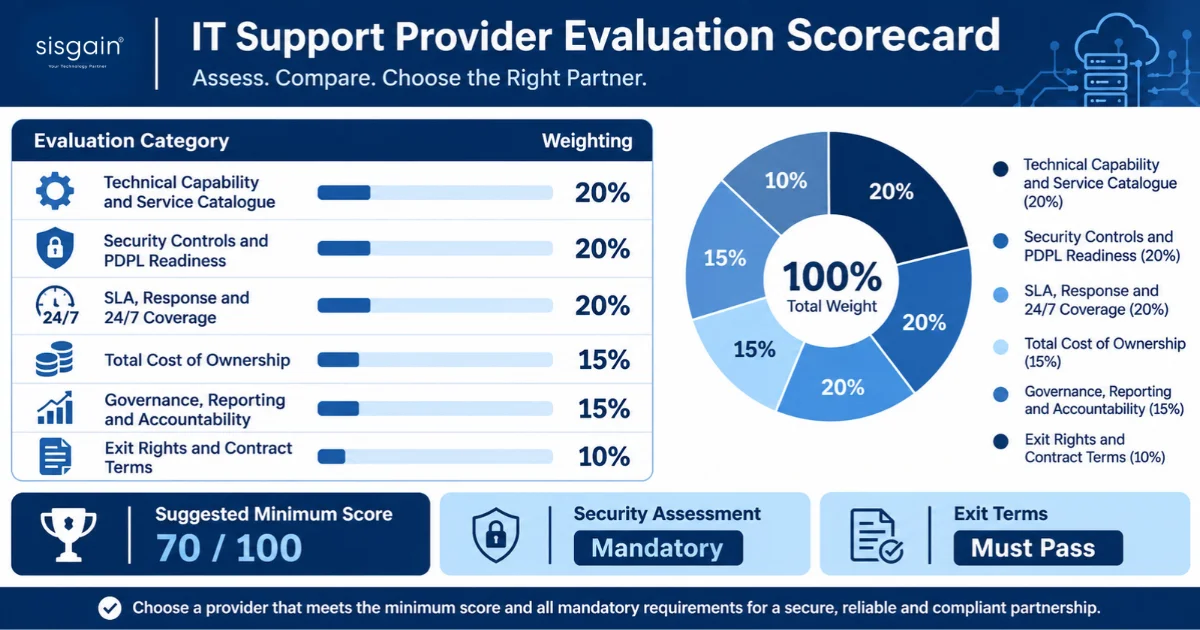
A scorecard keeps comparisons objective. Score each provider from 1 to 5 on the twelve points in this guide, then weight the scores according to your priorities. The table below shows an illustrative weighting you can adjust.
| Evaluation area | Illustrative weight |
|---|---|
| Technical capability and service catalogue | 20% |
| Security controls and PDPL readiness | 20% |
| SLA, response and 24/7 coverage | 20% |
| Total cost of ownership | 15% |
| Governance, reporting and accountability | 15% |
| Exit rights and contract terms | 10% |
Set a minimum threshold before you shortlist. For example, you might require a weighted score of at least 70 out of 100 and a passing score on security and exit terms. Treat any unanswered security question as a serious concern.
Collect the same documents from every provider: the service catalogue, a sample SLA, the security policy, insurance certificates, the data processing agreement, an organisation chart showing the support structure, a sample monthly report, and references. Providers that refuse to share these before signing are signalling how they will behave afterwards.
ALSO READ - How Much Does IT Support Cost in Dubai? Pricing Models for UAE Businesses
12. Conduct a Final Vendor Assessment Before Signing
Before you sign, test the provider’s claims. Request a short paid pilot or a structured onboarding discovery session and observe how they perform. Ask them to walk through a simulated incident, such as a ransomware alert or a failed server, and watch how they communicate and what steps they take. Confirm that the engineers named in the proposal are the ones who will support you.
Finish with a legal review of the contract, verification of insurance coverage, and a final reference check. This is also the moment to confirm the 90-day onboarding plan in writing, so both sides agree what success looks like.
Break-Fix vs Managed IT Services vs Co-Managed IT Support
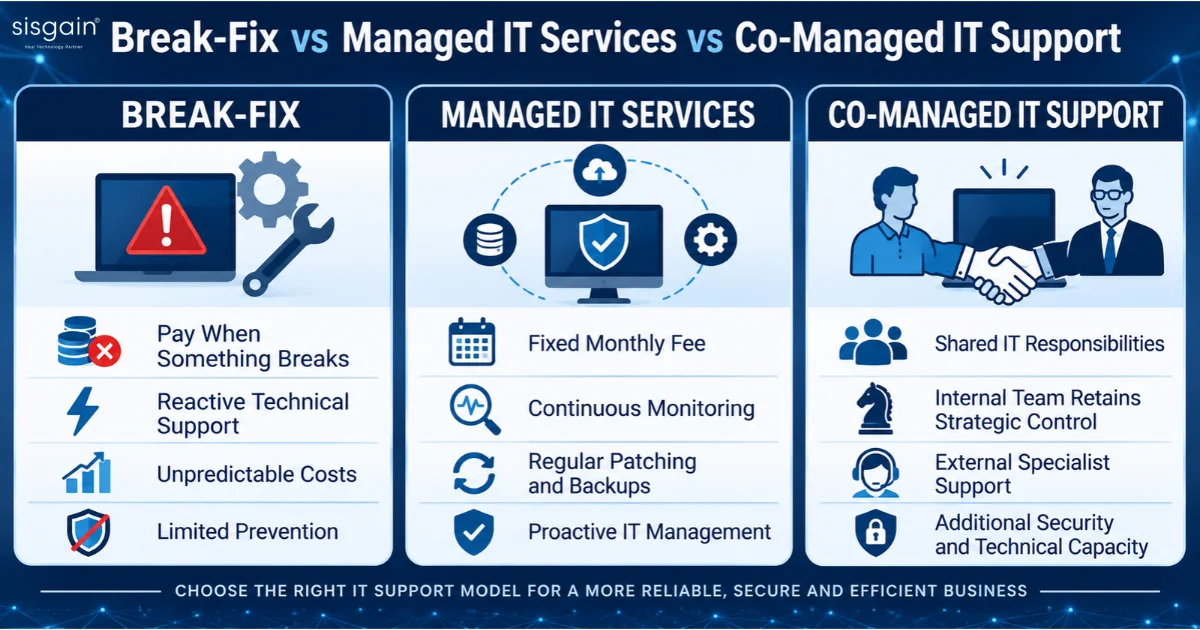
Your service model shapes everything else. Break-fix means you pay when something fails. It suits very small firms with simple setups and low tolerance for ongoing costs, but it offers little prevention and unpredictable bills.
Managed IT services mean the provider takes responsibility for monitoring, patching, backups, and support for a fixed monthly fee. This model suits most growing businesses because it turns unpredictable costs into a budget line and shifts the focus to prevention. Many organisations cite the benefits of IT outsourcing in the UAE as lower overheads, access to specialist skills, and easier scaling, though these gains depend on a well-written contract.
Co-managed IT support splits the work. Your internal team keeps control of strategic decisions and business applications, while the provider adds capacity, security monitoring, and specialist skills. This suits businesses with an existing IT function that needs help during peak periods or on advanced security work.
What Should a 90-Day IT Support Onboarding Plan Include?
A solid onboarding plan turns the contract into working operations. In the first 30 days, the provider should complete discovery, document your environment, confirm admin access and account ownership, deploy monitoring, and verify that backups actually restore. Your team should receive a clear escalation guide.
From day 31 to 60, focus on the controls that reduce the most risk. This typically includes enforcing multi-factor authentication, putting patching on a regular schedule, agreeing acceptable use policies, and setting baseline metrics for ticket volumes and response times.
From day 61 to 90, the provider should present an improvement roadmap, review SLA performance against the baseline, and hold the first formal service review. By this point, you should know whether the relationship delivers what the proposal promised.
Red Flags to Avoid When Choosing an IT Support Company in Dubai
Several warning signs appear repeatedly in poor engagements:
- Vague or missing SLAs, or response times that apply only to “business hours” without defining them.
- Refusal to provide references, sample reports, or a data processing agreement.
- Security claims with no supporting evidence, certificates, or named tools.
- Admin credentials, tenant ownership, or documentation held by the provider with no route for you to access them.
- Long lock-in periods with automatic renewals and difficult cancellation terms.
- Low quotes that depend on heavy exclusions or unexplained after-hours surcharges.
Any one of these deserves a direct question. Several together should end the evaluation.
Conclusion
Selecting an IT partner is a decision about risk, continuity, and how your business handles data. The providers worth shortlisting will answer hard questions with specifics, show real reports and references, and accept clear exit terms if the relationship fails. Use the twelve-point framework to keep the comparison evidence-based, and do not sign until the security, exit, and accountability terms are as strong as the sales pitch.
Partner with an experienced IT team that prioritizes security, reliability, and long-term business growth. Contact SISGAIN Technologies today to discuss your IT requirements and find the right technology solution for your business.