
The worst server outages I've handled in 25 years weren't caused by hardware. They were caused by an SLA nobody read closely until the server was already down.
The contract said "24/7 support." Nobody asked whether that meant an engineer picking up at 2 a.m. or a ticket sitting in a queue until morning. Nobody asked what "critical" meant, or whether "response" meant someone was fixing the problem or just acknowledging it.
That gap between what a server supporting SLA in Dubai says and what it delivers is the subject of this guide. It's also more urgent than usual. Windows Server 2016 reaches the end of extended support on 12 January 2027, and Ramadan is expected to begin about four weeks later. If you run on-premises or hybrid servers, your provider's answers in the next few weeks matter.
Here's the short version:
A server supporting SLA in Dubai should name every covered asset, define priorities by business impact, commit to separate response, restoration and resolution targets, schedule patching around your working week and Ramadan hours, and state exclusions, reporting and remedies in writing.
This guide is written for IT managers, CTOs and operations managers who are signing, renewing or auditing a server support contract.
What Is a Server Support SLA?
Quick answer: A server support SLA is the written part of your contract that says what the provider will look after, how fast it will respond, when service will be restored, and what happens if it misses those targets. If it isn't measurable and written down, it isn't a commitment.
A service level agreement, or SLA, turns a sales promise into something you can check. It normally measures three things: availability (uptime), how quickly the provider responds, and how quickly the problem is fixed.
The word "measurable" does a lot of work here. "Fast response" is a brochure line. "Acknowledgement and triage within 15 minutes for a Priority 1 incident, measured from ticket creation" is an SLA clause. Ask for the second kind.
Support, Maintenance and Management: What's the Difference?
Before you compare SLAs, check that the providers are even selling the same thing. In Dubai, the three terms are used loosely, and a provider can quote you for "server support" while leaving out everything that prevents outages.
Service | What it means | Typical activities |
Server support | Help when something is wrong or at risk | Incident response, troubleshooting, access issues, vendor coordination |
Server maintenance services in Dubai | Scheduled work that prevents failures | Updates, health checks, capacity reviews, backup verification, log review, hardware checks |
Server management services in Dubai | Ongoing administration of the whole environment | Configuration, security hardening, monitoring, patching, user and access administration, capacity planning, incident coordination |
The rule I use: if the contract says "support" and doesn't mention monitoring, patching or backup checks, you're buying a fire brigade, not fire prevention. That can be a valid choice for a small, stable environment. It should be a choice you make on purpose.
What a Good Dubai Server Support SLA Must Cover
Treat the list below as the minimum, not a wish list. Each row has what to demand and what should worry you.
S No. | SLA element | What to demand | Red flag |
1 | Scope of assets | Every covered server, hypervisor host, storage device, firewall, backup server, VM, OS, database and application, named | "All your IT infrastructure" with no list |
2 | Coverage hours | Business hours, extended hours and 24/7 stated separately | "24/7" with no detail on who answers |
3 | Monitoring | A list: availability, CPU, memory, disk, services, event logs, backup jobs, replication, hardware and security alerts | "Proactive monitoring" and nothing else |
4 | Priority definitions | P1 to P4 defined by business impact | Priorities decided by the provider after the fact |
5 | Response targets | A maximum time to acknowledge and begin triage, per priority | One target for everything |
6 | Restoration targets | A time to restore service or provide a workaround | Only a response time is stated |
7 | Escalation path | Named contacts and time thresholds | "We'll escalate as needed" |
8 | Patch management | Patch categories, testing, approval, reboot rules, emergency patching, maintenance windows | Patching happens "when required" |
9 | Backup and recovery duties | Who monitors backups, who restore-tests, how often, and who assists in disaster recovery | Backups "monitored" but never restored in a test |
10 | Security boundaries | Who handles antivirus or EDR, vulnerability fixes, firewall changes, access reviews and incident response | Security assumed to be someone else's job |
11 | Reporting | A monthly report: incidents, SLA performance, patch status, backup results, capacity trends, risks | Reports that list activity but not outcomes |
12 | Remedies | Service credits, escalation or contract remedies when targets are missed | No consequence for a miss |
If you want to see how these elements fit together in a live service, this is how we structure server support from our Dubai engineers.
Response Time vs Restoration Time vs Resolution Time
This is where weak SLAs hide, so slow down here.
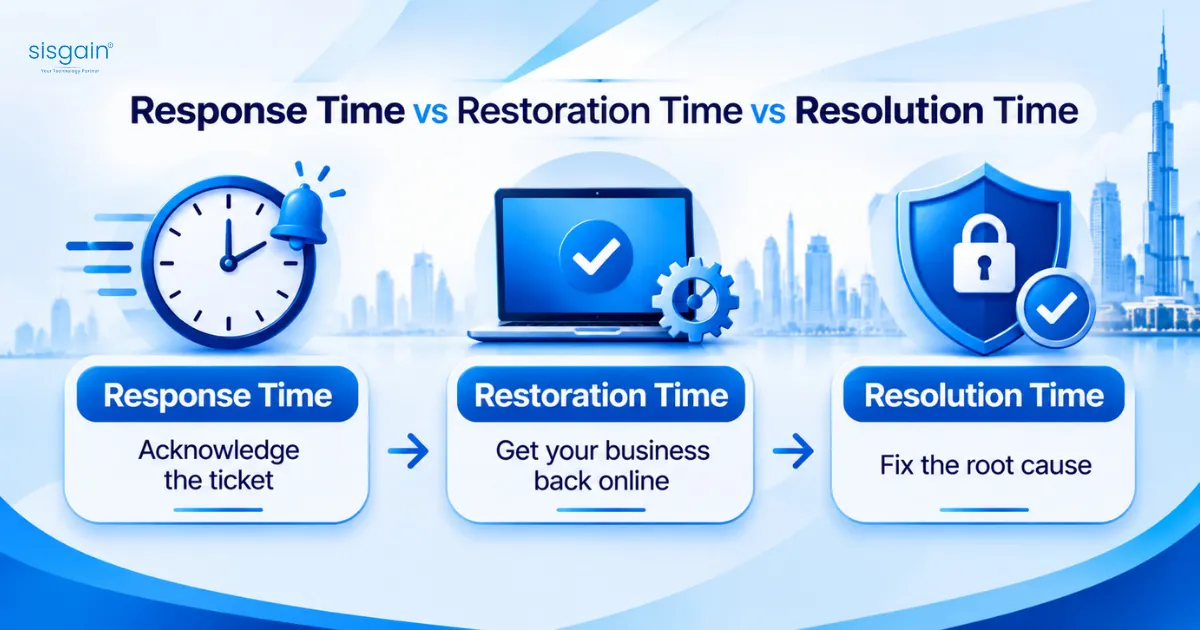
- Response time: when the provider acknowledges the ticket and starts diagnosis.
- Restoration time: when your business can work again, even if it's through a workaround.
- Resolution time: when the root cause is permanently fixed.
Here's a scenario. Your file server fails at 9:10 a.m. The provider responds in 15 minutes. At 11:00 a.m. they bring up a replacement share so staff can work. The next day they replace the failed storage controller and confirm the cause. That's one incident and three separate milestones. A good SLA commits to all three. A weak one commits only to the first, which is the easiest to hit.
Don't accept an uptime percentage on its own. Here's what the numbers actually allow:
Uptime promised | Downtime allowed per year |
99% | about 87.6 hours (3.65 days) |
99.5% | about 43.8 hours |
99.9% | about 8 hours 46 minutes |
99.99% | about 52.6 minutes |
A percentage means little unless the SLA also says how uptime is measured, which maintenance windows are excluded, and how you'll see the evidence. A 99.9% promise with a long list of exclusions can allow far more real downtime than it appears to.
What an SLA Usually Does Not Cover
"SLA" doesn't mean "everything is included." Read the exclusions before the headline numbers. These are the ones I see most often:
- Hardware replacement costs, spare parts and vendor warranty claims.
- Third-party application support, licensing and software-vendor escalation.
- Projects: migrations, new server builds, major upgrades and architecture redesign.
- Problems caused by unauthorised changes, unsupported software or expired licences.
- Data recovery where backups are missing, corrupted, untested or outside the retention period.
- Internet, power, building-network or ISP outages outside the provider's control.
- Work outside agreed coverage hours, unless an after-hours rate or emergency retainer is defined.
- Change requests. "Unlimited changes" needs a definition: how many standard changes, how many emergency changes, and what counts as a project instead.
None of these exclusions is unreasonable by itself. The problem is when you find out about them during an outage instead of before signing.
On-Premises, Hybrid and Cloud: Who Is Responsible?
A common misunderstanding is that moving to the cloud removes the need for server support. It removes some of it. Your operating system, configuration, security, backup and incident-management responsibilities don't disappear. They move.
Environment | The provider may handle | You and the provider must clarify |
On-premises | Server OS, monitoring, patching, backup jobs, local troubleshooting, hardware coordination | Hardware ownership, spare parts, physical access, network and power responsibility |
Hybrid | On-prem server operations plus cloud connectivity, identity, backup and monitoring integration | Who manages cloud resources, VPN or private links, DNS, identity and failover |
Cloud (IaaS) | VM availability, OS patching, monitoring, backup configuration, support tickets | Shared-responsibility boundaries, application support, data protection, cloud costs, configuration changes |
The test is simple: a provider can't credibly promise a restoration time for an application it doesn't support, a cloud platform it doesn't administer, or a backup process it has never tested.
If your environment spans several layers, check whether the provider's IT infrastructure management covers the full stack or just the servers. For cloud workloads, ask whether cloud managed services are included in the same SLA or sit under a separate contract. And if you're considering a move, read about data residency and PDPL checks before a cloud move first.
Patch Windows That Fit UAE Business Hours and Ramadan
Generic SLAs assume a generic working week. UAE businesses don't have one.
Under the UAE labour law, private-sector working time is eight hours a day or 48 hours a week. During Ramadan, daily working hours are reduced by two hours for private-sector employees. Your own entity may be governed by different rules (free zones and government bodies have their own arrangements), so check what applies to you.
That has three practical effects on a server SLA:
- Maintenance windows should be written down. Define windows outside your core hours, and require advance notice for any reboot.
- Emergency patching needs its own process. A critical security patch can't wait for the next monthly window. Agree who approves it and how fast.
- Ramadan coverage should be confirmed in writing. Ramadan 2027 is expected to begin around 8 February, subject to moon sighting. Ask the provider to confirm revised coverage hours, response expectations and any planned maintenance restrictions before then.
A window that suits an office running 9 to 6 can collide with a clinic, warehouse or retail operation that runs different hours. Match the schedule to how your business actually works.
Windows Server 2016: A Deadline Dubai Businesses Should Plan For
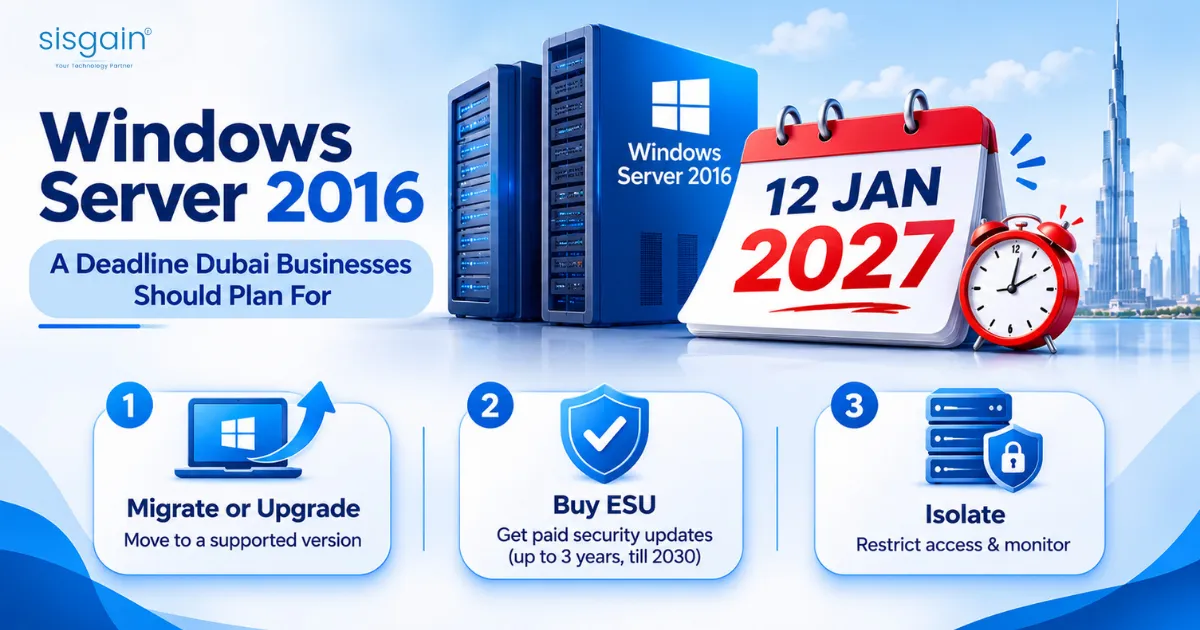
Mainstream support for Windows Server 2016 ended in January 2022. Extended support ends on 12 January 2027, and the January 2027 security update is the last one under the standard lifecycle.
After that date, regular monthly security updates stop. Servers still running 2016 will keep working, but any new vulnerability stays unpatched unless you take one of the options below.
Your realistic options:
- Migrate or upgrade. Move workloads to a supported version. Microsoft lists Windows Server 2025 as its latest long-term servicing release. This is the cleanest answer, and also the slowest. Application compatibility testing is where timelines slip.
- Buy Extended Security Updates (ESU). Microsoft has announced paid ESU for Windows Server 2016, delivered through Azure Arc. It covers Critical and Important security updates only, for up to three years, to January 2030. Billing starts the day after support ends, and servers enrolled late can be back-billed. Check Microsoft's current terms and pricing before you plan around it.
- Isolate what you can't move. For a legacy application that can't be upgraded, segment the server, restrict access and monitor it closely. This is a stopgap, not a plan.
ESU buys time. It doesn't fix the underlying problem. If you have older systems too, note that Microsoft's paid programme for Windows Server 2012 and 2012 R2 ended in October 2026, so those servers are already without security updates.
If your applications are the blocker, modernizing legacy systems in Dubai is worth reading alongside your migration plan. When you're ready to move workloads, look at cloud migration services in Dubai that include testing and rollback.
Ask every prospective provider this: What is your Windows Server 2016 assessment, your migration plan, your ESU position, and your cut-off date for onboarding unsupported systems? A provider that can't answer clearly isn't ready for the next few months.
A Monthly Server Support Checklist
Bring this to your monthly service review. It also works as a self-audit.
- All covered assets are still listed and correctly monitored.
- P1 and P2 incidents reviewed, with root causes and repeat issues noted.
- Response and restoration performance checked against SLA targets.
- Backup success rates verified, and a restore test performed or reviewed.
- Disk capacity, memory pressure and CPU trends reviewed, with growth forecasts.
- OS, firmware, application and security patches applied or scheduled.
- Failed logins, privileged-access changes and security alerts reviewed.
- Certificate, licence, warranty and support-contract expiry dates checked.
- Pending risks, vulnerabilities and upgrade recommendations reviewed.
- Documentation, credentials, network diagrams and escalation contacts confirmed current.
- Windows Server 2016 migration status reviewed, if applicable.
If you haven't looked at your environment recently, start with a baseline. This guide to what an IT health check and infrastructure audit includes explains what a proper one covers.
Questions to Ask Before You Sign a Server Support Contract
Whether you're talking to a large vendor or a smaller Dubai server support company, put these in writing and compare the answers side by side.
- Which exact servers, operating systems, applications and network components are covered?
- What is monitored continuously, and who receives alerts outside business hours?
- What are the response, restoration and resolution targets for each severity level?
- How are priorities classified, and who can raise a P1 incident?
- What does monthly maintenance include, and what is billed separately?
- Which patch types need approval, and when are reboots performed?
- How often are backups monitored and restore-tested?
- What is excluded, especially hardware, licences, third-party software and projects?
- What reporting will we receive each month, and can we see a sample?
- What happens if you miss an SLA target?
And two more worth asking: how do you handle Windows Server 2016 systems, and can you provide references from businesses with similar infrastructure in Dubai?
Red flags: "best effort" wording for critical systems, no sample SLA report, no named escalation contacts, and no clear exit terms. For a wider framework, see this 12-point checklist for choosing an IT support company. If cost is part of the decision, how IT support pricing models work in Dubai will help you compare quotes on the same scope.
Get a Free Server Health Review
If you're not sure your current SLA would hold up in a real outage, check it before the outage does. Our team will review your server estate against the points in this guide: asset inventory, patch status, backup restore results, SLA gaps and Windows Server 2016 exposure.
Get a free server health review and you'll know where you stand before January.