
A good server support SLA in Dubai does more than promise “24/7 support.” It defines which servers are covered, classifies incidents by business impact, commits to separate response and restoration targets, states maintenance windows, lists exclusions, and explains what happens when the provider misses a target.
Businesses in Dubai depend on fast on-site response, effective remote remediation, reliable spare-parts logistics, disciplined patching schedules, and clear escalation paths. Yet many contracts advertise a “15-minute response” or a “2-hour onsite visit” without explaining how those promises are scoped, measured, or enforced. If you are comparing server support services in Dubai, use this article as your contract checklist. It will help you avoid hidden gaps, vague promises, and one-sided terms before you sign.
What a good SLA must define: covered assets, support hours, severity levels, separate response/restoration/resolution targets, maintenance rules, exclusions, reporting, and remedies for missed targets.
One rule runs through this guide: every claim about coverage, response time, or exclusions should be treated as something to ask for in writing. Providers in Dubai publicly advertise very different commitments, from 15-minute response and 2-hour onsite support to 4-hour response and even 48-hour SLAs. That variety proves the exact commitment must be written into your contract, not assumed from a sales page.
What Is a Server Support SLA?
A server support SLA is a written agreement that defines the servers covered, support hours, incident priorities, response and restoration targets, maintenance responsibilities, exclusions, reporting, and remedies if the provider misses its commitments. In Dubai, it should distinguish remote response from onsite attendance and state exactly what is included in the contract.
Put simply, an SLA (service level agreement) turns a promise into a measurable obligation. “We will look after your servers” is a sales statement. “We will acknowledge a P1 incident within 30 minutes, restore service or apply a workaround within four hours, and issue a service credit if we miss that target” is an SLA clause.
SLA vs AMC: what is the difference?
Many businesses already have a server AMC (annual maintenance contract) and assume it works as an SLA. It often does not. An AMC typically describes the maintenance activities a provider will perform. An SLA makes measurable commitments about how well and how quickly those activities happen. Many good contracts combine both, but you should check that the second half exists.
| |
Server AMC |
Server support SLA |
|---|---|---|
|
What it mainly describes |
Maintenance activities, visit frequency, covered equipment |
Service levels, targets, and responsibilities |
|
What it guarantees |
Usually that work will be performed |
Measurable response, restoration, and reporting commitments |
|
Typical wording |
“Quarterly health checks”, “support as required” |
“P1 response within X minutes; restoration within Y hours” |
|
If the provider falls short |
Often no defined remedy |
Service credits or other agreed remedies |
“Support” can mean many different things
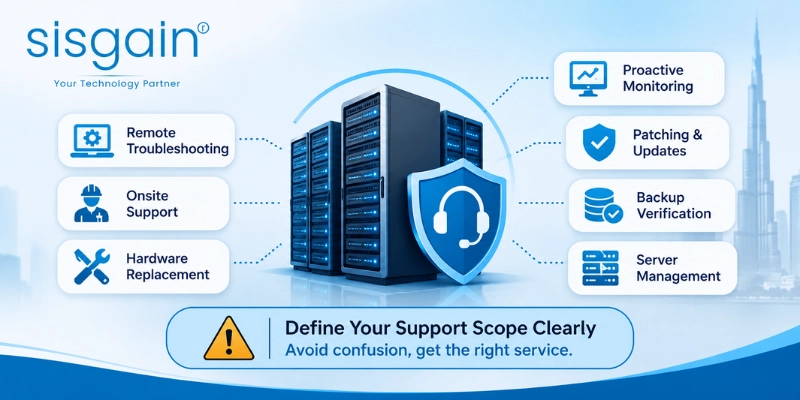
The word “support” is where most misunderstandings begin. It can mean any of the following, and each one must be explicitly scoped:
- Remote troubleshooting by a service desk
- Onsite attendance by an engineer
- Hardware replacement and spare-parts supply
- Proactive monitoring and alerting
- Operating system and firmware patching
- Backup verification and restore testing
- Full server management services in Dubai, where the provider owns day-to-day operation
If your contract only says “server support” without listing which of these apply, you are relying on goodwill, not an agreement. Many buyers search for business server support Dubai expecting the full list, then discover they bought only remote troubleshooting.
What a Good Server Support SLA in Dubai Should Cover
When you review a server support SLA Dubai providers offer, check that it covers at least these eight areas:
- List every covered server, storage device, and dependency
- Define 1 - 4 incidents by business impact
- Set separate response, restoration, and resolution targets
- State remote and onsite support hours
- Schedule patching, monitoring, and maintenance windows
- Confirm backup monitoring and restore testing
- Define escalation contacts and procedures
- List exclusions, additional charges, and remedies for missed targets
Expanded into a full contract review, this becomes a 10-point checklist. Before signing, make sure the document answers each of these:
|
SNO |
Field to complete |
Question to ask the provider |
|---|---|---|
|
1 |
Covered assets |
Is every server, host, storage array, and backup system listed by name? |
|
2 |
Support hours |
Which services are 24/7 and which are business hours only? |
|
3 |
Severity definitions |
How is a P1 defined, and who decides the priority? |
|
4 |
Response target |
How fast, by which channel, measured from when? |
|
5 |
Restoration target |
How long until service is restored or a workaround is in place? |
|
6 |
Resolution target |
When is the root cause permanently fixed? |
|
7 |
Escalation route |
Who is called if a target is about to be missed? |
|
8 |
Preventive maintenance and backup checks |
How often are patching, health checks, and restore tests done? |
|
9 |
Reporting |
Do you receive a monthly report against targets? |
|
10 |
Service credits and remedies |
What happens if the provider misses a target? |
Dubai-specific questions matter too. Ask whether onsite support is included in the monthly fee, what travel time counts toward the response clock, whether spare parts are stocked locally and covered, and whether public holidays or Ramadan working hours change coverage. A provider that cannot answer these clearly is telling you something important.
Finally, expect reporting. A credible provider should send monthly reports showing tickets raised, response times against target, any misses, and the corrective actions taken. Without reporting, you cannot tell whether the SLA is being met, and a service credit clause becomes impossible to enforce.
Free resource: Download the free Server SLA Review Checklist and identify coverage gaps before renewing your contract.
Covered Assets and Scope of Work
The single most useful document in any server contract is the asset register. Insist that the provider lists every in-scope asset, including physical servers, virtual hosts, storage, hypervisors, operating systems, applications, firewall and network dependencies, and backup systems. For each one, the register should record hostname, location, operating system, warranty or end-of-life (EOL) status, criticality, and who is responsible for its backup.
Here is a simple example of how this should look:
|
Asset |
Example |
Covered? |
Owner |
|---|---|---|---|
|
Physical server |
DXB-APP-01 (Dell, 2021) |
Covered |
Provider |
|
Hypervisor |
VMware cluster, 3 hosts |
Covered |
Provider |
|
Line-of-business application |
ERP database |
Not covered |
Software vendor |
|
Backup platform |
Nightly backup appliance |
Covered (monitoring and restore tests) |
Provider |
|
Firewall |
Branch firewall |
Not covered |
Network team |
Clarify early whether the provider manages third-party applications, databases, and cloud workloads, or only the server layer. A server can be “healthy” while the application on it is broken, and many disputes start exactly there.
The scope should also define preventive work: health checks, capacity reviews, log review, patching, antivirus updates, reboot planning, and backup restore testing. If your servers connect to wider systems such as networks, storage, and cloud platforms, it is worth understanding how the contract fits into broader Infrastructure Management Services Dubai arrangements, so nothing falls between two providers.
Severity Levels and Business Impact
Severity levels decide how urgently your problem is treated, so they should be written in terms of business impact, not technical jargon. A P1 should mean something like a production server outage, a data-loss risk, a security incident, or a failure affecting revenue-critical systems. Lower levels describe progressively smaller business effects.
A “critical” label means nothing unless it triggers a specific response, escalation path, and restoration commitment. If the contract says “critical issues will be prioritised” without numbers, you have no enforceable promise.
|
Priority |
Business impact example |
Response target (example) |
Restoration expectation (example) |
|---|---|---|---|
|
1 |
Production server down; payments, ERP, or email unavailable; security incident |
Minutes, 24/7 |
Hours, with workaround acceptable |
|
2 |
Major degradation; a key system slow or partly unavailable |
Within the hour |
Same business day |
|
3 |
Single user or non-critical service affected |
Within a few business hours |
One to two business days |
|
4 |
Routine request, advice, or minor change |
Next business day |
Agreed schedule |
These numbers are examples to help you compare, not an industry standard. Ask each provider for their own figures in writing, and ask who has the final say if you and the provider disagree on a ticket’s priority.
Response, Restoration, and Resolution Targets
These are three different commitments, and they should never be merged into one “response time.” Response means the provider acknowledges the issue and begins work. Restoration means service is restored or a workaround is applied. Resolution means the root cause is permanently fixed.
|
Commitment |
What it means |
Example |
|---|---|---|
|
Response time |
Provider acknowledges and begins diagnosis |
15–30 minutes for P1 |
|
Onsite attendance |
Engineer arrives at the site, if required |
Within 2–4 hours |
|
Restoration time |
Service is restored or a workaround is in place |
Within 4 hours for P1 |
|
Resolution time |
Underlying issue is permanently fixed |
Within an agreed window |
Why does this matter? A “15-minute response” only tells you someone will reply quickly. It says nothing about when your server will actually be back. A “2-hour onsite” promise only matters if the engineer arrives with the right part and the authority to fix it. And a “4-hour restoration” commitment is far more valuable than either, because it is measured by your outcome, not the provider’s activity.
Also recommend separate targets for remote and onsite response, with clear rules for business hours and after hours. Finally, ask how the clock is measured: from ticket creation, from engineer assignment, or from the moment monitoring detected the fault. The difference can be significant.
Preventive Maintenance and Monitoring
Good server maintenance services in Dubai prevent incidents rather than only reacting to them. Your SLA should require scheduled maintenance windows, advance notice, change approval, rollback plans, and post-change validation. Unplanned reboots during business hours are a sign that this discipline is missing.
Specify what monitoring covers: CPU, memory, disk, services, security events, backup jobs, and capacity thresholds. State who receives alerts, through which channel, and what action is expected before you notice an issue. The value of proactive monitoring is that the provider fixes the problem first.
A simple monthly maintenance calendar makes this concrete:
|
Week |
Activity |
|---|---|
|
Week 1 |
Health check, log review, antivirus and firmware updates |
|
Week 2 |
Patch deployment in the agreed maintenance window, with post-change validation |
|
Week 3 |
Backup restore test on a sample server or dataset |
|
Week 4 |
Capacity review and monthly report with recommendations |
Security, Backup, and Recovery Responsibilities
Separate “backup monitored” from “backup restores successfully.” A green tick on a backup job proves only that the job ran. Require periodic restore tests, so you know your data can actually be recovered when you need it.
The SLA should also define who is responsible for OS hardening, vulnerability patching, antivirus or EDR, access reviews, and security incident escalation. Clarify whether Cloud Security Services Dubai are included or need a separate scope, especially for hybrid or cloud-hosted workloads. If part of your environment runs in the cloud, check how the server contract works alongside Managed Cloud Services Dubai, so responsibilities for hosted workloads are not left undefined.
A RACI-style table (Responsible, Accountable, Consulted, Informed) removes the guesswork:
|
Area |
Client |
Provider |
|---|---|---|
|
Backup job monitoring |
Informed |
Responsible |
|
Backup restore testing |
Accountable (approves) |
Responsible |
|
OS and security patching |
Approves windows |
Responsible |
|
Security alert triage |
Informed |
Responsible |
|
Data restoration after an incident |
Accountable |
Responsible (within agreed scope) |
|
Compliance evidence and audit reports |
Accountable |
Provides data and logs |
What a Server Support SLA Usually Does Not Cover
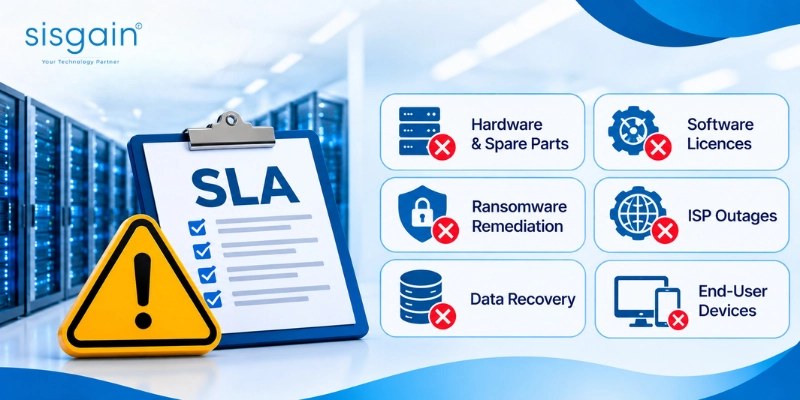
The exclusions section is where many contracts quietly transfer risk back to you. Warn your team that many contracts exclude hardware, software licences, third-party application support, data recovery, ransomware remediation, ISP outages, and end-user devices. None of these is unreasonable by itself, but each one must be visible before you sign.
“Unlimited support” deserves special attention. It may still exclude major projects, migrations, new-server builds, decommissioning, or after-hours change work. Ask exactly where “support” ends and “project” begins.
Other common exclusions include equipment beyond end-of-life, unlicensed software, customer-caused configuration changes, unsupported operating systems, and failures caused by power, internet, or third-party vendors. If a server runs an operating system the vendor no longer supports, the provider may legitimately refuse to guarantee it, and you should know that in advance.
The practical advice is simple: ask for exclusions in writing, and request a fixed-price scope for any foreseeable project work such as an upgrade or migration.
Red-flag clauses to negotiate before signing:
- Hardware failure and spare parts excluded, with no pricing stated
- Data recovery excluded or charged at undefined rates
- Ransomware or security incident remediation excluded entirely
- “Reasonable efforts” wording with no numeric targets
- Onsite visits billed per call-out without a response commitment
- After-hours and public holiday work billed at undefined premiums
- No service credits or remedies for missed targets
- Unilateral right for the provider to change scope or terms mid-contract
A server support SLA Dubai provider that welcomes questions on these clauses is generally a better partner than one that avoids them.
How to Compare Server Support SLA Providers in Dubai
Price sheets are easy to compare. Service quality is not, unless you use a framework. Score every provider against the same criteria: scope clarity, severity definitions, measurable targets, local onsite capability, spare-parts access, security practices, reporting, and remedies for missed targets.
|
Criterion |
Weight |
Must-have or nice-to-have |
|---|---|---|
|
Scope clarity and asset register |
20% |
Must-have |
|
Severity definitions and measurable targets |
20% |
Must-have |
|
Local onsite capability in Dubai |
15% |
Must-have for critical servers |
|
Spare-parts access |
10% |
Must-have for physical servers |
|
Security and backup practices |
15% |
Must-have |
|
Monthly reporting |
10% |
Nice-to-have, but strongly recommended |
|
Remedies for missed targets |
10% |
Must-have |
Adjust the weights to your business. A company with one critical server room cares more about onsite response than a firm running mostly cloud workloads.
Compare “response time” only after checking three things: whether it is remote or onsite, whether it applies in business hours or 24/7, and whether it is measured from ticket creation or engineer assignment. Two providers can both advertise “15 minutes” and mean very different things.
Also request two references from businesses with similar server environments, and ask each how the provider handled a recent P1 incident. Their answer will tell you more than any brochure. If you are building a shortlist of Dubai server support company options, add these questions to your sales calls:
- Can you show a sample monthly SLA report?
- Which of your commitments are 24/7, and which are business hours only?
- How are P1 incidents declared, escalated, and reviewed afterwards?
- Do you hold spare parts locally, or order them after the fault?
- What happens, in writing, if you miss a restoration target?
If you also want the same partner for desktops, networks, and users, review how the server contract fits with your wider IT Support Services Dubai arrangement, so you do not pay twice for overlapping services.
Next step: Book a 20-minute SLA review call to assess your current server support coverage and priorities.
How Much Should Server Support Cost in Dubai?
No honest article can give a universal price, because the scope of the SLA drives the cost. What you can do is understand the main cost drivers, so quotes become comparable. This is also the right way to think about IT Support Cost in Dubai: price follows scope, not the other way round.
|
Cost driver |
Typically raises cost |
Typically lowers cost |
|---|---|---|
|
Number and criticality of servers |
Many servers, revenue-critical systems |
Few, non-critical servers |
|
Coverage hours |
24/7 with after-hours engineers |
Business-hours only |
|
Onsite response commitment |
Short guaranteed onsite window |
Remote-first, best-effort onsite |
|
Hardware and spares |
Parts and logistics included |
Parts billed separately |
|
Security scope |
EDR, vulnerability management, incident response |
Basic patching only |
|
Reporting |
Detailed reports, service reviews |
Standard monthly summary |
Do not choose on the lowest monthly fee alone. A cheap contract with broad exclusions can create higher downtime costs and expensive emergency projects later. When you compare server support services in Dubai and server maintenance services in Dubai, ask for a quote that lists what is and is not included, then compare AMC pricing on a like-for-like scope.
When a Standard SLA Is Not Enough
A standard SLA suits stable, moderately critical environments. Some situations need more: regulated data, 24/7 revenue-critical systems, multi-site operations, legacy or EOL hardware, hybrid cloud, and strict recovery time objectives (RTO).
Enhanced arrangements can include a dedicated engineer allocation, guaranteed spare parts, proactive capacity management, disaster-recovery testing, and security incident response. These add cost, but they reduce the risk of long outages in environments where downtime is expensive.
|
Business scenario |
Standard SLA |
Enhanced SLA |
Managed infrastructure |
|---|---|---|---|
|
Single office, few non-critical servers |
Suitable |
Usually unnecessary |
Unnecessary |
|
24/7 revenue-critical system |
Rarely sufficient |
Suitable |
Consider |
|
Multi-site operations |
Limited |
Suitable |
Suitable |
|
Legacy or EOL hardware |
Risky |
Suitable with spares cover |
Consider migration |
|
Hybrid cloud environment |
Gaps likely |
Suitable |
Suitable |
|
Strict RTO or regulated data |
Insufficient |
Suitable with DR testing |
Suitable |
If your environment spans on-premise and cloud, Managed Cloud Services Dubai can sit alongside or replace parts of a traditional server SLA. Whatever you choose, review the SLA every 6–12 months, because infrastructure, staffing, and business criticality all change.
Conclusion: Make the SLA Work for You
A strong server support SLA is specific, measurable, and honest about its limits. It lists what is covered, separates response from restoration and resolution, explains maintenance and security responsibilities, names its exclusions, and states what happens when targets are missed. Use the checklists, tables, and questions above to compare proposals, and insist that every commitment appears in writing.
Ready to check your current contract? Send your current SLA or server list on WhatsApp for a no-obligation coverage review and tailored proposal from a trusted server support sla dubai provider.