
The bottleneck in QA is no longer writing test scripts. It’s deciding which tests are correct, which risks matter, and whether the evidence is enough to ship.
That shift is happening fast. Google Cloud’s 2025 DORA report found that 90% of software professionals now use AI at work, up 14% on the previous year. Yet only 24% say they trust it a great deal or a lot, and 30% trust it only a little or not at all. Teams are producing more code, with more AI help, and QA is the function asked to vouch for it.
This guide takes a clear position: generative AI makes QA faster only when it is grounded in approved requirements, checked through independent verification, and owned by humans at the release gate. You’ll get a task-based model for deciding where to start, a seven-step pilot plan, a prompt template, a governance model, and a scorecard you can copy.
What Is Generative AI in Software Testing?
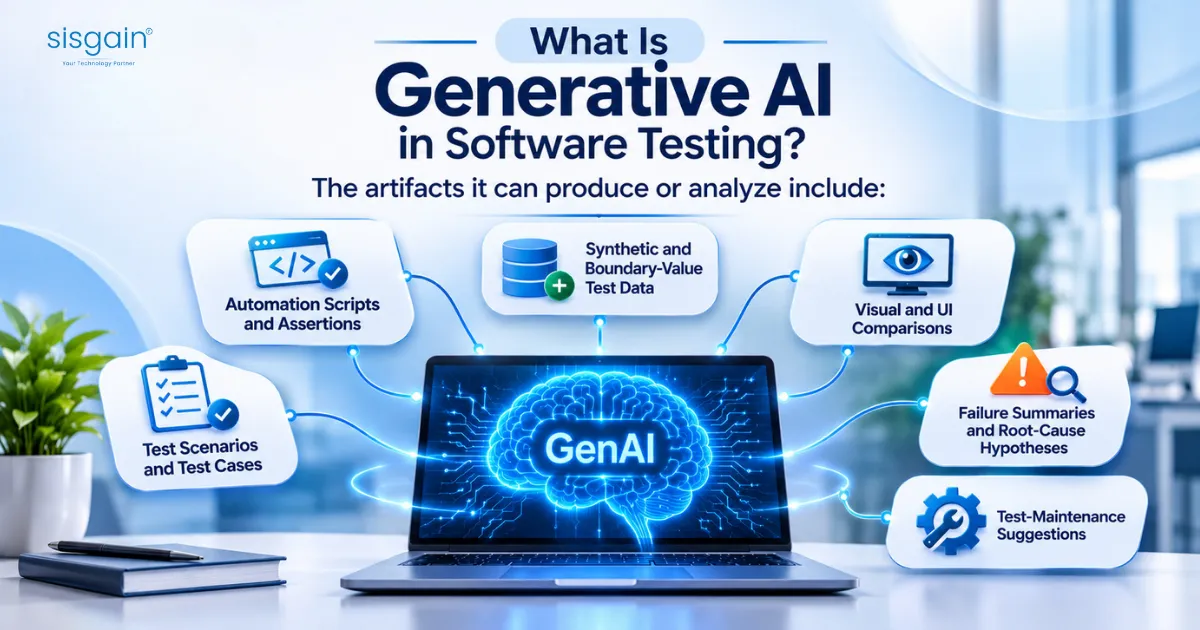
Quick answer: Generative AI in software testing means using large language models to draft and analyze QA artifacts: test cases, automation scripts, test data, and failure summaries. It speeds up authoring and triage, but its output is a draft. Humans must validate expected results, business rules, and the release decision.
The artifacts it can produce or analyze include:
- Test scenarios and test cases
- Automation scripts and assertions
- Synthetic and boundary-value test data
- Visual and UI comparisons
- Failure summaries and root-cause hypotheses
- Test-maintenance suggestions
One clarification saves a lot of confusion. Using GenAI to test software is different from testing software that contains GenAI features. The second problem involves nondeterministic outputs, safety, and model behavior. This guide covers the first: GenAI as a QA copilot.
The Real QA Problem in 2026
Release cycles keep shrinking. AI coding assistants raise the volume of change. QA teams are expected to widen coverage without adding headcount.
Industry data shows how uneven the results are. The World Quality Report 2025–26, produced by Capgemini, Sogeti, and OpenText from a survey of more than 2,000 senior executives across 22 countries, found that 89% of organizations are piloting or deploying GenAI in quality engineering: 37% in production and 52% in pilot. But only 15% have reached enterprise-wide implementation. The average productivity gain was 19%, and one third of organizations saw minimal gains.
Those numbers describe a gap between trying AI and getting value from it. The same report lists the top barriers as data privacy risk (67%), integration complexity (64%), and hallucination and reliability concerns (60%). None of those is a tooling problem. They are validation, integration, and governance problems, which is why many pilots stall. It’s also what separates them from what makes enterprise AI projects succeed.
The DORA finding points the same way. AI speeds up development, and that speed can expose weaknesses downstream. QA sits downstream.
Manual, Automated, and GenAI-Assisted QA: How They Fit Together
GenAI doesn’t replace the other two approaches. It changes where the effort goes.
| Manual testing | Traditional automation | GenAI-assisted testing |
Best for | Exploratory, usability, ambiguous requirements | Repeatable regression, smoke, performance checks | Drafting tests, expanding scenarios, generating data, summarizing failures |
Speed to author | Slow | Medium to slow | Fast for first drafts |
Maintenance burden | Low | High when UIs change often | Shifts to reviewing and correcting drafts |
Main risk | Inconsistency, coverage gaps | Brittle scripts, stale suites | Plausible but wrong tests |
Human role | Performs and judges | Writes and maintains | Validates, approves, and owns outcomes |
Use manual effort where judgment matters. Keep a deterministic runner for repeatable regression; a team running automation testing services or an in-house framework still needs one. Then use GenAI around those two: to author faster, widen scenarios, and shorten triage.
A Task-Based Model: What to Automate, What to Validate, What Humans Own
“Should we use GenAI in testing?” is the wrong question. Ask instead: which QA task has high repetition, clear inputs, and a practical validation gate?
The table ranks common tasks by fit and gives a sensible order for a first pilot.
QA task | GenAI fit | Human role | Validation burden | Pilot order |
Turn acceptance criteria into test cases | High | Validate business rules and coverage | Medium | 1 |
Summarize failures and logs | High | Confirm root cause before ticketing | Low | 2 |
Generate synthetic test data | High | Check schema, privacy, business constraints | Medium | 3 |
Draft UI or API automation scripts | Medium-high | Review selectors, assertions, maintainability | Medium-high | 4 |
Suggest regression tests from a code change | Medium | Confirm impact analysis | Medium-high | 5 |
Visual regression analysis | Medium | Judge intentional vs. unintended changes | Medium | 6 |
Self-heal broken locators | Medium | Approve repairs that change test intent | High | 7 |
Exploratory and usability testing | Low | Human-led | n/a | Keep manual |
Release approval | Low | Human-owned | n/a | Never delegate fully |
Each artifact type carries different risk, so each needs a different review lane. A failure summary that’s wrong wastes a developer’s hour. An assertion that’s wrong in a payment flow ships a defect with a green checkmark on it. Treating both as “AI output” is how review standards get diluted.
The Test Oracle Problem
Quick answer: A test oracle is the trusted basis for deciding whether observed behavior is correct. It comes from approved requirements, contracts, product rules, historical behavior, or domain experts. It should never come from the model’s own output.
A generated test can be technically valid and still wrong, because its expected result is wrong. Take a checkout test that confirms the payment request returns 200 OK. It passes. Meanwhile, the tax calculation is off, a discount rule is skipped, or a currency conversion rounds the wrong way. The test is green and the business outcome is incorrect.
The fix is procedural. Every generated test should trace to a requirement ID, and the expected result should be checked against the approved source, not against the model’s confidence. Tests that can’t be traced to a requirement are orphans. Reject them.
Testing AI-Generated Code With Independent Verification
This is the newest problem, and most GenAI testing content skips it. When a coding agent writes a feature and then writes its tests, both artifacts can share the same misunderstanding. The tests pass, and the feature is still wrong.
Quick answer: To test AI-generated code safely, separate generation from verification. Define expected behavior from the ticket and business rules before trusting any generated test, run deterministic checks first, and have a human approve adversarial cases and the final release record.
An independent verification loop looks like this:
- Capture the context. Collect the ticket, acceptance criteria, business rules, and the full code diff.
- Run deterministic checks. Build, lint, type checks, static analysis, dependency and secret scanning. These don’t depend on a model’s judgment.
- Define expected behavior first. Write down what correct looks like before reading any generated tests.
- Build a risk-based matrix. Cover the happy path, invalid inputs, authorization, boundaries, state changes, concurrency, and failure handling.
- Use GenAI for adversarial cases. Let it propose edge cases and abuse scenarios, then have a reviewer approve them.
- Run targeted checks, then widen. Start with tests tied to the change and expand by risk.
- Investigate failures with evidence. Use logs, traces, screenshots, and application state, not a summary alone.
- Produce a release record. Link requirement to test, result, approval, and any unresolved risk.
The rule to put on the wall: the author can’t be the only verifier. That applies to people and to agents. It also explains why how AI agents differ from chatbots matters for QA. An agent that can act in your environment needs boundaries and a second set of eyes.
A Realistic Sprint Workflow
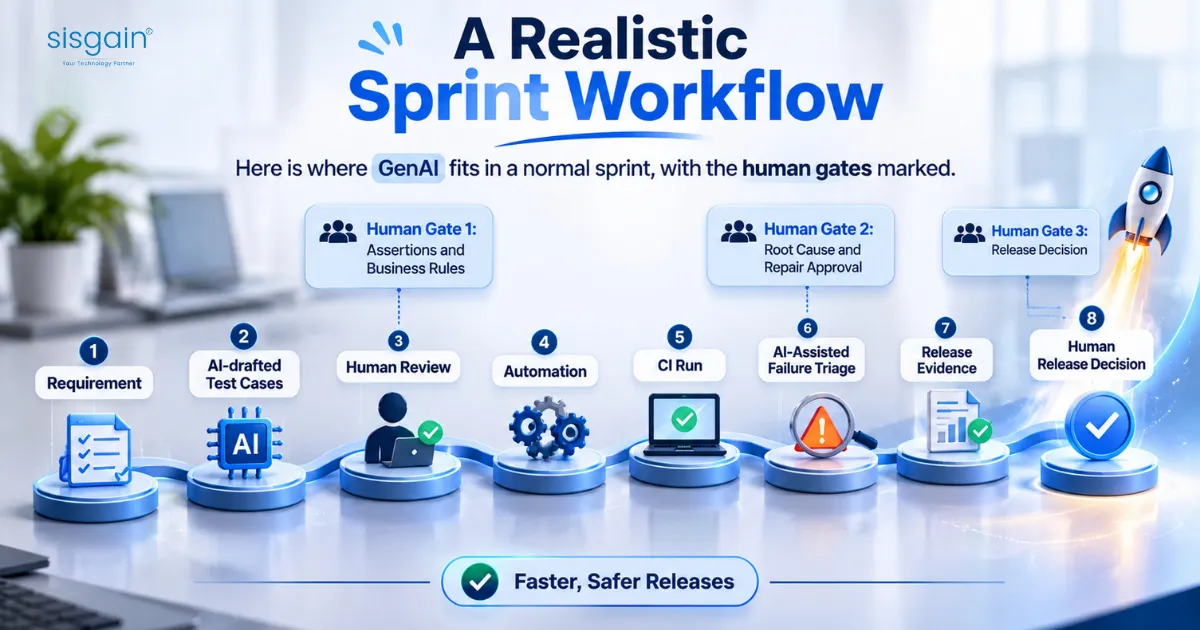
Here is where GenAI fits in a normal sprint, with the human gates marked.
Requirement → AI-drafted test cases → Human review (Gate 1: assertions and business rules) → Automation → CI run → AI-assisted failure triage (Gate 2: root cause and repair approval) → Release evidence → Human release decision (Gate 3)
Compare that with the manual version of the same sprint. Testers read the story, write cases by hand, script the automatable ones, run the suite, and read raw logs to sort real failures from flaky ones. The gates are the same. What changes is how much time goes into drafting and summarizing, and how much goes into judgment.
Gate 2 deserves emphasis. If a tool repairs a broken locator and the test passes again, someone has to confirm it still checks what it was meant to check.
A Seven-Step Implementation Playbook
- Baseline first. Record current authoring time, maintenance time, coverage, defect escape rate, QA cycle time, and cost per release. Without this, you can’t prove anything later.
- Pick one narrow pilot. For example, drafting regression cases for one stable module, or summarizing failures from one CI pipeline. Teams that want a partner to scope this can look at QA testing services, but the scoping logic holds either way: narrow, stable, measurable.
- Ground the model. Feed it approved requirements, API contracts, existing test repositories, and defect history through retrieval or a curated context layer. Teams building this typically rely on RAG development services or an internal equivalent. A model with no grounding invents requirements.
- Create review lanes. Low-risk drafts can get sampled review. Payments, authentication, privacy, compliance, and data-integrity tests get full review.
- Integrate, don’t isolate. Connect outputs to Jira, Git, CI/CD, your test management tool, and defect tracking. A copilot living in a separate tab gets abandoned.
- Measure net outcomes. Track accepted-draft rate, correction effort, false positives, escaped defects, and maintenance time.
- Expand on evidence. Scale a workflow only after it beats its baseline over at least one full release cycle.
A prompt template you can start with
A structured prompt does more for quality than a clever one. This version forces the model to surface gaps instead of guessing.
Role: You are a senior QA analyst.
Context:
- Product: [name]
- User story: [paste story]
- Acceptance criteria: [paste criteria]
- Business rules: [paste rules]
- Known risks: [paste risks]
- Test environment constraints: [paste constraints]
Task:
- Identify ambiguities or missing acceptance criteria.
- Generate functional, negative, boundary, and edge-case scenarios.
- For each scenario, provide: Test ID, requirement traceability,
preconditions, steps, expected result, risk level, required review level.
- Flag any scenario that cannot be verified from the provided context.
Constraints:
- Do not invent requirements, APIs, or business rules.
- Mark assumptions clearly.
- Prioritize customer-impacting and compliance-sensitive scenarios.
Pair it with a short assertion-review checklist. Does the expected result come from an approved source? Does the assertion check the business outcome or only that a page is loaded? Would the test fail if the feature broke in the way we fear most?
Governance as an Operating Model
Governance fails when it lives in a policy document nobody opens. Assign owners and rules.
Control | Practical rule | Owner |
Data governance | No production PII in prompts. Use masking, synthetic data, retention limits, and approved model endpoints. | Security / Data governance |
Model governance | Keep a model inventory with versions, evaluation results, and rollback plans. | AI / Platform team |
Access governance | Give agents least-privilege access and log every tool call and environment action. | Platform / DevOps |
Output reliability | Requirement traceability, assertion review, and rejection logging. | QA lead |
Auditability | Preserve prompt, context, model version, generated artifact, review decision, and execution result. | QA / Engineering |
Release accountability | AI may recommend it. Humans approve release readiness. | Engineering / QA / Product |
A simple RACI keeps this honest. QA is responsible for review and acceptance of generated tests. Engineering is accountable for the release decision. Security is consulted on data handling. Product is consulted on business rules and informed of results. The AI or platform team is responsible for the model and its access controls.
Data privacy deserves its own line item, since it topped the barriers in the World Quality Report. If your test data touches personal information, review UAE PDPL compliance expectations before any record reaches an external model. For a wider rollout structure, the 90-day AI governance implementation plan goes deeper.
One rule belongs in every policy: an AI agent must not approve its own repair, its own test, or its own release.
Metrics That Prove Value
Vague claims like “improves productivity” don’t survive a budget review. The World Quality Report’s own data shows why: a 19% average gain hides the fact that a third of organizations saw almost none. Your result depends on your baseline.
Metric | What to measure | Why it matters |
Authoring cycle time | Requirement to approved test case | Shows efficiency after review, not before |
Accepted-draft rate | Share of AI drafts needing no or minor edits | Reveals output quality |
Review burden | Reviewer minutes per accepted test | Exposes hidden labor |
Coverage lift | New requirements, edge cases, or flows covered | Shows whether coverage is meaningful |
Escaped defects | Production defects traced to missed scenarios | The most important quality signal |
Maintenance effort | Time spent fixing broken tests | Tests whether self-healing helps |
False-positive rate | Failures later traced to environment, data, or automation | Protects developer trust |
Cost per accepted test | Generation, review, execution, and maintenance cost | Prevents “tests generated” vanity counts |
For the pilot scorecard, add three columns: baseline, pilot result, and decision rule. Set the decision thresholds before the pilot starts, so nobody moves the goalposts after seeing the numbers.
Risks, Failure Modes, and Controls
Risk | How it fails | Control |
Hallucinated requirements | The model invents a feature, API, or expected behavior | Map every test to a requirement ID and reject orphans |
Weak assertions | A test checks that a page loads, not that the outcome is right | Tie assertions to acceptance criteria |
Shared blind spots | AI-written code and AI-written tests repeat the same error | Define expected behavior independently and add adversarial review |
Silent self-healing | A locator repair makes the test pass but changes what it validates | Review every repair that could alter intent |
Sensitive-data leakage | Customer data, credentials, or source code reach an external model | Mask data, use synthetic data, check provider retention terms |
Reviewer fatigue | High volume turns approval into a rubber stamp | Risk-based lanes, sampling, rotation, acceptance-rate monitoring |
Deskilling | Junior testers stop learning test design | Have AI suggest while juniors design and implement |
What’s Actionable Now
Skip the speculation and focus on four practices you can adopt this quarter: agentic QA with tightly scoped permissions, change-based test selection, independent verification of AI-generated code, and traceable release evidence. Teams building agentic workflows often start with AI agent development services or build internally, but the controls above apply either way.

Conclusion
Generating tests is the easy part now. Trusting them is the work. Ground the model in approved requirements, check expected results against an independent source, route risk to the right level of review, and keep a human accountable for the release call. Do that and GenAI shortens your cycle time without lowering your standards.
If you’re deciding where to begin, a GenAI QA readiness assessment can map your workflows, risks, and baseline before you commit to a pilot. Our team offers AI consulting services for exactly that, and you can contact Sisgain to talk through your QA setup