
A healthcare app can look polished in a demo and still fail in production if clinicians end up entering the same patient information twice, if patients cannot see their own lab results, or if the underlying architecture was never built to protect sensitive health data in the first place. These are not edge cases — they are the most common reasons healthcare software gets abandoned after launch.
Cross-platform healthcare app development is one way to address part of this problem: a single codebase that runs on both iOS and Android, built using frameworks such as React Native or Flutter, connected to healthcare-specific backend services, EHR systems, and cloud infrastructure. It is not a shortcut, and it does not remove the need for careful architecture, but for many patient-facing and administrative healthcare workflows it is a sound engineering choice.
This guide walks through how to build a healthcare app in 2026, where React Native fits into a healthcare architecture, how EHR integration with FHIR and HL7 actually works, what HIPAA-aware development really involves, realistic cost and timeline ranges, and how healthcare organizations in Dubai, Abu Dhabi, and across the UAE can evaluate a development partner before committing budget to a project.
What Is Cross-Platform Healthcare App Development?
In plain terms, cross-platform healthcare app development means building one application that runs on both iOS and Android from a largely shared codebase, rather than building two separate native applications in Swift/Kotlin. The shared layer typically handles UI, business logic, and API calls, while native modules handle anything that requires direct access to device hardware or OS-level APIs — camera access for document scanning, biometric authentication, or background processing for remote monitoring, for example.
A typical cross-platform healthcare application sits on top of backend APIs, a cloud infrastructure layer (AWS, Azure, or Google Cloud), and one or more healthcare integrations — most commonly an EHR/EMR system accessed through FHIR or HL7 interfaces. React Native and Flutter are the two frameworks most commonly used for this approach; React Native currently has broader adoption among healthcare and enterprise mobile teams because of its maturity and native module ecosystem.
Healthcare organizations generally consider cross-platform development for four reasons:
Faster development. Shared business logic, shared UI components, and a single set of core screens reduce the amount of duplicate work between iOS and Android. Features like appointment scheduling, secure messaging, or a patient dashboard are written once and rendered on both platforms, rather than implemented twice.
Lower — but not guaranteed lower — overall complexity. This point matters and is often oversold. Cross-platform development can meaningfully reduce UI and business-logic duplication, but it does not reduce the cost of security engineering, EHR integration, compliance documentation, clinical validation, or QA. In most healthcare projects, these non-UI workstreams consume more budget than the mobile front end itself. A healthcare app is not cheap simply because it is cross-platform.
Consistent experience across devices. Clinicians increasingly use a mix of hospital-issued Android tablets and personal iOS devices; patients use whatever phone they own. A shared codebase makes it easier to guarantee that a scheduling flow, a messaging thread, or a lab-results view behaves identically regardless of platform — which reduces training overhead for clinical staff and support overhead for patients.
Faster iteration on evolving workflows. Clinical and administrative workflows change — a new intake form, a new insurance requirement, a new triage step. Updating one codebase instead of two shortens the time between identifying a workflow problem and shipping a fix, which matters more in healthcare than in most other software categories because workflow friction directly affects clinical staff time and patient outcomes.
Cross-Platform vs Native Healthcare App Development: Which Is Better?
Neither approach is universally correct. The right choice depends on the workflows the app needs to support.
|
Factor |
Native (iOS/Android separately) |
Cross-Platform (React Native/Flutter) |
|
Development speed |
Slower — two codebases |
Faster — shared codebase |
|
Cost |
Generally higher for equivalent scope |
Generally lower for UI/logic layer, similar for integration/security |
|
Codebase |
Separate Swift/Kotlin projects |
Single shared codebase with native modules where needed |
|
Performance |
Best for compute-intensive or real-time tasks |
Strong for typical app workloads; near-native for most UI |
|
Device APIs |
Full, immediate access to new OS APIs |
Good access via native modules; occasional lag on brand-new APIs |
|
Maintenance |
Two codebases to patch and test |
One primary codebase to patch and test |
|
Healthcare workflows (scheduling, portals, messaging) |
Well supported |
Well supported |
|
Telehealth |
Well supported |
Well supported |
|
Remote patient monitoring (RPM) |
Well supported |
Well supported, native modules for device SDKs |
|
Medical devices / biosignal capture |
Preferred for high-frequency or regulated device data |
Possible with native modules; native often simpler for SaMD scope |
|
EHR integration |
Same effort — integration lives at the API layer, not the UI layer |
Same effort — integration lives at the API layer, not the UI layer |
|
Compliance (HIPAA, etc.) |
Determined by architecture and operations |
Determined by architecture and operations |
The last two rows are worth pausing on. Compliance is primarily an architectural and operational responsibility, not a framework feature. Neither React Native nor native Swift/Kotlin is "HIPAA compliant" out of the box — compliance comes from how data is stored, transmitted, logged, and access-controlled, not from the language the UI is written in. Similarly, EHR integration happens at the API and backend layer; the mobile framework consumes FHIR resources through HTTP calls regardless of whether the app is native or cross-platform.
Native development is generally preferable when:
- The app processes high-frequency biosignal or waveform data in real time (e.g., continuous ECG capture)
- It relies on advanced on-device machine learning tightly coupled to OS-specific ML frameworks
- It integrates with specialized, OEM-specific medical device SDKs that only ship native libraries
- The workload is extremely latency-sensitive at the OS level
Cross-platform development is generally suitable when the app centers on:
- Patient portals and self-service scheduling
- Telehealth and video consultation workflows
- Secure messaging between patients and care teams
- Medication tracking and reminders
- Patient engagement and education content
- RPM dashboards that consume data from wearables via cloud APIs rather than processing raw signals on-device
- Administrative and operational tools for clinical staff
Practical framework: if the primary risk in the project is workflow complexity, integration complexity, or time-to-market, cross-platform development is usually the stronger fit. If the primary risk is real-time signal processing or deep hardware integration, weight the decision toward native, or a hybrid approach — cross-platform for the majority of the app, with a native module for the specific hardware-bound feature. For organizations evaluating vendors for this decision, a specialist Cross Platform App Development Company can usually walk through this trade-off against your specific device and workflow requirements rather than defaulting to one framework.
How to Build a Healthcare App in 2026
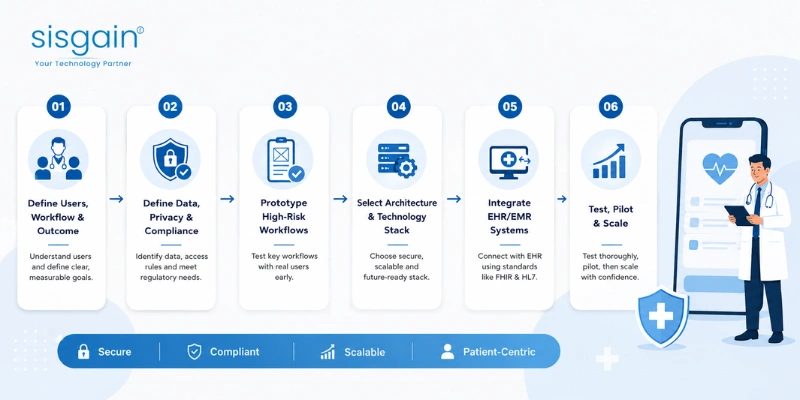
Healthcare software development fails most often not because the code is bad, but because the team started with a feature list instead of a workflow problem. The sequence below reflects the order healthcare projects should actually be planned in: workflow first, compliance second, architecture third, features fourth, technology last.
Step 1 — Define the User, Workflow and Business Outcome
Every healthcare app serves some combination of four user types: the patient, the clinician, the administrator, and sometimes the caregiver managing care on someone else's behalf. Each has different priorities — a patient wants clarity and low friction, a clinician wants speed and accuracy inside an existing workflow, an administrator wants visibility and control.
Before any design work begins, the project needs a measurable outcome, not a feature wish list. Examples of real, testable outcomes:
- Reduce appointment no-shows through reminders and self-scheduling
- Reduce clinical documentation time per encounter
- Improve patient response time to care-team messages
- Increase active patient portal adoption
- Reduce manual re-entry of data already captured in the EHR
- Improve patient access to historical records and lab results
Do not begin with features. Begin with workflow problems. A team that starts by listing 40 screens usually ends up building software that duplicates existing EHR functionality poorly instead of solving a specific friction point well.
Step 2 — Define Data, Privacy and Regulatory Requirements
Before architecture decisions are made, the team needs clear answers to a small set of questions: What data enters the application? Where is it stored, and for how long? Who can access it, and who can modify it? Who owns the data? Which third-party systems does it flow to — analytics platforms, cloud email providers, SMS gateways?
The regulatory scope depends on the specifics of the project. Not every healthcare app automatically requires HIPAA compliance — HIPAA applies specifically to covered entities (such as healthcare providers and health plans) and their business associates handling Protected Health Information (PHI) in the U.S. regulatory context. A UAE-based healthcare organization may be subject to UAE federal and emirate-level data protection requirements, and to GDPR if it serves EU patients, in addition to — or instead of — HIPAA, depending on where patients are located and which markets the application serves. Organizations should confirm applicable regulatory scope with legal counsel rather than assuming a single framework covers every case. Where the application functions as a medical device (Software as a Medical Device, or SaMD) — for example, software that provides a diagnosis or treatment recommendation — additional regulatory review (such as FDA pathways in the U.S., or equivalent frameworks elsewhere) may apply. SOC 2 and ISO 27001 are commonly requested by enterprise healthcare customers as evidence of security operational maturity, independent of which regulatory framework applies.
Step 3 — Prototype the Highest-Risk Healthcare Workflows
Before writing production code, the highest-risk workflows — patient intake, scheduling, telehealth session flow, clinical messaging, RPM data review — should be prototyped in a tool like Figma using synthetic (fake) patient data, then tested with actual clinicians and, where feasible, patients. This is where workflow assumptions get corrected cheaply.
A workflow that saves clinicians two minutes per encounter is more valuable than an interface with dozens of features nobody consistently uses. Usability testing with real healthcare staff — not just internal stakeholders — routinely surfaces friction points that a purely visual design review misses, particularly around how information is entered during time-pressured clinical interactions.
Step 4 — Select the Architecture and Technology Stack
Each layer of the stack exists to solve a specific problem, not simply because it is popular.
Mobile layer: React Native or Flutter for the shared UI and business logic, with native modules (Swift/Kotlin) where the app needs deep hardware access — biometric authentication, background health data sync, or specific wearable SDKs.
Backend layer: Node.js or Python powering REST (or GraphQL) APIs, sitting behind an API gateway that handles rate limiting, authentication, and request routing. Background job queues handle asynchronous work — sending reminders, processing EHR sync jobs, generating reports — without blocking the user-facing request path.
Database layer: A relational database such as PostgreSQL is the standard choice for healthcare data because it supports strong data integrity constraints, transactional consistency, and mature encryption and access-control tooling — all important where clinical data accuracy is non-negotiable.
Cloud infrastructure: AWS, Azure, or Google Cloud, each of which offers infrastructure that can be configured to support HIPAA-aligned architectures (encryption at rest and in transit, private networking, audit logging) when properly implemented — the cloud provider offers the tools, but the responsibility for correct configuration sits with the development team.
Security layer: Multi-factor authentication (MFA), OAuth 2.0 for delegated authorization, role-based access control (RBAC) enforcing least-privilege access, encryption of data at rest and in transit, a secure secrets management system (rather than hardcoded credentials), and comprehensive audit logs recording who accessed or modified what data, and when.
DevOps layer: CI/CD pipelines that run automated tests before deployment, strictly separated development, staging, and production environments, centralized monitoring and logging, and automated regression testing to catch workflow-breaking changes before they reach clinicians or patients.
Step 5 — Integrate EHR/EMR Systems
EHR integration should be scoped and validated before core development begins, not bolted on afterward. This is covered in depth in the dedicated section below, built around FHIR, HL7, SMART on FHIR, and OAuth 2.0.
Step 6 — Test, Pilot and Scale
Testing for a healthcare application needs to go beyond standard functional QA. It should include security testing (penetration testing and vulnerability scanning), permission testing (verifying RBAC actually blocks unauthorized access at every layer, not just in the UI), interoperability testing (confirming EHR data maps correctly across real-world edge cases), performance and load testing, usability testing with real clinical users, and regression testing to catch workflow breakage introduced by new releases.
Rollout should be phased: pilot with a small, controlled group → limited release to a broader but still bounded population → full rollout. Skipping the pilot phase is one of the most common causes of clinical staff rejecting new software — problems that would have been caught with 20 real users surface instead with the entire hospital, at a much higher cost.
React Native Healthcare App Development: Architecture and Best Practices
React Native healthcare app development has become common in the industry because it lets teams maintain one primary codebase while still reaching native performance for the vast majority of screens, and it has a mature ecosystem of native modules for the hardware access healthcare apps typically need — camera, biometrics, push notifications, and background sync.
A representative architecture for a React Native healthcare application:
|
Layer |
Example |
|
Mobile |
React Native (with native modules for biometrics, camera, background sync) |
|
API layer |
Node.js or Python REST/GraphQL services |
|
Database |
PostgreSQL |
|
Cloud |
AWS, Azure, or GCP |
|
Authentication |
OAuth 2.0, MFA, SSO for staff accounts |
|
EHR |
FHIR/HL7 integration layer |
|
Monitoring |
Centralized logging and alerting |
|
CI/CD |
Automated build, test, and deployment pipeline |
There are several React Native-specific considerations that matter more in healthcare than in a typical consumer app:
- Secure token storage. Authentication tokens and session credentials should be stored in the platform's secure hardware-backed storage — Keychain on iOS, Keystore on Android — never in plain local storage or AsyncStorage.
- Data minimization on-device. PHI should generally not be cached on the device beyond what is needed for the current session. Every piece of PHI stored locally is an additional asset that must be protected if the device is lost, stolen, or compromised.
- Background processing constraints. Android's battery optimization and background execution limits can interrupt sync jobs for RPM or messaging apps; these need to be explicitly accounted for, not assumed to work like foreground code.
- Wearable and RPM integrations typically rely on cloud-to-cloud data ingestion (from the wearable vendor's API) rather than the mobile app processing raw device signals directly — this keeps the mobile layer simpler and shifts complexity to the backend integration layer.
- Push notifications carrying clinical content need care — a notification preview that displays "Your test results show..." on a lock screen is a PHI exposure risk regardless of how secure the app itself is.
- Offline behavior needs explicit design decisions: what happens to a partially completed intake form or medication log entry if connectivity drops mid-session, and how is data reconciled without creating duplicates once connectivity returns.
React Native is not the correct choice for every healthcare use case. Where the application depends on continuous high-frequency sensor processing, deep integration with a specific regulated medical device SDK, or real-time on-device inference tightly coupled to OS-native ML frameworks, native development — or a native module wrapping the specific hardware-bound feature — remains the more defensible engineering choice.
EHR Integration in Mobile Apps: FHIR, HL7 and SMART on FHIR
EHR integration in mobile apps is frequently the single hardest and most underestimated part of a healthcare app project — harder than the mobile UI, and often harder than the security work. This is because EHR systems were built for clinical documentation workflows, not for mobile app consumption, and every healthcare organization's EHR configuration differs slightly even within the same vendor platform.
FHIR (Fast Healthcare Interoperability Resources) is the modern standard for exchanging healthcare data over web APIs, published by HL7 International. It organizes data into structured "resources" — the ones a healthcare app most commonly interacts with are Patient (demographics), Appointment (scheduling), Encounter (a specific visit or interaction), Observation (vitals, lab results, RPM readings), and MedicationRequest (prescriptions). Because FHIR resources are standardized, a well-built integration layer can, in principle, work across multiple EHR vendors with comparatively modest per-vendor adjustments — though in practice each EHR vendor's FHIR implementation has its own quirks and coverage gaps that need to be validated directly against that vendor's sandbox.
HL7 (specifically HL7 v2, the older messaging standard) remains widely used in hospital environments for real-time clinical messaging — admissions, discharges, transfers, lab result delivery — particularly where legacy hospital information systems have not migrated to FHIR-based APIs. A healthcare app integrating with an established hospital environment should expect to encounter HL7 v2 interface engines alongside, or instead of, FHIR APIs, and should plan for both.
SMART on FHIR is an authorization and app-launch framework built on top of FHIR and OAuth 2.0. It defines how a third-party application can be securely launched from within an EHR (or independently) and granted a scoped, time-limited authorization to specific FHIR resources for a specific patient or user — without ever handling the EHR's underlying login credentials directly.
OAuth 2.0 is the authorization protocol underlying SMART on FHIR: it allows an app to request and receive a scoped access token from an authorization server, rather than being handed broad, standing access to the entire EHR.
EHR Integration Roadmap
Phase 1 — Read-only integration. Start with low-risk, high-value read access: patient demographics, upcoming appointments, and basic clinical context. This validates the data mapping and authentication flow without any risk of writing incorrect data back into the clinical record.
Phase 2 — Write-back. Once read access is validated, introduce controlled write-back for lower-risk data — patient-submitted intake forms, care task completion, patient-generated information such as symptom logs.
Phase 3 — Workflow automation. Layer in notifications and status-change triggers — appointment reminders, care-team alerts when a patient submits an RPM reading outside a defined threshold, task assignment updates.
Phase 4 — Edge cases. This is where most integration timelines slip. Real-world EHR integration has to account for duplicate patient records, patient identity mismatches across systems, missing or incomplete data fields, API failures and rate limits, planned and unplanned EHR downtime, and the need for retry logic built around idempotency — ensuring that a retried request (say, after a timeout) doesn't create a duplicate appointment or a duplicate medication entry.
Practical insight: start with read-only Patient and Appointment resources before introducing any write-back workflow. This sequencing lets the team validate that data is mapping correctly — that patient identity resolution is accurate, that appointment times reflect the correct timezone and status — before the integration has the ability to alter the source-of-truth clinical record. Introducing write-back too early is one of the most common causes of data-integrity incidents in EHR-integrated mobile apps.
If the integration does not reduce manual re-entry or measurably improve a clinical or administrative workflow, simply connecting the app to an EHR does not create meaningful business value — it just adds another data pipeline to maintain. Organizations investing in Modern Hospital Information Systems should evaluate integration scope against the specific workflow it is meant to fix, not treat "EHR integration" as a checkbox.
HIPAA Compliant Healthcare App Development: Security Checklist
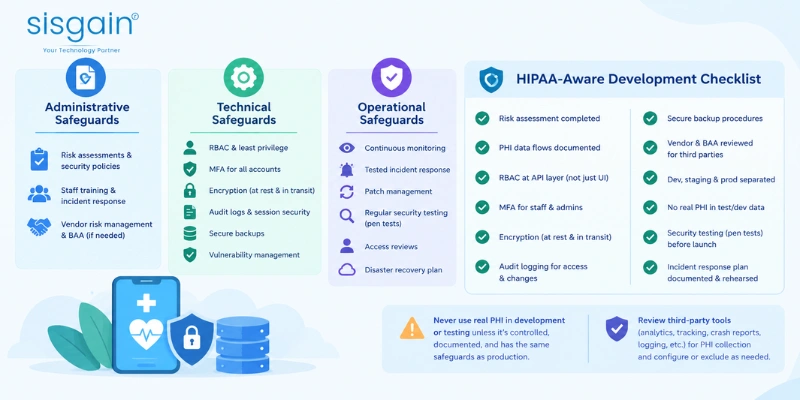
HIPAA compliant healthcare app development is often misunderstood as "add encryption and you're compliant." Encryption is one control among many; HIPAA's Security Rule is built around three categories of safeguards, and all three matter.
Administrative safeguards include documented risk assessments, written security policies, workforce security training, an incident response plan, vendor risk management, and — where a business associate relationship exists — a signed Business Associate Agreement (BAA) between the covered entity and any vendor handling PHI on its behalf.
Technical safeguards include role-based access control (RBAC) enforcing least-privilege access, multi-factor authentication (MFA), encryption of data at rest and in transit, secure session management (timeouts, token expiry), comprehensive audit logs, secure backup procedures, and ongoing vulnerability management.
Operational safeguards include continuous security monitoring, a tested incident response process, disciplined patch management, regular security testing (including penetration testing), periodic access reviews to remove stale permissions, and a documented disaster recovery plan.
HIPAA-Aware Development Checklist
- Risk assessment completed
- PHI data flows documented end-to-end
- RBAC implemented and tested at the API layer, not just the UI
- MFA implemented for staff and administrative accounts
- Encryption enabled at rest and in transit
- Audit logging implemented for access and modification events
- Secure, tested backup procedures configured
- Vendor and BAA requirements reviewed for every third-party service touching PHI
- Development, staging, and production environments strictly separated
- Real PHI removed from test and development data
- Security testing (including penetration testing) completed before launch
- Incident response process documented and rehearsed
Never put real PHI into development or testing environments unless there is a specific, controlled, documented reason and the environment has the same safeguards as production. Development environments are, in practice, one of the most common sources of healthcare data exposure — they tend to have weaker access controls, are shared more broadly across a team, and are often excluded from the same monitoring applied to production.
Third-party tools deserve the same scrutiny as core infrastructure. Analytics SDKs, tracking pixels, crash-reporting tools, and general-purpose logging libraries can unintentionally capture PHI — a crash report that includes a stack trace with a patient's name in a variable value, or an analytics event that logs a full API request payload, can leak sensitive data outside the organization's controlled environment without anyone intending it to happen. Every third-party SDK integrated into a healthcare app should be reviewed for what data it collects by default, and configured — or excluded — accordingly. Organizations formalizing this into a documented program often reference frameworks such as a HIPAA-Compliant App in 2026 checklist to keep administrative, technical, and operational controls aligned as the product evolves.
Real-World Healthcare App Case Study: React Native + EHR Integration
Centizen developed a cross-platform healthcare application built on React Native, hosted on AWS, with FHIR-based EHR integration. The application supported appointment scheduling, secure messaging, medication tracking, lab report access, treatment history, and patient information management. According to the case study, the project was delivered in approximately five months.
According to the case study, the reported outcomes included:
- 35% reduction in patient no-shows
- 40% increase in patient portal usage
- 50% faster patient–doctor communication turnaround
These figures are reported case-study results, not general industry benchmarks, and they should not be read as a guarantee of outcomes for any other project. That said, they illustrate a defensible pattern seen across similar healthcare app deployments: automated reminders and self-service scheduling can meaningfully affect appointment attendance; easier, more direct digital access to records and communication tends to correlate with higher patient portal adoption; and integrated, in-app messaging between patients and care teams can shorten communication turnaround compared with phone-based workflows. Whether a specific organization would see comparable results depends heavily on baseline adoption, patient population, clinical workflow design, and how well the rollout is piloted and supported — not on the technology stack alone.
How Much Does Healthcare App Development Cost in 2026?
The figures below are indicative benchmark ranges, not a fixed UAE quotation. Actual cost depends on project-specific scope.
|
Project type |
Indicative range |
|
Focused MVP |
$60,000–$150,000 |
|
Full healthcare app with deep EHR integration |
$220,000–$450,000+ |
|
HIPAA hardening |
+$10,000–$25,000 |
|
FDA/SaMD scope |
+$25,000–$80,000 |
|
SOC 2 support |
+$15,000–$60,000 |
What actually moves these numbers:
- Number of platforms (iOS, Android, web) supported
- Number of distinct user roles (patient, clinician, admin, caregiver) and how differentiated their workflows are
- Depth of EHR integration — read-only vs. bidirectional, single-vendor vs. multi-vendor
- Whether telehealth (video infrastructure, session recording, consent workflows) is in scope
- Remote patient monitoring and wearable integrations
- Admin dashboards and reporting/analytics depth
- Security requirements beyond baseline (penetration testing cadence, advanced audit tooling)
- Regulatory and compliance scope (HIPAA, SOC 2, FDA/SaMD)
- Number and complexity of third-party integrations (payments, insurance verification, pharmacy systems)
- Testing depth, including interoperability and security testing
- Cloud infrastructure design (multi-region, high availability, disaster recovery)
- Post-launch maintenance and support commitments
These ranges should not be treated as guaranteed UAE pricing — they reflect general project scope patterns observed across the industry. The most reliable way to estimate a specific project is to define users + workflows + integrations + compliance scope + platforms + security requirements in detail before requesting quotes; this is also the information a serious vendor will ask for before providing a meaningful estimate. Organizations comparing options often start by reviewing general Healthcare App Development Cost frameworks before requesting scoped quotes from two or three vendors.
How Long Does It Take to Build a Healthcare App?
|
Phase |
Typical range |
|
Discovery |
2–4 weeks |
|
UX/UI design |
3–6 weeks |
|
Core development |
8–16 weeks |
|
EHR integration |
4–12+ weeks |
|
Security & QA |
3–8 weeks |
|
Pilot |
2–6 weeks |
As a general pattern, a focused MVP typically takes approximately 3–5 months, while a complex healthcare platform with deep EHR integration, multi-role access control, and regulatory scope can take 9+ months. EHR validation cycles, security audits, third-party integrations, and regulatory review are the phases most likely to extend a timeline beyond initial estimates — they depend on external systems and stakeholders, not just internal development velocity.
The Centizen case study referenced above reported an approximately five-month delivery timeline for its scope (scheduling, messaging, medication tracking, lab reports, treatment history, and FHIR-based EHR integration) — useful as a reported project example, not as a universal benchmark for every healthcare app.
How to Choose a Healthcare App Development Company in UAE
Before committing budget, verify the following with any prospective partner:
- Healthcare domain experience — not just general mobile development experience, but specific exposure to clinical workflows, patient data handling, and healthcare operational realities.
- EHR/FHIR integration experience — direct experience integrating with real EHR platforms, not just theoretical familiarity with the FHIR specification.
- Security and compliance capabilities — a documented approach to RBAC, encryption, audit logging, and risk assessment, not a one-line claim of "HIPAA compliant."
- Cloud architecture expertise — demonstrated ability to design for the specific cloud provider and compliance posture the project requires.
- Real healthcare case studies — evidence of comparable projects, ideally with reported outcomes, not just a portfolio of generic apps.
- QA and interoperability testing rigor — a defined testing process that includes permission testing and integration validation, not just functional UI testing.
- Post-launch support — a clear plan for patching, monitoring, and incident response after go-live, since healthcare software carries ongoing operational risk.
- Documentation and knowledge transfer — architecture documentation, data flow diagrams, and access to source code and infrastructure configuration, not a black-box deliverable.
- Ability to support UAE healthcare requirements — familiarity with the practical realities of deploying and supporting healthcare software for organizations operating under UAE data protection expectations, alongside any HIPAA or GDPR scope relevant to the specific patient population.
Questions to Ask Before Hiring a Healthcare App Development Partner
- Have you integrated with Epic, Oracle Health (Cerner), or other EHR systems, and can you describe the scope?
- Which specific FHIR resources have you worked with in production?
- How do you protect PHI across the mobile app, API layer, and database?
- How do you implement and store audit logs, and who can access them?
- What security testing is included in the project, and how often does it recur post-launch?
- How do you handle EHR downtime or API failures without breaking the user experience?
- How do you prevent duplicate transactions or records during retries — what's your idempotency strategy?
- What does post-launch support actually include, and what is the response time for critical issues?
- Can you provide healthcare-specific case studies with reported outcomes?
- How do you validate clinical workflows with real clinicians before and after launch?
A serious Healthcare Software development companies shortlist should be built around detailed answers to these questions rather than portfolio aesthetics alone.
Planning a healthcare app for a hospital, clinic, or digital health business in the UAE? Start by defining your workflows, integrations, security requirements, and MVP scope before evaluating vendors — that scoping work is what makes a cost estimate meaningful. Teams offering Top-Notch Healthcare Software Services, including SISGAIN, can help evaluate architecture options, EHR integration approach, and development roadmap once that scope is defined. SISGAIN's relevant capabilities span healthcare software development, healthcare mobile applications, EHR/EMR integration, telemedicine, remote patient monitoring, and secure cloud architecture for healthcare organizations, including those exploring Healthcare Software Development Services in Dubai.