
Building a healthcare app for the UAE isn't a matter of bolting on encryption and calling it HIPAA-compliant. The real work is designing a product that holds up against the UAE's data protection law, the health authority in the emirate you're launching in, the interoperability platform your patients' records already live in, and the cybersecurity controls auditors will actually check.
This guide walks through what that means in practice — not as a legal summary, but as a build plan: which regulations shape which features, how the architecture should be structured, what a realistic budget looks like in 2026, and where founders most often get it wrong.
Quick Answer: What Does It Take to Build a UAE-Compliant Healthcare App?
A UAE-compliant healthcare app needs more than standard app security. Depending on your emirate and use case, you may need to address PDPL, Federal Law No. 2 of 2019, DHA/DOH/MOHAP licensing, NABIDH/Malaffi/Riayati integration, UAE data residency, consent management, cybersecurity controls, and clinical documentation.
This guide covers:
- UAE healthcare regulations, layer by layer
- Telemedicine compliance
- Data residency and cloud architecture
- NABIDH, Malaffi, and Riayati integration
- Security and privacy features
- Development costs and timelines for 2026
- The mistakes that cost health-tech startups the most time and money
What Makes UAE Healthcare App Development Different?
Healthcare Apps Are More Than Ordinary Mobile Applications
A fitness app that mishandles a step count is an inconvenience. A healthcare app that mishandles a patient's record is a liability — and a regulatory one. The data these apps touch includes patient records, medical history, prescriptions, lab reports, consultation notes, personal identifiers, and clinician-to-patient communication. Every one of those categories carries its own handling requirements once you're operating under UAE health law.
Why a UAE-First Compliance Strategy Matters
Requirements shift depending on the emirate you're building for, the type of healthcare facility involved, whether you're offering telehealth or in-person care, what data you're actually processing, which systems you need to integrate with, and whether your app includes any AI-driven or diagnostic functionality. A telemedicine app serving Dubai clinics and a records app for a Northern Emirates hospital network are, in regulatory terms, two different products — even if the codebase looks similar.
What Can Go Wrong If Compliance Is Considered Too Late
Teams that treat compliance as a post-launch checklist tend to run into the same wall: architecture that needs rebuilding, integrations that get delayed by months, licensing complications that stall a launch date, vendors that need replacing mid-project, and security remediation that costs more than it would have cost to design correctly the first time. This is exactly where a partner offering Custom Healthcare IT Solutions In UAE earns its fee — tailored compliance and integration architecture from the start avoids all five of these problems.
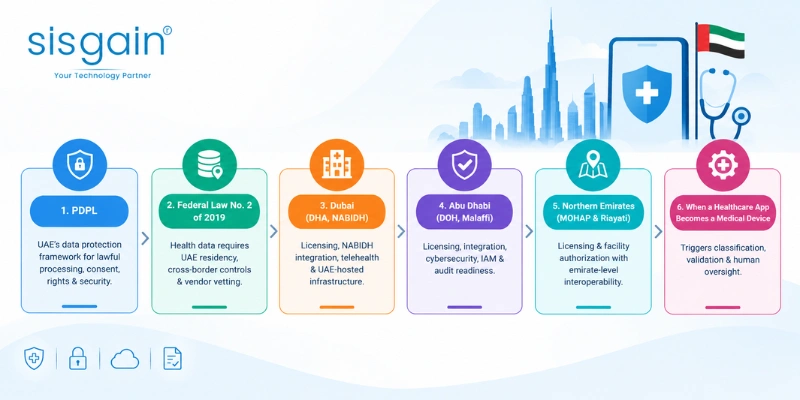
UAE Healthcare App Compliance Framework: The 5 Layers You Must Understand
PDPL: UAE's Federal Personal Data Protection Framework
Federal Decree-Law No. 45 of 2021, commonly referred to as the PDPL, is the UAE's federal personal data protection framework. It sets out lawful processing and purpose limitation, data minimization, privacy notices, consent management, data-subject rights, security obligations, accountability, and breach response planning.
For your product, this translates into concrete features: privacy policy and consent screens that are actually readable, workflows that let a patient request access to or correction of their data, retention controls that don't just keep everything forever, data-processing agreements with every vendor that touches patient data, and privacy-by-design baked into the architecture rather than added as a patch.
Federal Law No. 2 of 2019: Health Data & ICT Requirements
Health data carries protections beyond general personal data, and that's where Federal Law No. 2 of 2019 comes in. It's the reason UAE data residency isn't optional guidance — it's a design constraint. This law shapes storage and processing decisions, cross-border transfer restrictions, and how closely you need to vet cloud hosting and third-party vendors before you sign a contract with them.
Does hosting healthcare data outside the UAE automatically make an app non-compliant? Not necessarily in every circumstance, but UAE healthcare data residency and applicable approvals need to be assessed before you select a cloud region or a third-party processor — not after you've already built on top of it.
In practice, that means your UAE-region hosting strategy, backup and disaster recovery plan, and vendor data-flow map all need to be settled during architecture planning, not discovered during a security review.
Dubai: DHA, NABIDH & Telehealth Requirements
Building for Dubai means factoring in DHA licensing considerations, NABIDH interoperability, telehealth-specific requirements, clinical documentation standards, consent and access controls, and UAE-hosted infrastructure. For Dubai-focused healthcare platforms, NABIDH should be treated as a core integration workstream from the start — not a feature you bolt on once the app is already in the App Store. Teams that push it to "phase two" almost always end up rebuilding data models they thought were finished.
If your platform needs to exchange clinical data at all, this is also where HL7 & FHIR Integration Solutions in UAE become relevant — NABIDH connectivity runs on these standards, and getting the data model right the first time saves months of rework later.
Abu Dhabi: DOH, Malaffi & ADHICS v2.0
Abu Dhabi introduces its own set of considerations: DOH licensing and health data requirements, Malaffi integration, ADHICS v2.0 cybersecurity expectations, risk assessments, identity and access management, monitoring and incident response, vendor risk management, and audit readiness.
It's worth being precise here: ADHICS isn't a universal requirement for every UAE healthcare app. The controls that actually apply depend on your organization, the type of facility you're building for, and how the app is deployed. A wellness app with no clinical data footprint and a hospital's patient portal sit in very different places on that spectrum.
Northern Emirates: MOHAP & Riayati
Outside Dubai and Abu Dhabi, MOHAP and emirate-level requirements govern licensing and facility authorization, while Riayati handles interoperability. If you're deploying across multiple emirates, a single compliance strategy usually doesn't fit all of them — what satisfies MOHAP in Sharjah won't automatically satisfy DHA in Dubai.
When Does a Healthcare App Become Software as a Medical Device?
Diagnostic features, AI-driven triage, and clinical decision support can push an app into medical device territory, which brings classification considerations, validation requirements, and a need for human oversight in the loop. This is a question worth answering during discovery, before development starts — not something to figure out after the AI model is already trained and shipped.
HIPAA vs UAE Healthcare Compliance: What Changes?
What HIPAA Can Still Teach UAE Healthcare App Developers
HIPAA isn't useless here. Its core disciplines — encryption, access control, audit logs, risk assessments, incident response, vendor security, and data protection — are sound security practice regardless of jurisdiction. If your team has built HIPAA-compliant systems before, that experience transfers.
Why HIPAA Alone Is Not Enough for UAE Clinics
What doesn't transfer automatically are UAE-specific data residency rules, PDPL obligations, emirate-level health authority requirements, the NABIDH/Malaffi/Riayati interoperability layer, local licensing, and different retention and breach-notification obligations. A team that assumes "HIPAA-ready" equals "UAE-ready" usually discovers the gap during a compliance review, which is the most expensive possible time to discover it.
HIPAA vs UAE: Quick Comparison
|
Dimension |
HIPAA |
UAE Healthcare Compliance |
|
Primary framework |
U.S. healthcare privacy and security rules |
PDPL, health-data law, and emirate-level regulations |
|
Scope |
U.S. covered entities and business associates |
Entities processing personal and health data in the UAE |
|
Data residency |
No general U.S. residency requirement |
UAE healthcare data residency must be assessed |
|
Consent |
HIPAA-specific permitted uses |
UAE privacy and health-data consent requirements |
|
Interoperability |
Depends on applicable U.S. requirements |
NABIDH, Malaffi, and Riayati may be relevant |
|
Cybersecurity |
Risk-based security framework |
Applicable UAE cybersecurity standards and controls |
|
Licensing |
U.S. healthcare context |
DHA, DOH, MOHAP, or other relevant authority |
Treat this table as a starting orientation, not a legal equivalence chart. Every facility and use case needs its own assessment against the requirements that actually apply to it.
How to Build a UAE-Compliant Healthcare App: Architecture Blueprint
Start With a Regulatory & Product Discovery Workshop
Before a single screen gets designed, nail down the target emirate, the healthcare use case, the data types involved, the users and their roles, the integrations you'll need, the licensing requirements that apply, and the overall compliance scope. A useful shorthand for the sequence:
Use case → Emirate → Data classification → Licensing → Architecture → Development
Skip this step and you'll be making architecture decisions blind — which is how teams end up rebuilding their database schema after the compliance review.
Design the Cloud Architecture Around UAE Data Residency
Once you know your data classification, the cloud architecture follows: UAE-region hosting, database and object storage placement, encrypted backups, disaster recovery, vetted third-party data processors, and a clear map of where analytics and crash-reporting data actually flows (this last one trips up more teams than you'd expect — a default analytics SDK can quietly ship patient interaction data to a US server).
A simplified data flow looks like this:
Patient / Clinician → Mobile or Web App → API Layer → UAE-Hosted Application → UAE Database → HIE Integration
Branching off that core flow, you'll also need dedicated authentication, audit logging, monitoring, and backup/disaster-recovery components. This is the layer where Healthcare Software Development Services in Dubai matter most — a platform built by a team that's already solved UAE-region hosting and vendor vetting will move faster than one figuring it out for the first time on your project.
Implement Core Security Controls
|
Security Requirement |
App Implementation |
|
Access control |
RBAC + MFA |
|
Data protection |
Encryption in transit and at rest |
|
Accountability |
Audit logs |
|
Incident response |
Breach response workflow |
|
Data minimization |
Collect only necessary information |
|
Vendor security |
Data-processing agreements |
Beyond the table, this layer also covers TLS everywhere, least-privilege access as a default rather than an afterthought, proper session management, ongoing monitoring and alerting, regular vulnerability testing, and a documented incident response plan that someone has actually rehearsed.
Build NABIDH, Malaffi & Riayati Integration Into the Roadmap
Interoperability isn't just an API integration task you drop into a sprint. It requires FHIR/HL7 data mapping, patient identity matching, clinical data exchange, consent and access controls specific to the exchange platform, integration testing, and coordination with the relevant health authority for certification. Every one of those steps affects both cost and timeline, which is why HIE integration deserves its own line item in the project plan rather than getting folded into "backend development."
Mobile App Security: Avoid Uncontrolled PHI Storage
On the device itself: avoid storing protected health information locally unless there's a genuine reason to, use secure storage where local caching is unavoidable, never put sensitive data inside push notification payloads, enforce session timeouts, plan for remote wipe and MDM where clinicians are using shared or managed devices, and think through what offline mode actually exposes if a phone is lost or stolen.
AI Healthcare Apps Need Additional Validation
If your app includes AI triage, clinical decision support, or diagnostic suggestions, budget for model validation, bias and performance testing, explainability documentation, and human oversight built into the workflow rather than positioned as an optional review step. Depending on the intended use, this can also trigger medical device considerations discussed in section 2.6. Teams building this kind of functionality often bring in dedicated AI Software Development in UAE expertise specifically because validation and documentation requirements are different from standard feature development.
Essential Features of a UAE-Compliant Healthcare App
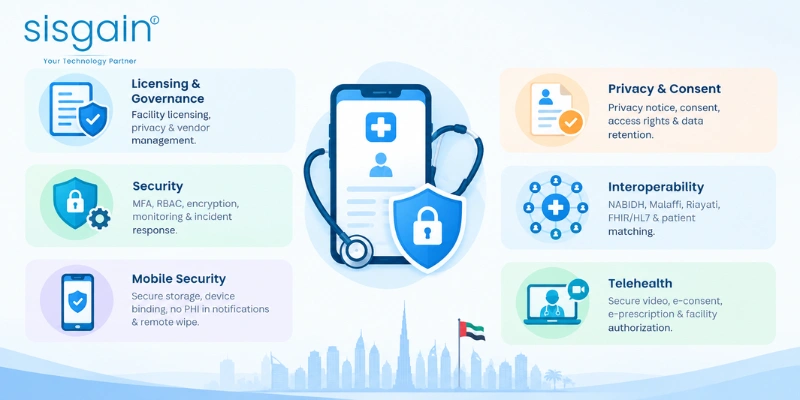
Licensing & Governance
Facility licensing, privacy governance, data-processing agreements, vendor risk management, compliance documentation.
Privacy & Consent
Privacy notice, consent capture, granular data-sharing permissions, access and correction requests, retention and deletion workflows.
Security
MFA, RBAC, encryption, audit logs, monitoring, penetration testing, incident response.
Interoperability
NABIDH, Malaffi, Riayati, FHIR/HL7 APIs, patient identity matching, clinical data exchange.
Telehealth
Secure video consultation, electronic consent, clinical documentation, e-prescription workflows, recording controls, facility authorization.
Mobile Security
Secure local storage, device binding, session management, no PHI in notifications, remote wipe support.
Healthcare App Development Process in the UAE
Step 1 — Discovery & Compliance Assessment. Define the use case, target emirate, data types, regulatory scope, and user roles before anything gets designed.
Step 2 — UX/UI Design. Build in Arabic/English support where required, accessibility, clear consent flows, patient-friendly navigation, and workflows that actually match how clinicians work day to day.
Step 3 — Architecture & Integration Planning. Lock down cloud infrastructure, APIs, security architecture, HIE integration, and third-party vendors.
Step 4 — Development & Testing. Secure coding practices, functional testing, security testing, interoperability testing, and user acceptance testing — not just a QA pass at the end.
Step 5 — Compliance Readiness & Launch. Documentation, security assessments, licensing coordination, deployment readiness, monitoring, and post-launch support.
A development partner with real UAE healthcare delivery experience should be able to walk you through each of these five stages with specifics, not just a generic agency workflow diagram — and for enterprise deployments, that experience matters even more. Ask to see how they've handled it before, particularly if the project is complex enough that you're effectively trying to Build Hospital Software in Dubai from a blank slate.
Healthcare App Development Cost in UAE: 2026 Estimates
How Much Does It Cost to Build a Healthcare App in UAE?
|
App Type |
Estimated Cost |
Typical Scope |
|
Basic healthcare app |
AED 100,000–300,000 |
Profiles, appointments, notifications |
|
Telemedicine MVP |
AED 150,000–500,000+ |
Video consultation, consent, e-prescription |
|
Full clinic/hospital platform |
AED 500,000–1,500,000+ |
Multi-specialty workflows, integrations, reporting |
|
AI-powered healthcare modules |
Additional cost |
Triage, risk scoring, clinical support |
These are indicative 2026 UAE development estimates, not fixed market prices. Your actual budget depends on scope, target platforms, integrations, compliance requirements, and the development partner you choose. For a deeper breakdown by feature and integration type, see our Healthcare App Development Cost in Dubai guide.
What Factors Affect Healthcare App Development Cost?
The number of platforms you're targeting, UI/UX complexity, telemedicine functionality, EHR integration, NABIDH/Malaffi/Riayati connectivity, AI features, the depth of security requirements, licensing and compliance scope, third-party services, and ongoing maintenance all move the number — sometimes significantly. A basic appointment app and a telemedicine MVP can look similar on a feature list and still be five times apart in cost once you factor in consent workflows and e-prescription compliance.
How Long Does It Take to Build a Healthcare App in UAE?
|
Project Type |
Indicative Timeline |
|
Basic healthcare app |
2–4 months |
|
Telemedicine MVP |
3–7 months |
|
Enterprise healthcare platform |
8–14+ months |
Licensing, interoperability work, and compliance testing are usually what stretch a timeline beyond initial estimates — not the core app development itself.
What Are the Ongoing Costs?
Cloud hosting, maintenance, security updates, compliance changes as regulations evolve, HIE version upgrades, monitoring, periodic audits and assessments, and third-party API costs all continue after launch. Budget for these as a percentage of the build cost, not as an afterthought once the first invoice arrives.
Common Mistakes UAE Health-Tech Startups Make
Assuming HIPAA automatically means UAE compliance. It's a good security baseline, not a substitute for a UAE-specific assessment.
Choosing cloud hosting without checking data residency. By the time this gets caught, migrating can mean rebuilding parts of the data layer.
Treating HIE integration as a future feature. NABIDH, Malaffi, or Riayati connectivity shapes your data model — deciding to add it later usually means redoing work, not just adding to it.
Underestimating cybersecurity and incident response. Weak identity and access management, missing audit logs, thin monitoring, and an incident response plan that exists only on paper are the most common gaps found in security reviews.
Using non-compliant third-party tools. Analytics SDKs, crash reporting, chat widgets, cloud storage, and external APIs can all quietly move patient data somewhere it shouldn't go. Every third-party tool needs the same scrutiny as your core infrastructure.
Designing consent UX as an afterthought. Consent screens that are legally sufficient but practically unreadable don't serve patients or the business. Consent needs to be clear and built into the user journey, not bolted onto the signup flow at the last minute.
Why Choose SISGAIN for UAE Healthcare App Development?
Build Healthcare Software Around Your Business & Compliance Needs
SISGAIN works across custom healthcare application development, telemedicine platforms, hospital and clinic software, healthcare integrations, AI-powered healthcare solutions, secure cloud architecture, and ongoing maintenance and support.
From Healthcare App Idea to Production-Ready Platform
We help healthcare organizations plan, design, and develop secure digital healthcare platforms tailored to their operational workflows, integration requirements, and compliance needs — whether that's a telemedicine MVP for a single Dubai clinic or an enterprise platform spanning multiple emirates.
Build for UAE Compliance From Day One
UAE healthcare app development needs a local-first approach. Compliance belongs in the architecture, not on a checklist you run through the week before launch. The right development partner reduces rework and gets you to a launch-ready state faster — but only if compliance planning starts at discovery, not after the first prototype is built.
Before you lock in a budget or a tech stack, get clear on your use case, your target emirate, and which of the five compliance layers actually apply to you.
Planning to build a healthcare app in the UAE? Get a free consultation with our healthcare software experts to discuss your use case, compliance requirements, integrations, and development roadmap.